
How to get 5-star Google reviews (without breaking Google's rules)
Every guide tells you to ask nicely and make it easy. Almost none tell you what is now against the rules, or what it costs.
Lachlan Fea 9 min read
In this article11 sections

You get 5-star Google reviews by doing work worth five stars, then asking every customer soon after the job through a link that opens the review box in one tap. What you can't do is filter for happy customers, pay for reviews, or offer anything in return. Google removes those, and in the US they now carry civil penalties.
That last sentence is the part most guides skip. A 5-star rating is an average, and the only way to move an average up is to add reviews from people who had a good time, at a steady rate, in a way that survives Google's spam filters and, if you sell in the United States, the Federal Trade Commission. If you want the number for your own profile, run your current rating through the calculator.
Customers read the reviews before they ever meet you. BrightLocal's Local Consumer Review Survey 2026, of 1,002 US consumers, found 97% read reviews for local businesses and 71% used Google for them.
Ask customers to leave a review
Most businesses with a rating problem understand that they should ask. The problem is how it happens: when somebody remembers, on a quiet Tuesday, whoever is fresh in mind. A business serving four hundred people a month collects six reviews.
Make the ask part of the job, not a task on a list. Every completed job gets one, on the same rule, whether it went well or not.
Asking everyone is the version Google allows, and it produces the better rating anyway. A business that asks only its favourites collects a small pile that reads as curated, and a rating built on twelve reviews falls apart the first time somebody has a bad day.
Timing matters more than wording. Ask while the customer can still picture the job: after the appointment, after the invoice is settled, after the install is signed off. Wait a fortnight and they are trying to recall a Tuesday.
Be straightforward
Say what you want, say how long it takes, and give them the link. That's the whole message.
Hi Emma, it's Sam from Coastline Physio. Thanks for coming in today. If you've got a minute, would you leave us a Google review? It takes about 30 seconds: [link]
That message leaves out two things, and yours should too.
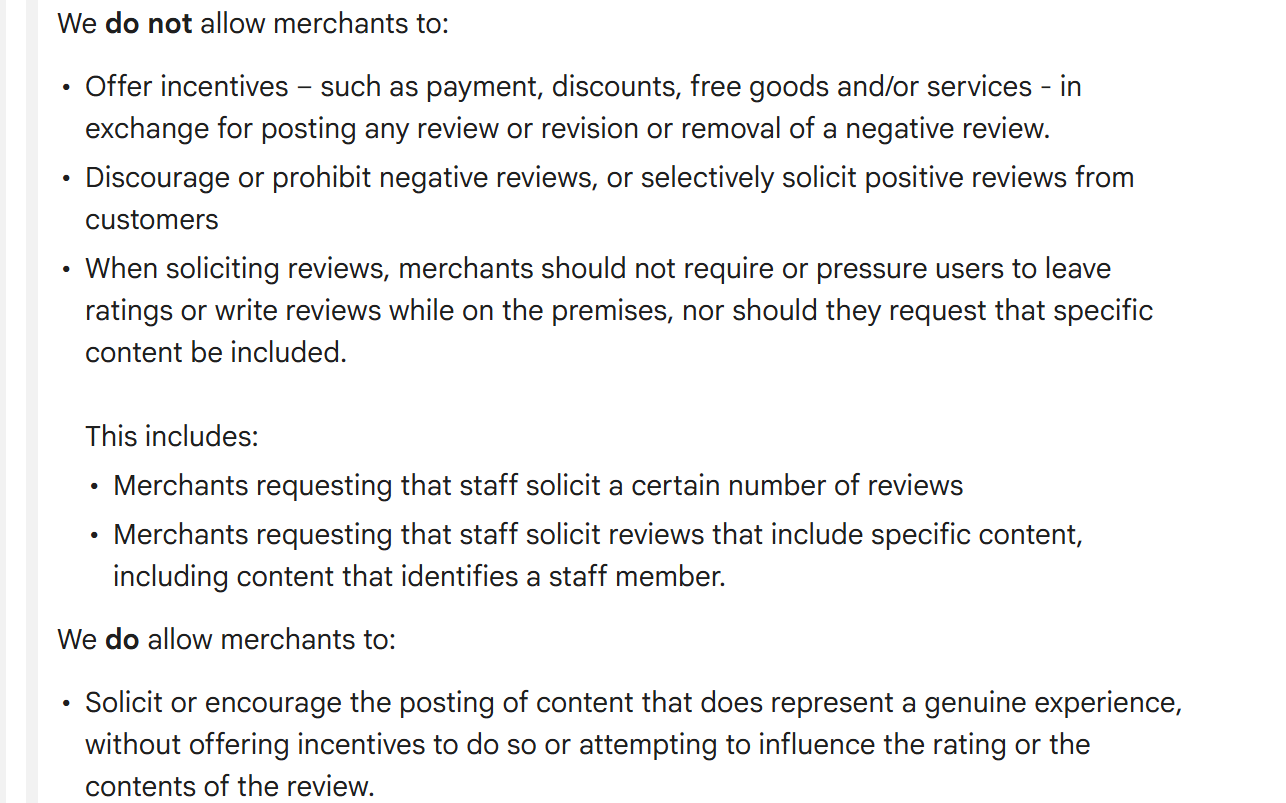
It doesn't ask for five stars. Search "give us 5 star rating" and you'll find plenty of templates that do. Google's policy for merchants bars requesting that specific content be included in a review, and a demand for a particular rating is the clearest form of that. Ask for a review. The rating is the customer's to give.
It doesn't tell the customer what to write. The advice to prompt people to "mention the treatment you had", or to name the person who looked after them, is everywhere, and it breaks the same rule. Google's policy names that one twice: merchants may not request that staff solicit reviews that include specific content, "including content that identifies a staff member".
Keep it short enough to read on a lock screen. The longer versions, including the follow-up and the email variants, are in our review request email and SMS templates.
Remove the friction
Most people don't refuse to review you. They open your message on a train, mean to get to it, and don't. Every step between the message and the review box loses a few more of them.
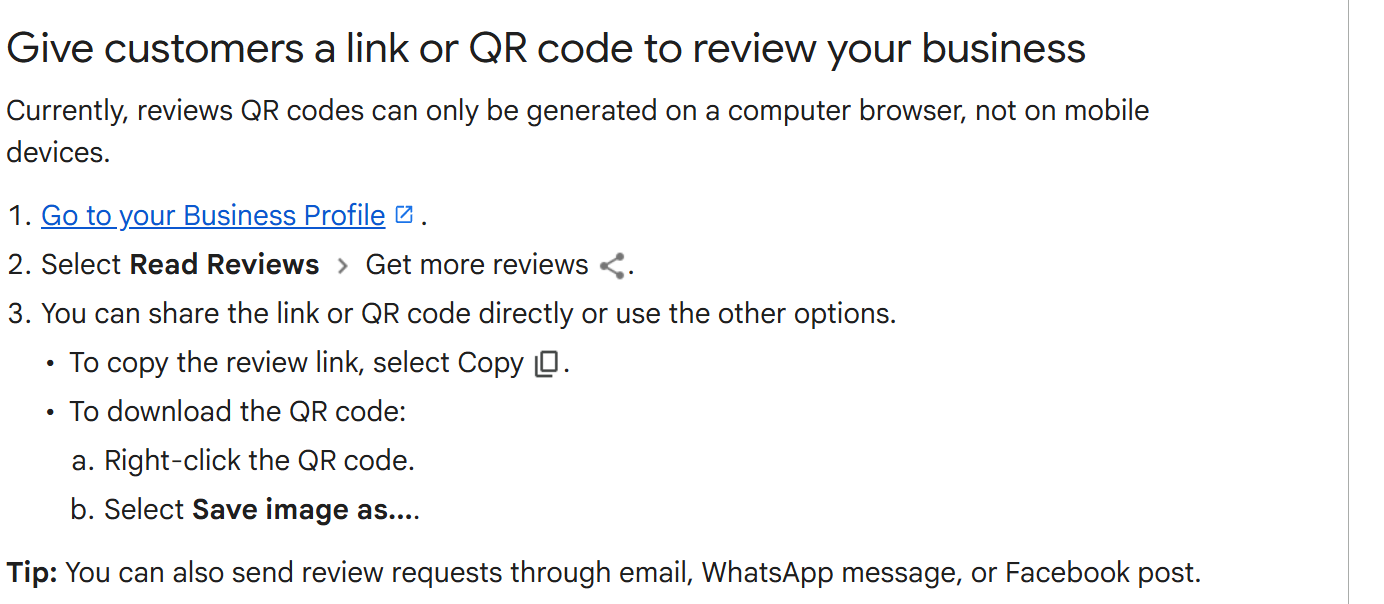
Google gives you a direct link for exactly this. On your Business Profile, choose Read Reviews, then Get more reviews, then select Copy to take the link. The same screen carries a QR code you can save by right clicking it, though Google notes that review QR codes can only be generated on a computer browser, not on mobile devices.
If you set this up a few years ago you'll remember it as an "Ask for reviews" button inside Google My Business. That button is gone and the product is now called Google Business Profile, but the link does the same job.
Put the link where the moment already happens: the bottom of your invoice, the booking confirmation, your email signature, or the thank-you page after a payment.
| How you ask | What it takes to set up | When it fits | Watch out for |
|---|---|---|---|
| SMS | A review link and a way to send it after the job | Trades, clinics, salons, anywhere you already hold a mobile number | Keep it to one send and one follow-up, and honour opt-outs the first time |
| The same link in a short message | Longer jobs, anything with an invoice or a paper trail | It sits unread for hours, so judge it over a week, not a day | |
| In person | A card or a printed code to hand over | High-touch work where you're face to face at the end | Hand it over and let them go. Standing there while they type breaches Google's policy |
| QR code | A code on a card, receipt, counter or window | Cafes, retail, waiting rooms, anywhere there's a queue | A code somebody chooses to scan is fine. A tablet you push at them is not |
The follow-up is where most of the reviews come from, and it's also where most businesses come unstuck, because a second message to somebody who has already reviewed you reads as spam. At any volume you want software that refuses to send as much as it sends. Cloutly treats a repeat customer as one contact asked once. A second booking moves the ask rather than adding one. Anyone who reviewed you in the last 90 days is skipped, a contact who opted out is never re-enrolled, and the follow-ups stop the moment the review lands.
What you must never do to get 5-star reviews
Most ranking guides wave at this part and move on. The rules changed in 2024 and they now carry a number.
Don't offer anything in return. Google prints the warning on the same help page that hands you your review link: offering incentives, "like free or discounted goods or services, to customers in exchange for reviews is considered fake engagement and is strictly prohibited", and that covers posting a review, changing one, or removing a negative one. The prize draw counts. So do the free coffee, the 10% off next visit, and the staff bonus paid per review.

Don't buy reviews. Since 21 October 2024 the FTC's rule on the use of consumer reviews and testimonials (16 CFR Part 465) has banned writing, buying, selling or distributing reviews from people who never had the experience, AI-generated ones included. It also bans compensation "conditioned on the writing of consumer reviews expressing a particular sentiment, either positive or negative", and undisclosed reviews from your own managers, employees or their immediate family. More on whether you can buy Google reviews and how to spot the fake ones.
Don't put a rating step in front of the review. Some tools ask the customer to pick a star rating first, pass the high ratings on to Google and route the low ones into a private form. It gets sold as catching problems before they go public. Google's policy names it: merchants must not "discourage or prohibit negative reviews, or selectively solicit positive reviews from customers". The FTC rule reaches the related version of it, where a business presents the reviews on its own site as if they were all of them while excluding the ones with low ratings. Cloutly doesn't do it, and hasn't since 2021. Ask everyone and take the result. The full argument is in our piece on review gating.
Don't pressure anyone on the premises. The same Google policy bars requiring or pressuring users to leave ratings or write reviews while they're on your premises, and bars asking staff to bring in a set number of reviews.
What it costs. The FTC can seek civil penalties for knowing violations. On 22 December 2025 it sent warning letters to ten companies over fake reviews and incentives paid for positive ratings, and put the figure plainly: civil penalties "at up to $53,088 per violation" that "can quickly add up". That maximum took effect in January 2025 and was not adjusted for 2026, so it is the number today. Google's own sanction is quieter and faster: it removes the reviews, and a profile that has had a batch removed tends to get closer attention on the next one.
Remain compliant with Google reviews best practices
Knowing the rules is one thing. Dealing with enforcement is another. It is automated, and it never tells you what happened.
Reviews disappear. Sometimes it's a policy call on the reviewer's account, sometimes the review never posted because the customer wasn't signed in to a Google account, sometimes a filter reacted to a spike. If a batch vanishes, start with our post on Google reviews not showing up rather than assuming a competitor reported you.
A steady rate protects you. Twenty reviews arriving on one afternoon, at a business that collected two in the previous year, is the pattern the spam systems exist to catch. The same twenty over three months is invisible to the filter and more convincing to a reader, who can see the dates.
You can report a review that breaks the rules, and you should when it does, but "this customer is wrong about us" isn't a policy violation. What Google will and won't act on is set out in our guide to the Google review policy.
Maintain a positive brand image
No amount of asking can make up for service that doesn't deserve five stars. The gap between four stars and five is usually not the work itself. It's the last five minutes.
Five-star reviews often mention the same small set of things. Somebody answered the phone. Somebody explained the price before starting. Somebody spotted a problem and fixed it before the customer had to raise it. None of that is a marketing programme.
For an honest diagnosis, read your existing one and two-star reviews. They'll tell you which five minutes you're losing.
Respond to every review
Replying is the only part of your review profile you control outright, and Google recommends it. A reply is public and permanent, and the next customer reads it far more often than the reviewer does.
Keep replies short and specific to what the person actually said. Google's own tips say to skip sending the same thank you to everyone and to spend the time on reviews where you can share a useful update or answer a question, and to keep deals and promotions out of the reply. There are worked examples in positive review response examples.
Address negative reviews
A profile of nothing but five stars looks bought. Google's guidance says a mix of positive and negative feedback often feels more trustworthy, and readers behave that way: they go looking for the low ratings to see what happens when something goes wrong.
Reply to the bad ones the same day if you can. Acknowledge the specific thing, say what you're doing about it, and give one route to a human. Don't argue the facts in public, and don't hint at legal consequences: the FTC rule bans using unfounded or groundless legal threats, physical threats or intimidation to prevent or remove a negative review. Our 1-star review response guide has wording for the harder cases.
Ask in person, and with a QR code
The in-person ask lands better than any message, because the customer is standing in front of somebody they just had a good experience with. It also carries the tightest rules. Hand over a card with the code on it and let them leave. Put the code on the receipt, on the counter, on the window by the door. What you can't do is hold the phone, watch them type, or set up a tablet by the till for people to review you on. That's pressuring a review on the premises, and it's the thing Google names.
Print is cheap and it keeps working: a code on a card sits in a wallet, and somebody scans it that night. Our free Google review QR code generator makes one from your Business Profile.
What a good 5-star review actually says
A five-star review with no words is worth a fraction of one with them. "Great service, thanks" moves your average and does nothing else. "Booked Thursday, they came Friday morning, quoted before they started and the price didn't change" answers the question the reader actually has.
Here's the catch. You can't ask for that, because asking a customer to include specific content is against Google's policy. What you can do is ask at a point where the specifics are still in their head, which is the same argument for asking on the day rather than a fortnight later. Detail comes from recency, not from instructions.
Then put the good ones where people who aren't on Google will see them, which means embedding them on your own site rather than leaving them to be found.
FAQ
Can I offer a discount in exchange for a 5-star Google review? No. Google's policy bars offering payment, discounts or free goods and services in exchange for a review, a change to a review, or the removal of a negative one. In the US, compensation conditioned on a review expressing a particular sentiment is also covered by the FTC's 2024 rule.
Can I ask only the customers I know are happy? No. Google's policy for merchants bars selectively soliciting positive reviews and bars discouraging negative ones. Ask everybody on the same rule and take the result. Any tool that offers to screen customers by rating first is offering to break that rule for you.
Why did my new 5-star reviews disappear? The usual causes are a customer who wasn't signed in to a Google account, a spam filter reacting to an unusual spike, or a policy call on the reviewer's account. It's rarely a competitor. Start with our post on Google reviews not showing up.
Can I ask a customer to change their review to five stars? You can reply, fix the problem, and let them decide. You can't offer them anything to do it. Asking for a revision or a removal in exchange for a benefit is named in Google's policy, and inducing a review of a particular sentiment is covered by the FTC rule.
How often can I ask the same customer for a review? Once per job, with one follow-up, and not at all if they've reviewed you recently. Somebody who left you five stars in March doesn't need a request in April. If you're doing this by hand, keep a list of who has reviewed you and check it before every send.
Should I ask customers to mention the service or the person who served them? No. Google's policy bars requesting that specific content be included in a review, including naming a staff member. Ask on the day instead. The detail comes with the memory.
Nothing here works as a one-off push. The average moves on the rate you ask at, week after week. For the wider set of tactics, start with how to get more Google reviews.