
When AI gets your business details wrong (and how to fix it)
The assistant is not inventing your phone number. It is repeating something it retrieved, and the fix is at the source, not in the chat.
Lachlan Fea 9 min read
In this article10 sections
If ChatGPT hands out a phone number you gave up two years ago, or Gemini says you close at 4pm when you close at 6, or an AI Overview has you permanently closed, the assistant did not invent any of it. It retrieved a wrong detail from somewhere that still publishes it: your Google Business Profile, an old page on your own site, or a directory nobody has logged into since 2021. You cannot edit the answer. You fix the source and wait for the next retrieval to pick it up.
Fix wrong details before any other work in how AI search decides which local businesses get named. Visibility you have earned is worth nothing if the answer sends the customer to a disconnected line.
Why AI assistants get your business details wrong
Assistants build a local answer at the moment you ask, out of whatever they can retrieve about you. OpenAI says so in its own help centre: "Search results and citations can be incomplete, outdated, or incorrect", and its advice is to open a cited source and "review when it was published or updated" (Searching the web with ChatGPT). Google documents the same shape from the other end: Gemini's Maps grounding step "queries Google Maps for relevant information (e.g., places, reviews, photos, addresses, opening hours)" (Grounding with Google Maps).
So the mistake has an address. It is nearly always your Google Business Profile, which feeds Google's own surfaces and gets copied into half the directories that feed everyone else's; your own website, usually a contact page that was right when the site was built; a listing you have never logged into; or a page about you that you do not control at all, like a booking aggregator or an old press release.
Stale data outlives corrections because those sources copy each other. Fix the profile, leave the aggregator, and the aggregator keeps republishing the old number for the assistant to find.
Is it an AI hallucination, or stale data?
Almost always stale data. "AI hallucination" means a model generating something it never retrieved, and that does happen. Opening hours are the wrong place to go looking for it. Ask the assistant where the hours came from, then open that page. Nine times out of ten the page says exactly what the assistant said, and has done since your last renovation.
The distinction matters because the two fixes point in opposite directions. A fabrication is a vendor problem you can report and cannot repair. Stale data is a listings problem you can repair this afternoon.
When AI says your business is permanently closed
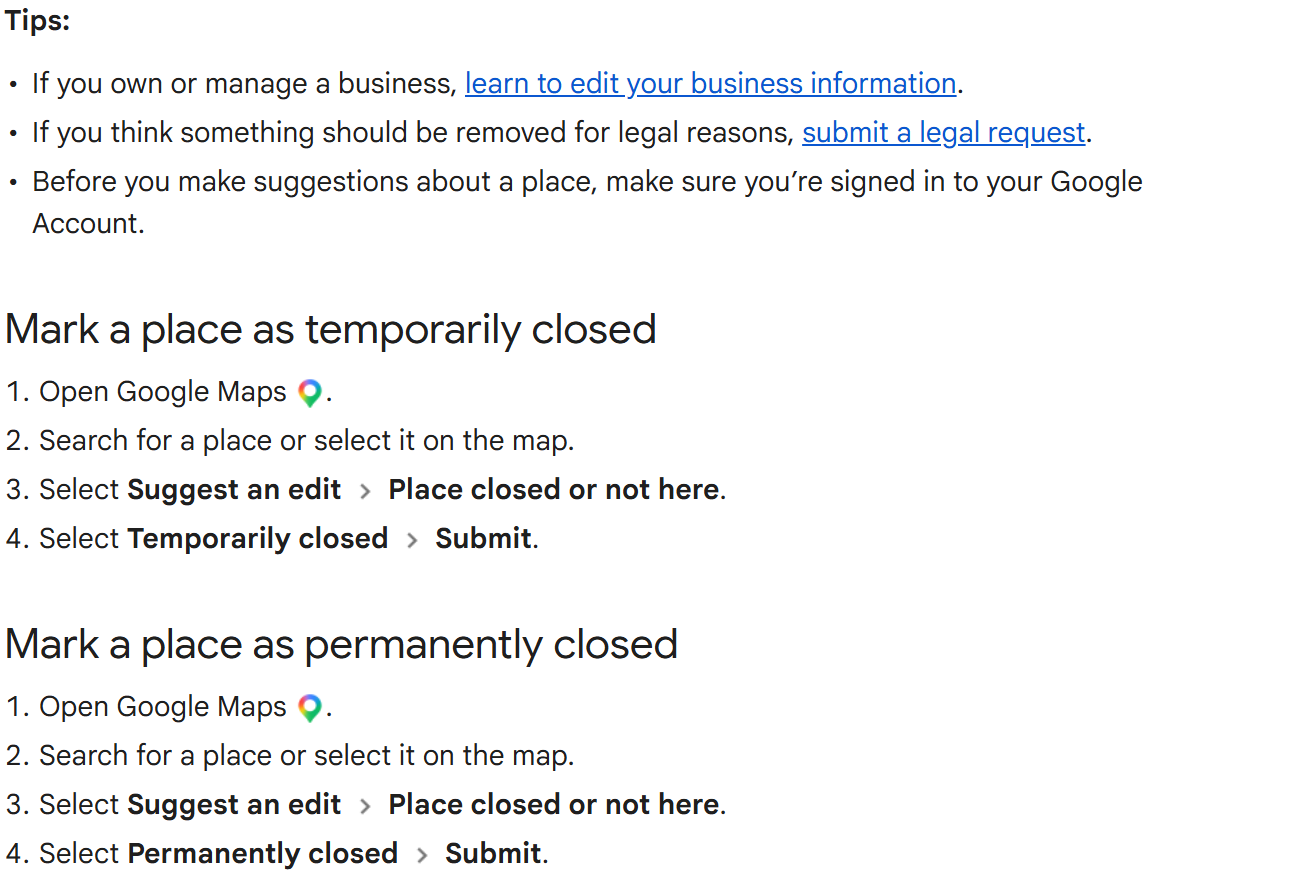
This one is not the assistant's doing at all. Anyone signed in to a Google account can propose that your shop has shut, and Google publishes the route: open Google Maps, search for the place, select Suggest an edit and then Place closed or not here, select Permanently closed and Submit (Mark a place reopened or closed on Google Maps). A competitor can do it. So can a customer who turned up on a public holiday.
Once Google carries the status, the assistants inherit it, because it travels with the profile into every surface that reads the profile, including the AI Overview above your own category search.
To undo it as the owner: go to your Business Profile, select Edit profile and then Hours, select Edit and then Open with main hours, tick the days you trade, set the times and Save. For several sites at once, sign in to Business Profile Manager, select the locations, then Actions, Open and Mark as open (Mark your business as reopened). Google's caveat on public edits applies to yours too: "We review your edits, so it can take some time for your changes to show on the map."
How to find where the wrong detail came from
Use these three checks.
- Read the citation the answer already gave you. ChatGPT shows them inline ("Responses that use web search may include citations. Select a citation to open its source") and has a Sources control. Perplexity numbers every answer. AI Overviews carry supporting links, under Google's own instruction to searchers to "Always check important info in more than one place" (AI Overviews in Google Search). The culprit is usually sitting there in plain sight.
- Ask the assistant where the detail came from. "Where did you get that phone number for Coastline Physio?" often names a page. Treat it as a lead rather than proof, because a re-ask can produce a different explanation. OpenAI's own documented move is more useful: when a result looks wrong, ask ChatGPT "to search again using a specific source, date, or location".
- Search for the wrong value itself. Put the old phone number in quotation marks into Google and look at everywhere it still lives. Do the same with the old suite number. That result list is your work list, and it beats anything an assistant tells you about its own reasoning.
Write down what was wrong, which assistant said it, what it cited and the date. You need that record to tell whether the fix worked.
The fix order: how to correct business information in AI search
Work outward from the source with the most reach, so the later fixes have less left to correct.
1. Google Business Profile first
Google says plainly that the profile feeds its AI answers: "Using products like Merchant Center (such as Merchant Center feeds) and Google Business Profiles can help your products and services to be visible in both AI responses and other Google Search results" (Google's guide to optimizing for generative AI features). It also feeds Gemini through Maps grounding, and it is the record most directories copy.
Go to your Business Profile, select Edit profile, change the field and Save. On mobile, open the Google Maps app, tap Business at the bottom right, then Edit profile. Then make the same change everywhere else it is published, which is NAP consistency.
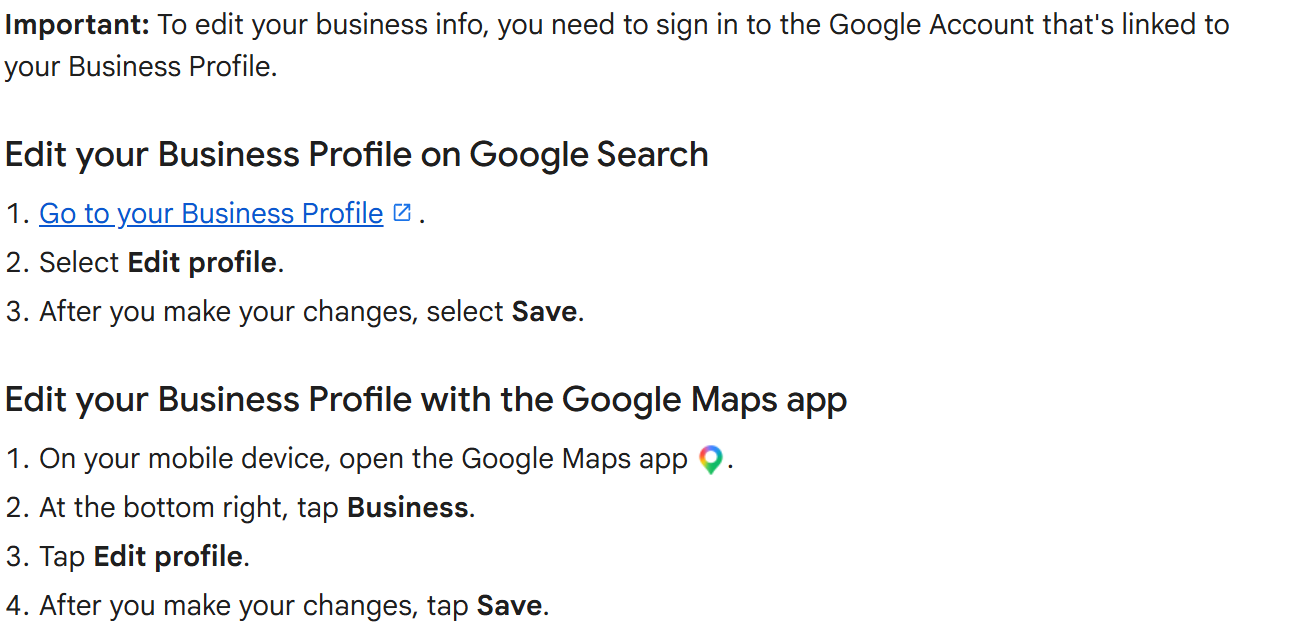
Nothing goes live the moment you save it. "We review your changes before we update them live on your profile", and some businesses have to verify the profile before they can change anything on it at all (Edit your Business Profile).
If the profile itself is a mess, or there are two of them, start at how to add your business to Google Maps rather than editing around the problem.
2. Your own website second
This is the page an assistant can read without a login, and the one you can change in five minutes. Contact page, footer, every location page, the structured data. Put the phone number, address and hours in text, not in an image or a script that only paints after the page loads.
Then go hunting for the old value on your own domain: old landing pages, a PDF price list, the "our new premises" post from the move. If it is on your site it is fair game for retrieval, and no assistant knows which of your pages you consider current.
One caveat. ChatGPT will not use a page it cannot crawl: OpenAI's eligibility rule is to "allow OAI-Searchbot to crawl the site and confirm that the website host or content delivery network allows traffic from OpenAI's published searchbot IP addresses". Blocking the crawler does not take the wrong answer away. It takes away the page that would have corrected it.
3. Then the directories the answer cited
Do the ones the citation named first: those are demonstrably being read. Then do these two anyway, because they sit under map apps and assistants plenty of people use and almost nobody in a service business logs into.
Apple Business (formerly Apple Business Connect). Sign in at business.apple.com, choose Brands and then Locations, and select the location to edit it. Apple is blunt about why: "It's important to keep your location data up to date in Apple Business to ensure customers discover your business on Maps and know when to visit your business" (Maintain location information accuracy). The walk-through is in how to add your business to Apple Maps.
Bing Places for Business. The old bingplaces.com address now redirects to bing.com/forbusiness, where the offer is still "Claim your business listing on Bing Places for Business" behind Get started and Sign in. Bing's index sits under Copilot, so a wrong record here is a wrong answer there.
How long a correction takes to reach an AI answer
Nobody publishes it, and anyone who gives you a number is guessing.
The vendors document the first leg only. Google reviews Business Profile changes before they go live and puts no clock on it. Google reviews suggested Maps edits and says only that "it can take some time for your changes to show on the map". Apple says a contested location name change takes "up to five working days". That is the whole of the published record.
No vendor documents the second leg, from a corrected listing to a corrected answer, and it is not really one lag either: the answer is rebuilt from a fresh retrieval every time somebody asks, with caches, crawl schedules and the assistant's choice of source in between.
So fix the source, re-ask a week later, re-ask a month later, and read the trend rather than the single run. Signed out, fresh chat, so you are measuring what a stranger sees.
How to report a wrong answer in each assistant
Every assistant has a feedback control. None of them is a correction channel, and no vendor promises that a report changes a future answer. Use them anyway, because they cost nothing, and because in ChatGPT's case there is a documented consequence.
| Assistant | Where the control is | What the vendor documents |
|---|---|---|
| ChatGPT | Thumbs down under the message, then Select an issue | The in-product path is documented for a "Safety or Legal concern"; anything else goes to the content reporting form. Reported domains and content "may be reviewed by OpenAI's Model Quality team, which may apply filters or other mitigations to help prevent ChatGPT from relying on unreliable sources in future responses" |
| Google AI Overviews | "At the bottom of each overview, find Thumbs up and Thumbs down icons", then Report a problem | Google says "AI Overviews can and will make mistakes" and that feedback helps improve them. No correction is promised, and the report carries your search query and its results |
| Gemini | Good response or Bad response under the reply, signed in; More and then Report legal issue for legal matters; Settings & help and then Send feedback for anything else | The conversation travels with the feedback: "your prompts and the Gemini app's responses" are added to it (Send feedback in Gemini Apps) |
| Perplexity | "Use the flag icon below the answer to report issues", or email support | Perplexity asks for the "URL to the query" and a "Description of the error and expected result", and lists "Outdated information" among the issues it looks for (Report incorrect answers) |
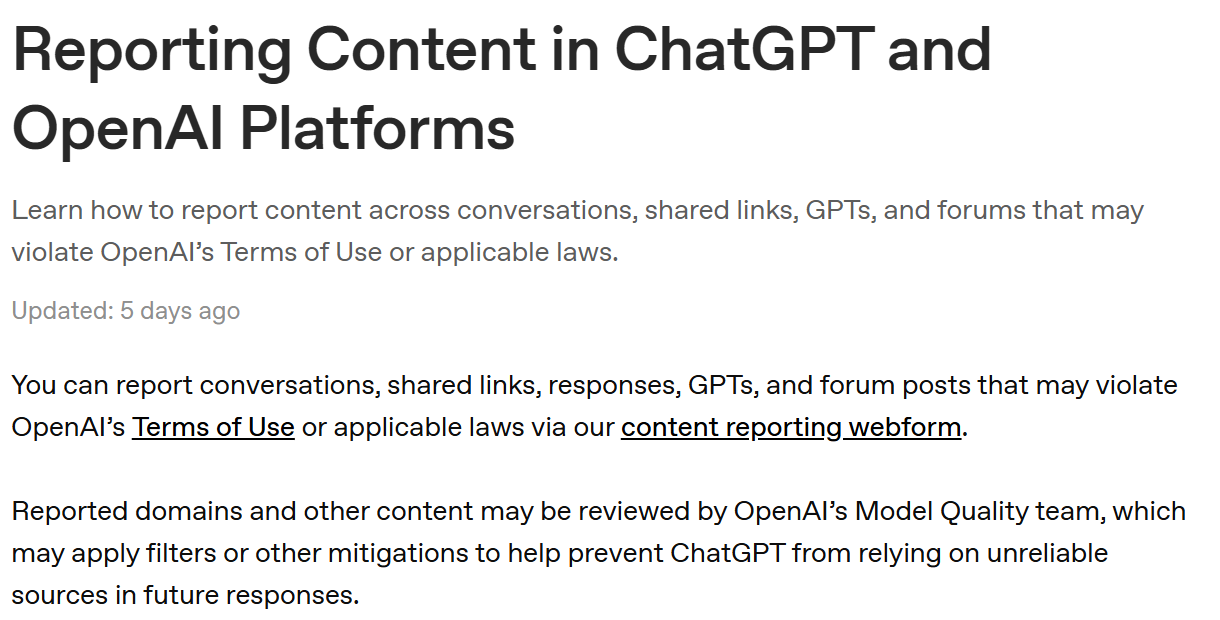
OpenAI's is the one lever with a mechanism behind it (Reporting content in ChatGPT and OpenAI platforms), and it points at the source domain rather than at the answer. If an aggregator with a dead phone number keeps getting cited about you, reporting that domain is a better move than thumbing down the reply.
One wrong location poisons the brand answer
With several sites, the failure is rarely spread evenly. Say Coastline Physio has four clinics and the Marrickville site moved in 2024, but an old aggregator page still carries the previous address. Ask "where is Coastline Physio" and a customer can be handed that address for a brand whose other three are perfectly correct.
Check per location and check the brand: one prompt naming each suburb, one naming only the business. They fail differently, and the brand-level prompt is the one that catches a single bad record contaminating everything. Clear duplicate profiles before you audit anything else, though, because two profiles for one shop give the assistant two versions of you and it is not obliged to pick the right one. Google Business Profile: multiple locations with the same name covers merging one.
Do you need an AI search visibility checker?
A checker identifies a wrong answer. You still repair it on Google, on your website and on the directories, not inside a dashboard.
Use a checker to keep the record: the same prompts at the same interval, with what each assistant said and what it cited, so you can tell a fix from a fluke. Judge one on whether it stores the answer text and the citation and keeps each location separate. A score on its own cannot be audited. You can also do the whole thing by hand, for nothing: how to monitor AI search visibility has the prompt set and the seven-column log.
A monthly fact-check that takes fifteen minutes
- Open a fresh, signed-out chat in ChatGPT, Gemini and Perplexity. Signed in, you are measuring your own account, not what a customer sees.
- Ask one question per location that a customer would actually ask: "what time does Coastline Physio in Marrickville close", "what is the phone number for Coastline Physio Marrickville".
- Ask one brand-level question with no suburb in it.
- Check every phone number, address and set of hours against your own record, not against your memory.
- For each mistake, open the citation and note the domain.
- Fix Google first, your site second, the cited directory third. Log the date, the assistant, the wrong value and the source, so next month you are comparing rather than starting over.
Cloutly's AI search visibility sweep asks ChatGPT, Gemini and Perplexity discovery questions such as "best {category} in {locality}" once a month and flags a wrong phone number in an assistant's answer ("{Assistant} gives out the wrong phone number for {venue}"), reported as a point-in-time sample of a non-deterministic system: one sample each, and a re-ask can differ. It checks the phone number and nothing else; website, address and hours drift is listings management, which watches Google's public view, Yelp, Facebook and TripAdvisor against the record you set.
FAQ
ChatGPT has the wrong information about my business. Can I edit it directly?
No. There is no business account inside ChatGPT and no field to correct. You can report the answer, and OpenAI says a reported domain may draw filters or other mitigations that stop ChatGPT relying on it in future. The repair itself happens on the source the answer cited.
Will fixing my Google Business Profile fix every assistant?
It fixes the Google surfaces and, over time, most of what copies from Google. It does not reach a directory that holds its own record, or a page about you on somebody else's site. Those get corrected where they live.
A competitor marked us permanently closed. Can I stop it happening again?
Not preventatively. Google accepts closure suggestions from the public and reviews them. What you can do is notice quickly, which is the argument for a monthly check rather than an annual one, then reopen the profile through Edit profile and Hours.
Should I block AI crawlers to stop the wrong information spreading?
No. Blocking a crawler removes your corrected page from the pool the assistant draws on, and leaves the third-party listing with the old number as the only thing it can find. OpenAI's own eligibility requirement is that OAI-Searchbot can crawl the site.