
Best reputation management software: how to choose in 2026
Most lists like this one are written by a vendor on them. So is this one, which is why every number below carries the page it came from and the day it was read.
Lachlan Fea 12 min read
In this article7 sections

The best reputation management software for your business is the one that fires a review request off the system you already use, reads the review sites your customers actually write on, and prices in a way that still makes sense at your twentieth location. Everything else on a feature list is decoration until those three are true. This is a guide to checking them, not a ranking.
Rankings here are close to worthless anyway. Almost every "best software" list on the first page of Google is published either by a vendor that puts itself at number one, or by an aggregator that sorts by how much each vendor pays to be listed. Neither tells you what happens when your fourth clinic opens.
Cloutly publishes this page, and Cloutly is one of the tools on it
That conflict belongs at the top of the page, not hidden in a footnote.
Every claim about another vendor comes from that vendor's own public pages, read on 6 September 2026. Where a vendor does not publish something, this page says so rather than repeating a number from a comparison blog. There is no "cheaper than" here, because the plans do not contain the same things and the arithmetic would be dishonest. The tools are listed alphabetically, because any other order would be our opinion dressed up as a finding. If a claim does not match a vendor's site today, the vendor's site is right and this page is stale.
The category labels are worth ignoring, by the way. Every product below asks for reviews, collects them, helps you reply, and in some cases publishes your business details to the directories, whichever of the two names it sells under. What review management is and why it matters covers the category properly, and our own product page is what one version of it looks like.
Six questions that decide the choice
How to choose review management software comes down to six answers, and you can get all six out of a sales call in half an hour. They separate a shortlist faster than any feature matrix.
1. How many locations do you have, and does the price follow them?
This is first because it changes the answer to every other one. A single salon and a network of forty clinics are not buying the same product, and the pricing model is where that shows up.
Per-location pricing means the fourth site costs what the first one did, and you can predict the bill before you open it. Per-seat pricing tracks how many people log in, which sounds cheaper until the area managers want access. Quote-only pricing means you find out what the fourth site costs when you ask, and by then you are already in.
So ask what happens at location twenty. Does a regional manager covering six sites count as one seat or six? Does reporting roll every location into one view, or leave you exporting and joining? And do the multi-location controls sit on the plan you are being quoted or the one above it? On Podium's own pricing page, "Advanced Multi-Location Management" is listed under Signature, the tier with no published price. Running a review programme across many locations covers what breaks at scale.
2. What tells it the job is done?
A review request is only as good as its timing, and timing comes from a trigger. That is either something you do by hand, or a signal from a system you already run: a booking marked complete in Mindbody, a sale closed in Square, a nightly CSV. Ask which of your systems the vendor connects to by name, and what event inside it fires the request. "We integrate with Zapier" is a real answer but a weaker one, because it means you own the plumbing.
Then ask what separates a smart ask from a blast. Does a customer who books twice get asked twice? Does someone who reviewed you last month get asked again? Does an opt-out stick? You feel these differences in month three, not in the demo. How to get more Google reviews covers what good timing looks like.
3. Which review sites does it read?
Ask for the list, not the number. Every vendor here quotes a source count and the counts are not comparable, because some include social networks, app stores and their own first-party form.
What matters is whether the four or five sites your customers use are on it: Google and Facebook for most service businesses, plus one industry site, TripAdvisor for a restaurant or Houzz for a builder. If your one important site is missing, a list of two hundred others does not help. Ask whether it reads the review text or only the star rating, too, because any analysis of what customers keep saying has to happen over the words.
4. Who writes the reply?
Every serious tool in this category now drafts review replies with AI. The question is not whether it can. It is what happens next.
Ask whether the draft posts automatically or waits for a person. Auto-posting is the feature that will eventually put an apology under a review that was actually praise, or a generic thank-you under an accusation you needed to handle carefully. A draft a person reads and approves is slower by fifteen seconds and much harder to regret. Ask what the draft is written from, too: your last fifty replies, or a template with the customer's first name dropped in. Review response examples will tell you whether what comes out sounds like your business.
5. Does it publish your listings, or only watch them?
These are two features sold under one word. Watching means the tool checks your hours, phone number, website and address on the directories and tells you when one has drifted. Publishing means the tool writes the correction for you.
Watching is useful and much more common. Publishing is harder, because it needs a verified connection to each directory and each directory has its own rules. Ask per directory whether the tool can write or only read, and what happens to an address change, which usually triggers re-verification. Then ask whether listings is in the price of a location or sold on top of it. On one platform below it is an add-on, which is the sort of thing you find in the order form rather than the pitch.
6. What are you signing, and how do you leave?
Ask for the term length before you ask about anything clever. Ask whether the trial needs a card, whether the contract auto-renews, and how much notice cancelling takes. Ask what happens to your data if you go: the reviews live on Google and Facebook and are not the vendor's to keep, but your reply history, contact list and reporting may sit inside their system only.
Two of the five tools below publish no price at all, and a third publishes a base price then says the real number depends on your business. None of that is automatically a problem. It does mean the first thing you learn about the product is how their sales process works.
The question underneath all six: does it gate?
Review gating is showing a customer a rating step first and only sending the ones who picked four or five stars on to the public review sites. It is sold, when it is sold at all, as protecting your rating.
Google's Maps content policy is explicit about it. Under Rating Manipulation, the list of things Google does not allow merchants to do includes "Discourage or prohibit negative reviews, or selectively solicit positive reviews from customers" (Prohibited and restricted content, read 6 September 2026). Reviews collected that way can be removed.
So ask a vendor to describe, screen by screen, what a customer sees after tapping the link in your request. If a star rating appears before the review sites do, that is gating, whatever the sales engineer calls it. Review gating: is it illegal? What Google and the FTC say has the detail. Cloutly does not gate and has not since 2021: our review page shows the sites the business chose, with a contact option beside them, and the customer picks.
Best reputation management software: what five tools publish
Five tools, listed alphabetically. Every cell comes from the vendor's own public pages, read on 6 September 2026. Where a vendor does not publish something, this table says so rather than guessing.
| Tool | Best suited to | Price published? | Contract terms | Free trial | Listings publishing |
|---|---|---|---|---|---|
| Birdeye | Marketing teams at large multi-location networks | No. A form asks for your location band and mobile number | "One platform, one contract" on its pricing page | Not offered on the pricing page | Yes, its own listings product |
| Cloutly | Service businesses from one location to several hundred | Yes, per location, on /plans | Month to month | 14 days, no card, starts on an email | Yes, to Google Business Profile and the Facebook Page; watches Yelp, TripAdvisor and Google's public view |
| NiceJob | One site, or a small group | Yes, US$75 and US$125 a month | "No contracts" on its pricing page. Multi-location pricing on request | 14 days, no credit card up front | Not mentioned on its pricing page |
| Podium | Local businesses that want the phone answered first | Yes, base prices: US$399 and US$599 a month, plus a custom tier | Not published | Not offered on the pricing page | Not publicly documented as of September 2026 |
| ReviewTrackers | Groups that need reporting across many sources | No. Its plans page reads "Plans start at $ per location per month paid annually" with the figure left blank | Paid annually, per that same line | Not offered on the plans page | Yes, sold as an add-on |
Read the price column carefully, because the plans behind those numbers are not the same shape. One includes an AI phone assistant and card payments. One is a per-location price for reviews, listings and an inbox. Comparing the digits alone will mislead you.
Birdeye
Birdeye is headquartered in Palo Alto, California, and sells the broadest surface here by a distance: AI products across search, listings, reviews, social, messaging, chat, surveys, insights, competitors, reporting and ticketing, under the line "AI Coworkers. Every Job. Every Location."
That breadth is the trade. It suits a network with a marketing function that can own the platform and use most of it. If the person choosing the software also cuts hair or runs the roster, it is a lot of product to carry.
The pricing page publishes no figure. Its headline reads "Pricing built around outcomes, not seat counts", and underneath, a form asks how many locations you have, in bands from 1 to 3 up to 1,000 and over, and for the best mobile number to reach you. The page also says "One platform, one contract", so ask about the renewal date early. How we compare with Birdeye sets the two out side by side.
Cloutly
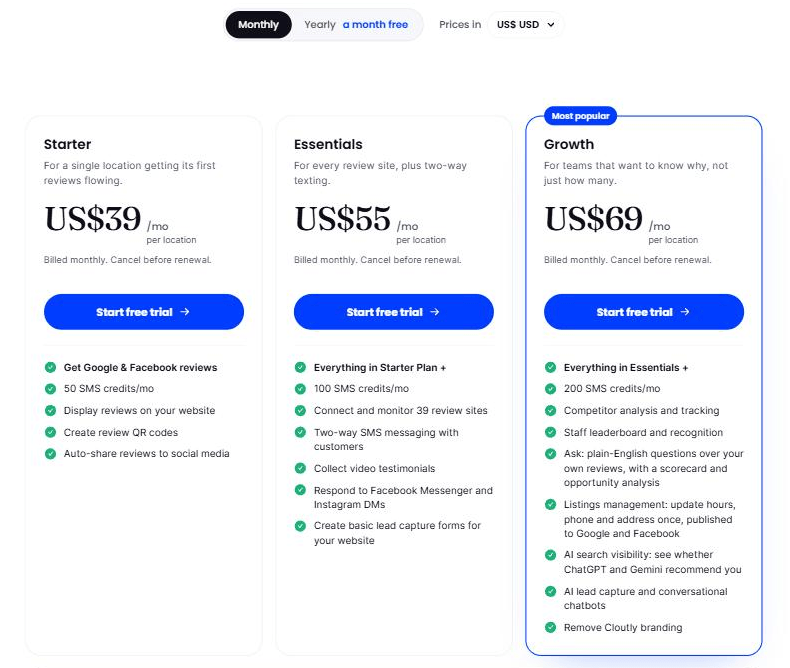
We publish our per-location prices on our plans page, in the visitor's own currency. Read in US dollars today, the three plans are US$39, US$55 and US$69 per location per month, billed monthly, with 14 days free and no card. The trial starts when you enter an email rather than when a rep calls you back.
The product reads 39 review sites. Reviews and messages from every location land in one inbox: Google and Facebook reviews, Messenger, Instagram DMs, SMS, email and the live chat on the review page. AI drafts replies to reviews and a person approves them before anything posts, and that drafting is on review replies only. Listings publishes hours, phone and address to Google Business Profile and the Facebook Page, preview first and human confirmed, then watches Google's public view, Yelp, TripAdvisor and Facebook weekly for drift. There are widgets, video testimonials, and per-location and per-staff-member credit for each review.
What we do not do is surveys. There is no NPS product, because the argument we are making is that an unsolicited public review is worth more to a service business than a private score. If you need a survey programme, buy one somewhere else.
NiceJob
NiceJob is based in London, Ontario, and publishes its prices, which is worth saying plainly because most of this category does not. Reviews is US$75 a month and Pro is US$125 a month, and the top of the page carries three promises: 14-day free trial, no contracts, no credit card up front. Its FAQ repeats the middle one, that "you are not locked into a contract at any time during your NiceJob subscription plan".
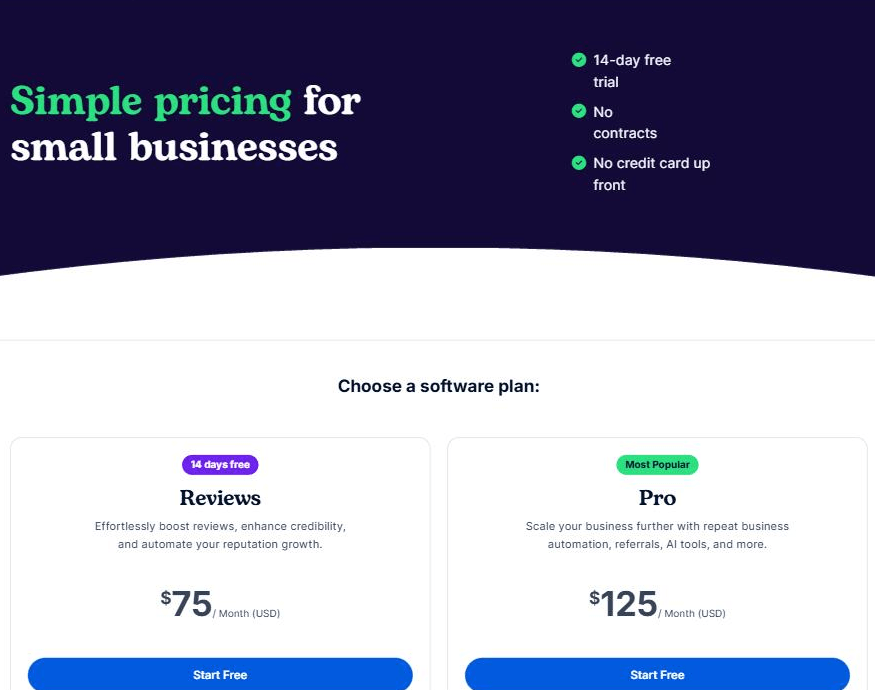
The plans list SMS and email invites, AI reply drafting, competitor review and SEO insights, widgets, a review microsite, staff leaderboards, referral and gifting automations, and NPS surveys on Pro. For a single site it is clean and genuinely easy to start.
Above one site it is harder to judge from the outside. The pricing page sends franchise and multi-location businesses to a custom quote, NiceJob does not publish a roles or permissions model for groups, and listings management is not mentioned at all. If office two is already on the whiteboard, ask about that first. Our NiceJob comparison covers the products line by line.
Podium
Podium is based in Lehi, Utah. Since 2025 it has sold an "AI Employee" for local businesses, an assistant that answers calls and texts and converts leads, with reviews as one part of a larger product. If you have read an older comparison calling Podium a texting tool, that description is out of date.
Its pricing page has changed too. It now publishes base prices for two of its three tiers, Core at US$399 a month and Pro at US$599 a month, with Signature on custom pricing and a "Talk to Sales" button under each. Podium's own FAQ frames those as starting points rather than the bill: "the monthly cost may vary depending on your specific business needs and operations. We've outlined the base costs of our different plans above." The page also notes a base 10DLC fee of US$5 a month for all US locations, US$5 for every additional number, and that HVAC businesses should contact sales. There is no free trial on the page and no contract length.
Core buys the lead conversion platform, review management with AI responses, basic automations and reporting, the mobile app and integrations, with phone systems as an add-on. Surveys, lead capture forms and text marketing sit on Pro. How we compare with Podium covers where the two products diverge.
The honest read: if what you want is for the phone and the texts to get answered when nobody is at the desk, and reviews are secondary, Podium is built for that and we are not.
ReviewTrackers
ReviewTrackers is based in Chicago and is the most reporting-led product here. It sells review monitoring and analytics across a wide set of sources, describing its data tier as combining review data from "100+ sources", plus SMS and email requests, QR capture, AI reply drafting, competitor benchmarking, widgets and a partner programme. If nobody can tell you what customers said across sixty sites last quarter, this is built for that question.
Two things from its own plans page are worth knowing before a call. The page says pricing is location-based, offers a slider for the number of locations you want to monitor, and prints "Plans start at $ per location per month paid annually" with the figure left blank. Move the slider anywhere between one location and five hundred and the number never appears. And local listings management sits under "Add-ons", alongside local search rank, managed services and white label, rather than in the core plan. An agency reselling under its own brand wants white label review management and its buyer's checklist rather than this list.
The third thing is not on their site. ReviewTrackers was acquired by InMoment in June 2022, moved to Press Ganey Forsta in May 2025, and Qualtrics completed its acquisition of Press Ganey Forsta on 19 May 2026. Three owners in four years is a fact rather than a verdict, but weigh it when the contract in front of you is annual. How we compare with ReviewTrackers has the rest.
When a spreadsheet is enough
Software is not the answer to every version of this problem. Use this test before you buy.
You probably do not need to buy anything yet if all of the following are true. You have one location. You get fewer than about fifteen reviews a month. One person owns replies and actually does them. And you already ask reliably, whether that is a card at the counter, a QR code on the receipt or a line in your follow-up email. A calendar reminder and a shared document will hold that, and the free half of it is in review monitoring. What you lose is the timing of the ask and the memory of who you already asked.
What breaks it is the second location, the second person replying, or volume past roughly twenty reviews a month. When two of those are true, the spreadsheet stops being a system and starts being a person remembering.
How to run a trial that tells you something
Free trials get wasted on clicking around the settings. Two weeks is enough if you decide beforehand what you are testing.
- Connect the trigger on day one. Not the review profiles, the trigger: the system that knows when a job is finished. If that connection does not work, nothing else in the trial matters.
- Send to twenty or thirty real customers from last week, not a test address. A tool that works on your own phone and fails on a customer's carrier is common enough to be worth ruling out.
- Open the review page on a phone, because your customers will. Check your name and logo, and check whether a rating step appears before the review sites.
- Reply to five reviews using the drafts, including one negative, and count how many you edited heavily. That number is the value of the feature.
- Add a second location, even a fake one. Almost nobody runs this test and it is the one that predicts month six. Does reporting roll up? Does the price move the way you expected?
On the last day, write down what you would miss. If the honest answer is "nothing much", you have saved yourself a year of a subscription.
Questions people ask
What is reputation management software? Software that asks your customers for reviews, collects what comes back from your public profiles into one place, helps you reply, and in some products keeps your business details accurate on the directories. Older tools focused on monitoring. Most now include the asking.
How much does reputation management software cost? The published monthly prices among the five above run from US$39 per location to US$599 for a business, and two of the five publish nothing at all. Those numbers do not describe the same product: the US$599 plan carries an AI phone assistant, surveys and payments, and the US$39 one carries none of them.
What is the best review management software for a small business? For one location, the deciding factors are whether it connects to the system you already use, whether the price is published so you can budget it, and whether you can start without a sales call. Any tool that clears those three is worth a trial. The feature lists are more alike than the marketing suggests.
Do you need reputation management software if you only have one location? Not necessarily. One site, under about fifteen reviews a month and one person who reliably replies can be run on a reminder and a shared document. The case for software starts at the second location, the second person replying, or the point where asking stops happening because everyone is busy.
What is the difference between review management and reputation management? Historically, review management meant collecting and answering reviews, and reputation management meant monitoring everything said about a brand, including news and social. The products have converged and vendors now use both terms for the same thing, so compare feature lists rather than category labels.