
How to respond to Yelp reviews: 8 templates (2026)
Yelp is the one review site that tells businesses never to ask. That makes your reply the only lever you have, and Yelp says you have to write it yourself.
Lachlan Fea 9 min read
In this article8 sections

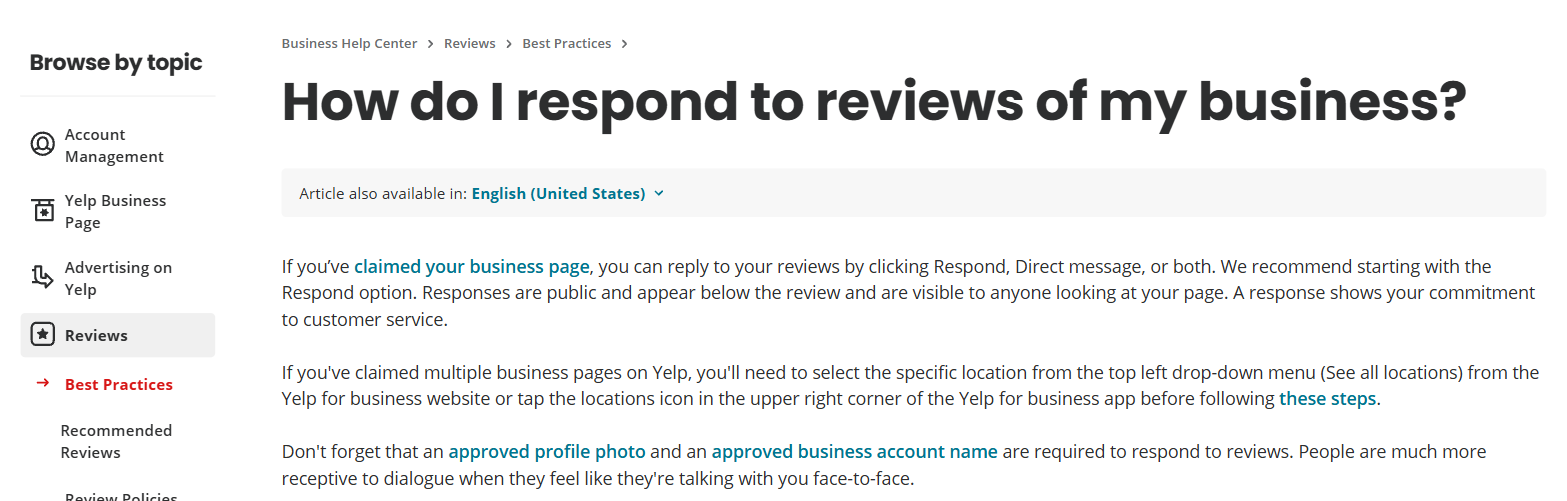
To respond to Yelp reviews you need a claimed Yelp Page, an approved profile photo of you or a representative, and an approved business account name. With those in place, every review in the Reviews section of your Yelp for Business account carries two buttons: Respond, which posts a public comment under the review, and Direct message, which sends a private note to the reviewer. Yelp recommends starting with the public one, because that is the one future customers read.
Learning how to respond to Yelp reviews is not the same job as replying on Google. Yelp is the one major review site that tells businesses never to ask for reviews, and its content guidelines say you cannot use a third-party AI tool to draft what you post. Your reply is close to the only lever you have here, and a person has to write it.
How to respond to Yelp reviews, step by step
These are Yelp's own steps, from How do I respond to reviews of my business?, read on 6 September 2026.
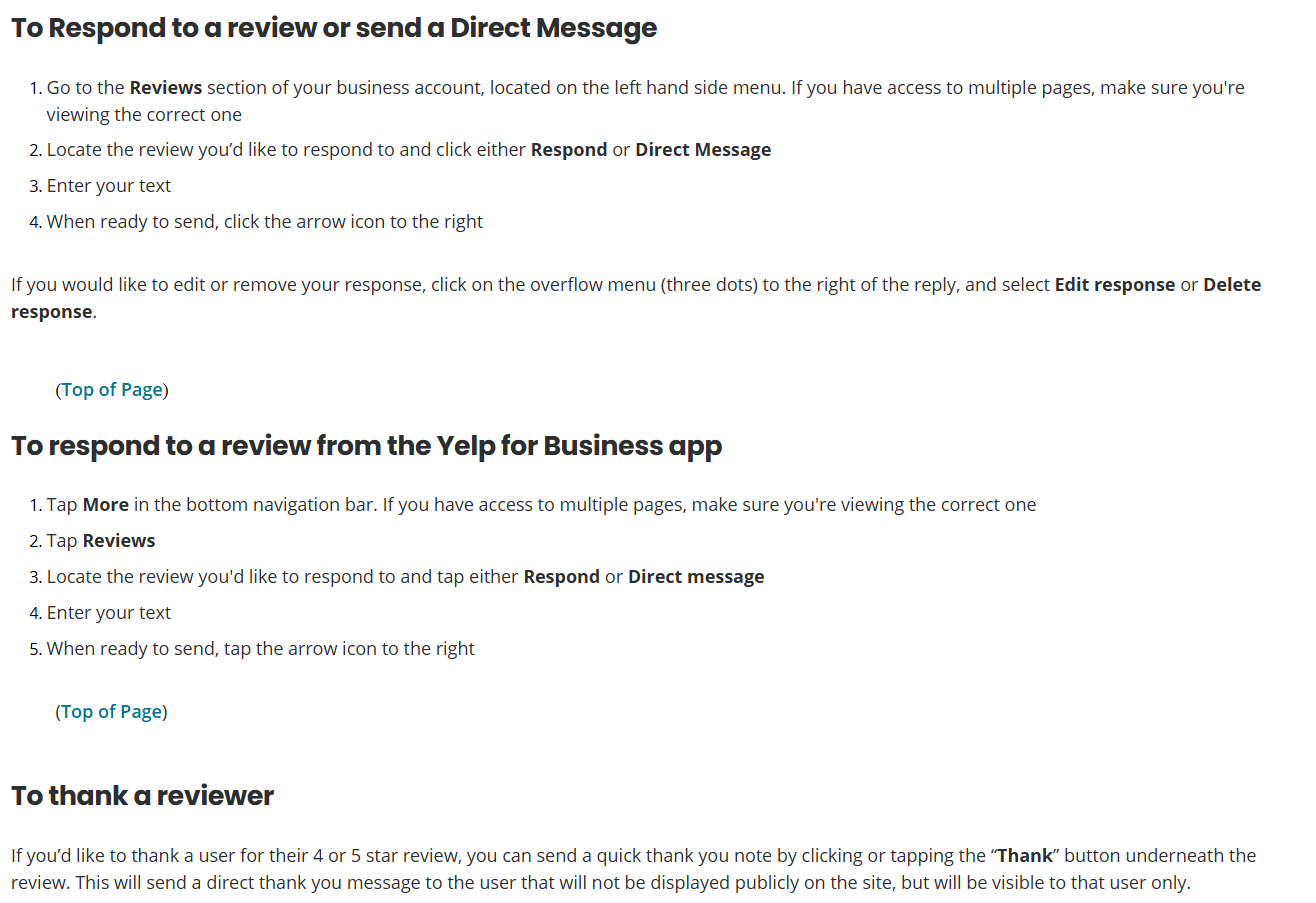
On the Yelp for Business website:
- Open the Reviews section of your business account, in the left-hand menu. If you have access to more than one page, check you are viewing the right one.
- Find the review and click either Respond or Direct message.
- Type your text.
- Click the arrow icon on the right to send.
In the Yelp for Business app: tap More in the bottom navigation bar, check which page you are on, tap Reviews, then Respond or Direct message, type, and tap the arrow icon.
Changed your mind after posting? Click the overflow menu (the three dots) to the right of your reply and choose Edit response or Delete response.
If one login holds several claimed pages, switch location before you start: the See all locations dropdown at the top left on the website, the locations icon in the top right corner in the app. Answering from the wrong page is the commonest multi-site mistake, and the fix is to give each page a named owner who writes its replies.
Yelp has a third route. Under any four or five-star review sits a Thank button, which sends a short note the reviewer sees and nobody else does. Yelp is blunt about it: a personalised public response is better, but this "will do in a pinch".
Yelp public comment vs direct message: which one to use
A public comment and a direct message do different jobs, and the mistake is using the private one first.
| Public comment (Respond) | Direct message | |
|---|---|---|
| Where it appears | "Directly below the review you are responding to and can be viewed by anyone who is looking at your Yelp Page" | Nowhere public. It "works like an email communication between you and the reviewer" |
| Who it is for | The next customer reading the profile | The person who wrote the review |
| Use it when | Always, first, on every review you answer | You need a booking date, an invoice number, a refund amount or a phone number |
| Do not use it for | Anything you would not want a stranger to read | Your only reply, because nobody else sees it |
Both quotes come from Yelp's tips for responding to reviews, and its support centre gives the reason to lead with the public one: "That way you get credit for your customer service." Use a public comment for the record and a direct message for details. Anything carrying a customer's private information belongs in the direct message, because Yelp's privacy guideline applies to what you write as much as to what they wrote.
What makes a Yelp reply different from a Google one
You must not ask for the review in the first place. Yelp's content guidelines say, under conflicts of interest, "Businesses should never ask customers to write reviews." Its help centre goes further: "you shouldn't be surprised if our software fails to recommend the reviews that you've asked your customers to write". Everywhere else, asking every customer is the job. On Yelp it can cost you the reviews it produces. For a network that means the volume per location is not yours to control. The reply rate is, and it is the only Yelp number a multi-site business can move.
Not every review counts. About three quarters of reviews across Yelp are recommended. The rest stay readable behind a "reviews that are not currently recommended" link at the foot of the page, and Yelp says they "do not factor into the overall star rating of that business". No Yelp employee can override that software. How the filter works is covered in our guide to deleting a Yelp review, and the share it catches is in Yelp statistics.
You have to write the reply yourself. The same guidelines say you "shouldn't use third-party AI tools and chatbots to create reviews or other content, including using such tools to draft or revise content", and Yelp adds that content created that way is "subject to removal and repeated violations may result in account closure". Software can put the review in front of you and flag the ones still unanswered. The sentences have to be yours. Yelp is one of the 39 review sites Cloutly reads, so every location's Yelp reviews land in the same inbox as Google and Facebook, and nothing in it asks a customer for a Yelp review.
What gets a Yelp response removed
Your comment is content you contribute to Yelp, so the content guidelines cover it. Five of them catch business owners.
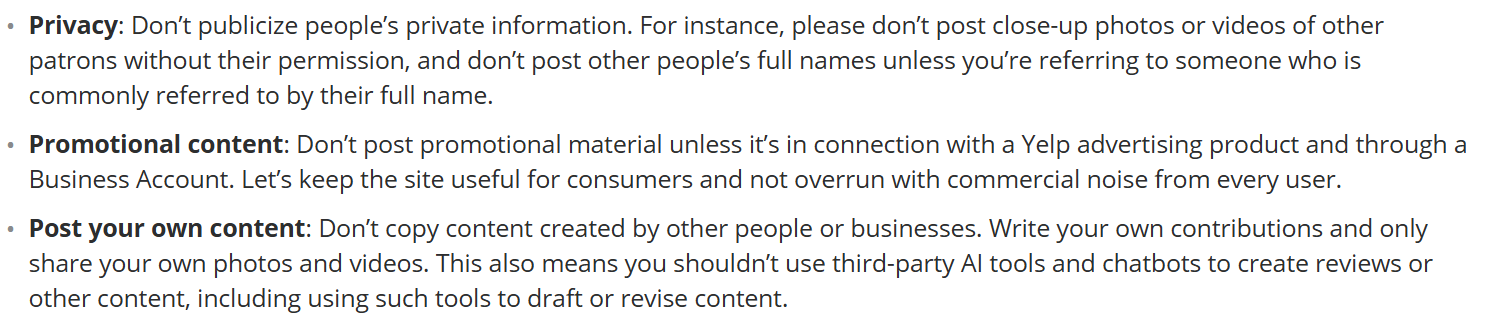
- Privacy. "Don't publicize people's private information", and don't post other people's full names. No surnames, no appointment details, no invoice amounts, nothing medical or financial in a public comment.
- Inappropriate content. Colourful language is fine. Threats, harassment, lewdness and hate speech are not, and a heated reply to a one-star is where owners cross that line.
- Promotional content. Yelp asks people not to post promotional material outside a Yelp advertising product bought through a Business Account. A comment is not the place for an offer code.
- Post your own content. The AI clause above, which covers drafting and revising.
- Relevance. Contributions should address the consumer experience. So should your reply, which is another way of saying do not argue about the reviewer.
How to respond to a bad Yelp review
Yelp's own advice is simple. Take a minute first: owners who pause "tell us their responses are less heated and more resolution based", though Yelp adds "don't wait too long". Take the high road, because a defensive tone turns off the people reading rather than the person who wrote the review. Accept that you cannot please everyone.
Use the reviewer's first name and no more, since the privacy guideline rules out the full one. Then say what changed, not only that you are sorry. An apology costs nothing and the next reader knows it. A named change with a number in it answers the question they are actually asking, which is what happens if this goes wrong for me.
Positive reviews need less work than owners think. Yelp's instruction is "a genuine, honest, personalized thanks. That's it." Name one thing only this review mentioned, and stop.
Eight Yelp review response templates
Copy any of these and change the line only your business could have written. Every business and customer below is invented.
1. A review Yelp is not recommending, that you can still see.
Thanks Marcus. Twenty minutes past a booked slot is not what we promise, and you were right to say so. The Thursday evening list has a fifteen-minute buffer in it now. If you bring Ruby back in, put my name on the booking.
Toby, Fernhill Veterinary
A not-recommended review sits behind a link at the foot of your page and does not count towards your rating, so treat it as a complaint to fix rather than a fire to put out. Reporting it changes nothing, because nobody at Yelp can override the software.
2. A review that names one of your staff.
Thanks Priya. Emma will be glad this is in writing and I have read it out to her. She spends most of a first session on the questions people are too polite to ask, which sounds like what happened here. See you at the six-week check.
Sam, Coastline Physio
Use the first name the reviewer used and no more. Yelp's privacy guideline rules out posting someone's full name, and that applies to your own team.
3. A review that is about a different location.
Thanks for writing this. Reading it back, I think the visit was to our Newtown yard rather than this one, and either way I want it looked at. Send the date and the docket number to the office email and I will take it to the right manager myself.
Grant, Northbank Storage
Yelp asks reviewers to post "only to the Yelp business page for the specific location you visited or contacted", so a misplaced review can be reported under the relevance guideline. Reply first anyway: the report may fail and the reply will not.
4. A complaint about price.
Thanks Josh. The call-out fee is on the website and in the booking text, and neither of those got in front of you, which is our problem rather than yours. The invoice breakdown is in your email and I am happy to walk through it on the phone.
Dan, Ridgeway Plumbing
Work out whether they were surprised or overcharged before you type. Surprise is a disclosure failure and you own it. Never apologise for the price itself.
5. A complaint about the wait.
Thanks Tessa. Forty minutes past a booking turns a table into a queue, and the worse part is that nobody came over to tell you what was happening. There is a runner on the floor from this month whose job is exactly that. Book the early sitting if you are in a hurry, and ask for me.
Hana, The Copper Pot
Name the failure the reviewer did not name. Usually it was the silence rather than the minutes.
6. A complaint you have already fixed.
Thanks for coming back to us, Rachel. The double charge was ours and it was refunded on Tuesday. The desk can issue a refund on the spot now, which is the bit that wasted your afternoon.
Bianca, Loomis and Fern
Say what you did and stop. Do not ask them to update the review, and never let a refund read as a trade for one.
7. A review you believe is fake.
We have no job, invoice or file under this name, and the work described is not something we do. Yelp pages are open to anyone, so occasionally a review turns up that does not match a visit. We have reported it and will leave it to Yelp. Our other 340 reviews are from people who booked.
Kirsty, Marlow Electrical
State the missing record as a fact, not an accusation. A public claim that someone was never a customer needs to be true: the US Federal Trade Commission's reviews rule treats a knowingly false public statement about a reviewer as review suppression.
8. A glowing one.
Thanks Dylan. That wheel took two builds, because the first set of spokes was a hair short and nobody was ever going to notice except us. Bring it back at 500 kilometres and I will re-tension it for nothing.
Ruben, Halcyon Cycles
Short, and one line of it is a fact only you could know. That is a complete reply to a five-star review, and it is the one people copy the least.
For the same job on other platforms, our review response examples cover thirty replies across Google, Facebook and Tripadvisor, and 1-star review response examples take the hardest single case. To read the reviews before you write, start with bad review examples.
Can I remove a negative review on Yelp?
Usually not. Only the person who wrote a review can delete it. You can report it, and Yelp's moderators take one down only when it breaks a content guideline, most often because it is not the writer's own firsthand experience or there is a conflict of interest. Plenty of reports come back declined, and a review you disagree with is not one of the categories.
If a reviewer offers to remove it for money or freebies, Yelp's instruction is specific: do not pay, save the messages, and report it. It will not get involved "if a customer is simply asking for a refund to remedy a bad experience". The full report flow, and what removal services are really selling, are in how to delete a Yelp review. If the page itself is the problem, deleting a Yelp account explains why that rarely helps.
Frequently asked questions
Can you respond to a Yelp review as the owner?
Yes, once you have claimed the page. Each review in the Reviews section of Yelp for Business carries a Respond button for a public comment and a Direct message button for a private note. Yelp also requires an approved profile photo of you or a representative, and an approved business account name.
Should you respond to every Yelp review?
Yes, starting with the public comment. In a 2023 survey commissioned by Yelp and conducted by Material, 70% of people who read reviews said they are more likely to write one for a business if they see the owner responding, and 86% said they are more likely to look past a business's critical reviews when it answers them and addresses the problem.
Can you use AI to write a Yelp review response?
No. Yelp's content guidelines say you should not use third-party AI tools or chatbots to create reviews or other content, "including using such tools to draft or revise content", and content created that way can be removed. This is the opposite of Google, where an edited AI first draft is fine.
Can you delete a response you posted on Yelp?
Yes. Click the three dots to the right of your reply and choose Edit response or Delete response, on the website or in the app.
Can you ask customers for Yelp reviews?
No. Yelp's content guidelines say businesses should never ask customers to write reviews, and its recommendation software looks for "reviews that it suspects the business owner or an employee asked for". Exclude Yelp from your review requests and let it fill up on its own.