
Review monitoring: how to catch a review the day it lands
Each review site buries its owner notification somewhere different, and switching every one of them on still leaves you checking things by hand.
Lachlan Fea 9 min read
In this article7 sections

Review monitoring is knowing a review landed, on any profile, without going to look for it. You set it up by switching on the notification each site already offers, adding a standing check for the sites that send nothing, and deciding in advance who acts when one arrives. For a single location with two or three profiles, that is an afternoon of work.
Verified 6 September 2026 against Google's help pages on managing your notifications, managing customer reviews, duplicate profiles and creating a Google Alert, plus the Google Alerts options panel itself; Yelp's notification settings article; Tripadvisor's guide to Management Responses; Facebook's pages on seeing your Page's recommendations and turning Recommendations on or off; and Meta's pages on business notifications and ratings and reviews in Meta Business Suite. Quotes are the platforms' own words.
What review monitoring is, and what it is not
Online review monitoring is the same job with a longer name. A review tracker is software that does it for you. Whatever you call it, the job is the same: get a review in front of someone while they can still do something about it.
It is not responding, and it is not asking. Monitoring is one of the four jobs in review management, and it sets the speed limit for the other three. A reply written eleven days late is a reply nobody reads.
Turn on what each site already sends you
Start with the free notifications. They cover most of what arrives, but each setting lives somewhere different and each has a hole worth knowing about before you rely on it.
Google Business Profile
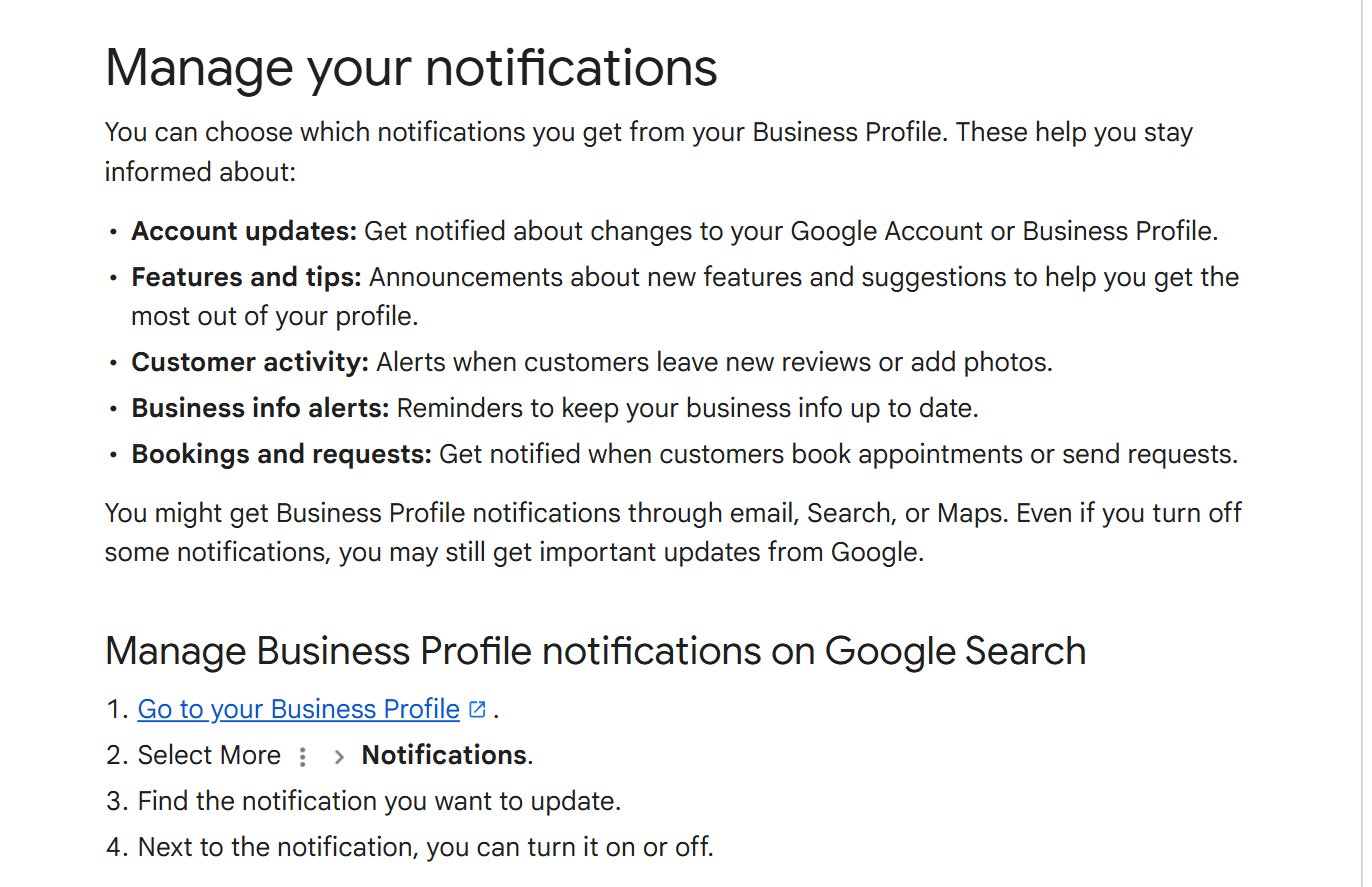
Google's notification settings sit on the profile itself. From Google Search, open your Business Profile, select More, then Notifications, find the notification you want and turn it on or off beside it. In the Google Maps app the path is different: tap Business at the bottom right, then Notifications at the top right.
The Manage your notifications page sorts them into five groups: Account updates, Features and tips, Customer activity, Business info alerts, and Bookings and requests. Reviews sit under Customer activity, which Google describes as "Alerts when customers leave new reviews or add photos". Switch that one on and Google will tell you a review arrived. Read the caveat printed on the same page while you are there: "Even if you turn off some notifications, you may still get important updates from Google." Turning things off is less final than it looks.
Then there are three gaps, and none of them is obvious from the settings screen.
The settings are per profile. Ten locations means ten passes, ten chances to miss one, and no screen anywhere that shows you which profiles you have already done.
Notifications announce arrivals, not edits. Google's review help page says a customer "can still change their review after reading your reply", and that "if they change their review, the date on their review will change to show when the latest update was made". A four star quietly rewritten down to one star appears as a fresh date on something you read a fortnight ago and stopped watching.
And a review on a profile you do not manage never reaches you at all. Duplicate and auto-created profiles are common, and Google's duplicate profiles page warns that when two are merged "their reviews are combined, but replies to reviews may be lost". Finding the duplicate late costs you the replies you already wrote.
On a Facebook Page they are not called reviews. They are Recommendations, and they live on the Reviews tab at the top of the Page. Facebook's help page gives the path plainly: click your profile photo, click See all profiles, switch into the Page, then "click Reviews at the top of your Page".
Before you monitor anything, check there is something to monitor. Recommendations can be switched off for a Page entirely, under Settings and privacy, then Settings, then Page and tagging, then the "Allow others to view and leave reviews on your Page?" toggle. Facebook's own wording is that turning Recommendations off "will disable Recommendations and remove the rating and reviews from your Page". A Page that has looked quiet for a year is sometimes a Page with that toggle off.
Facebook is the one platform here with no documented review alert. Meta sorts business notifications into three categories, Accounts, Ads and Pages, and describes the Pages group as covering "interactions on your business page, like comments and likes". Recommendations are not named in it. Meta Business Suite does have a Ratings and reviews tool under All tools, but Meta's page for it says those ratings come from customers who interacted with your ads, which is a different thing from a recommendation left on your Page. Until Meta documents an alert for the second one, treat Facebook as a profile you open on a schedule rather than one that chases you.
Yelp
Yelp does email owners, and the setting lives on the website only. From your Yelp for Business account, open the Language & Notifications page, tick the notifications you want, choose an email language, and click Save Settings.
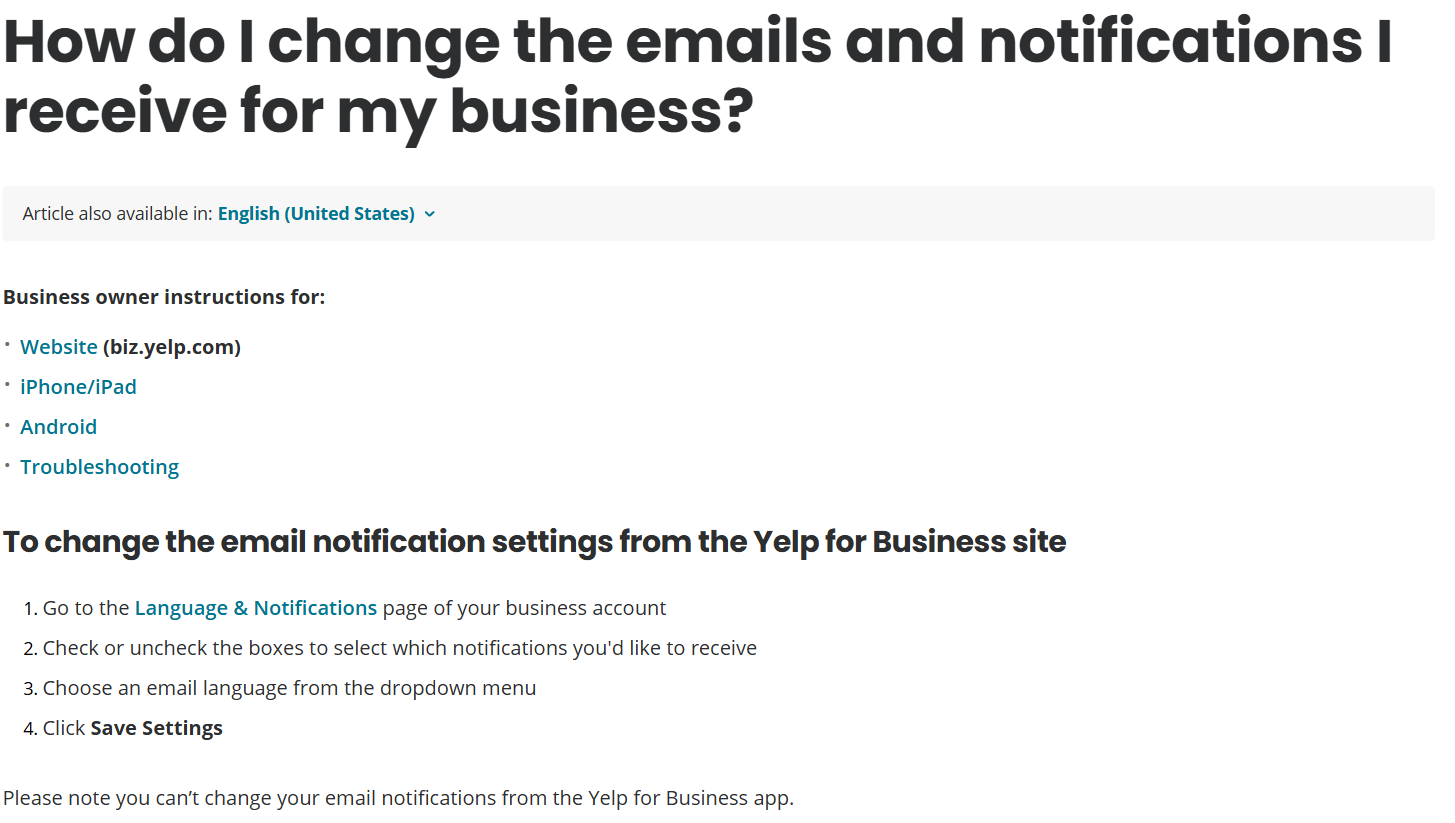
The line worth reading twice is Yelp's own: "Please note you can't change your email notifications from the Yelp for Business app." The app carries separate push switches, under More then Notification Settings, and Yelp attaches a warning to those steps: "If you have access to multiple business pages, you'll need to follow the steps below for each business page location." Same trap as Google, different building.
Yelp's mail comes from no-reply@yelp.com, and the first item on Yelp's own troubleshooting list is to search every folder, Spam and Trash included, for messages from that address. Do that before you conclude Yelp has gone quiet.
Tripadvisor
Tripadvisor's owner email is opt-in and it is buried. Click your profile icon at the top right of the Tripadvisor homepage, select Account info, hover over Settings and click Subscriptions, then on the Emails for Owners tab make sure Subscribed is selected next to Reviews & Questions.
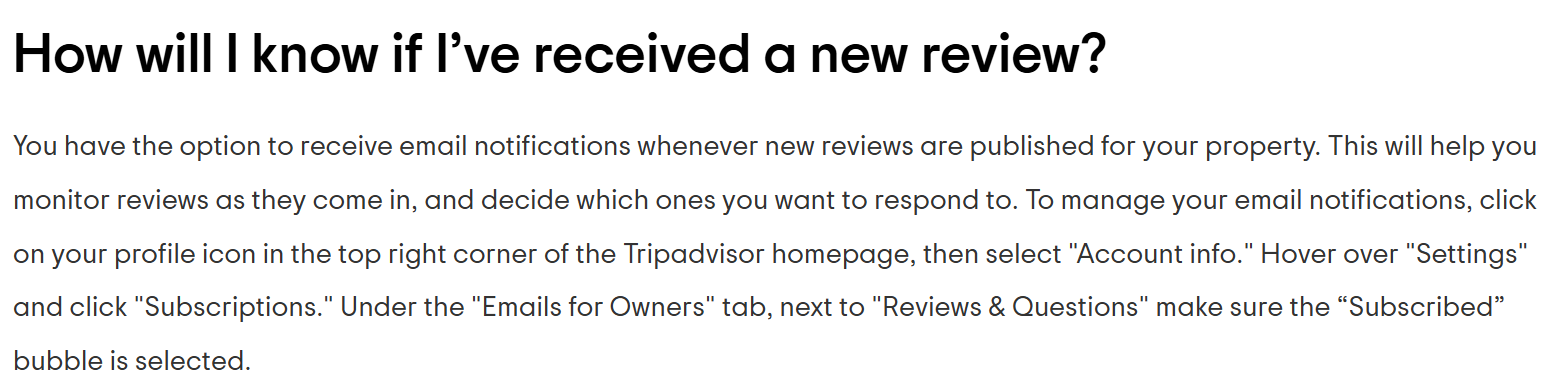
Tripadvisor says the subscription "will help you monitor reviews as they come in", which is the closest any of these four gets to describing monitoring as a job.
Replying happens in the free Management Center. Claim the property at tripadvisor.com/Owners, reach the centre through your profile icon and My Business, then use the Respond to Reviews card. Reviews there "can be filtered by response status, bubble rating, date and language", and the response-status filter is the most useful monitoring view on the site: a standing list of everything you have not answered.
The gap here is on the way out rather than the way in. Your reply is not live when you press submit. The status becomes "Response Pending", and Tripadvisor says "the majority of Management Responses will be reviewed and posted within a few business days". You cannot edit a response once it is up, only delete it and submit a new one. Build that delay into anything you promise a customer on the phone.
Google Alerts watches your name, not your reviews
Set an alert for the business name, and a second for the name plus the word review. Two minutes, and worth having, as long as you know what it is.
Google's Create an alert page is precise about the scope: you "can get emails when new results for a topic show up in Google Search". New results means pages entering the search index. A review posted on your Google Business Profile is not a new page in the index, so no alert will tell you it landed.
What alerts do catch is everything happening away from your own profiles: a forum thread, a local news mention, a complaint site, a directory that copied your listing and started collecting reviews of its own. Anything that arrives claiming a review landed is worth checking against the profile itself, because the negative review email scam is built on that message.
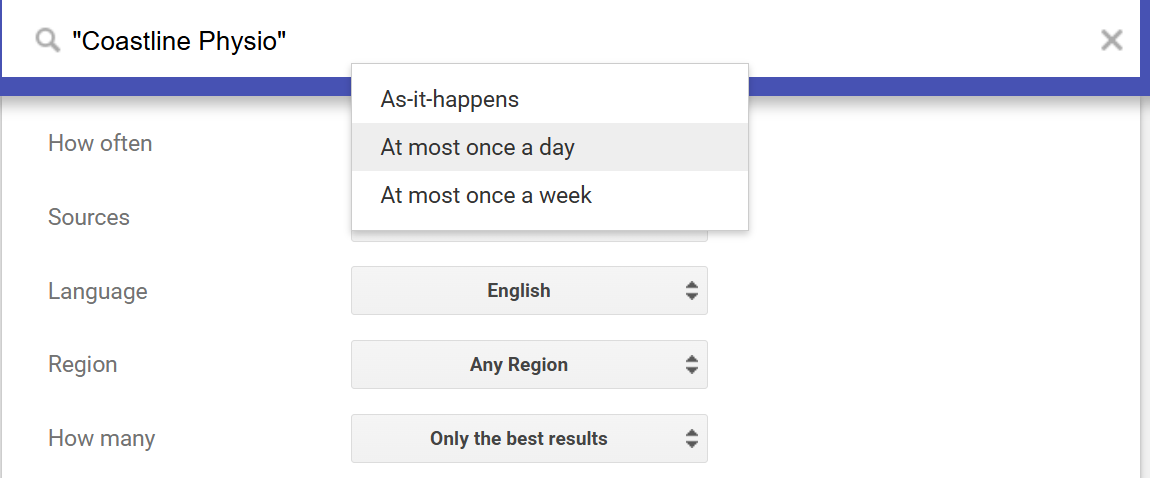
Click Show options before you create one. How often offers As-it-happens, At most once a day, and At most once a week, and it defaults to once a day. For a business name, leave it there. As-it-happens turns one busy news day into twenty emails, and an alert you have filtered into a folder is an alert you have switched off.
The weekly check, once you have more than one location
Notifications thin out as profiles multiply, so a group needs a standing check as well. Fifteen minutes on the same morning each week covers it.
- Open the unanswered view on every site that has one: Tripadvisor's response-status filter, and your Google reviews list sorted newest first.
- Write down the count of new reviews per location. The count is the point. A location that got none is a finding, and it vanishes inside a group total.
- Look at the reviews you have already replied to for changed dates. An edited Google review carries the date of its latest update and announces nothing.
- Once a month, search your own business name in Google Maps for every suburb you trade in, looking for duplicate or unclaimed profiles quietly collecting reviews.
- Confirm the Facebook Reviews tab is still switched on, and that the Yelp notification address still belongs to somebody who works there. Both fail silently.
- Send each location's new reviews to the person who was there. Head office cannot write the reply that names the real Tuesday.
Once that check is running, read the reviews in a batch to count recurring themes by location and decide what needs changing.
Where this stops working is arithmetic rather than discipline. Drayhill Dental runs six clinics, each with Google, Facebook and a booking platform. That is eighteen profiles, and at two minutes each it is a thirty-six minute Monday, every Monday, which is the first thing dropped in a week that goes wrong. Coastline Physio, one site and three profiles, will still be doing this by hand in five years and will be fine.
When a review monitoring tool earns its place
A tool starts to make sense when any of these is true:
- More than one location.
- More than about three profiles collecting reviews.
- Reviews arriving faster than anyone checks, so replies go out days late.
- More than one person needing to see the same review, which is where forwarded email starts to fail.
Below that, a tool is a paid substitute for a habit, and the habit is not hard.
The promise every tool makes is all your reviews in one place, and that really is the whole of it: one list instead of a tab per profile, a count per location, and a record of who replied and when. Cloutly does that across 39 review sites: every location in one inbox, filterable down to one, and new reviews appear on their own.
Be sceptical of two things while you shop. No tool makes a review arrive sooner than the site publishes it, so treat any promise built on speed as marketing. And walk away from any product offering to show your review link only to customers who rate you well first. That is review gating, and Google's Maps content policy tells merchants not to "Discourage or prohibit negative reviews, or selectively solicit positive reviews from customers".
The first hour after a bad review
Monitoring only pays off if something happens next.
- Read it twice, then check it. Find the date, the service and the name, and look them up in your booking system before you accept the account as written or dispute it.
- Decide whether it breaks the site's rules. Most bad reviews do not, and the test is narrower than owners expect: see how to remove a Google review. Report it if it qualifies, then carry on as though it will stay, because most reports fail.
- Reply for the next reader, not the reviewer. The person who wrote it has decided. The next forty people reading your profile have not. Worked replies are in our 1-star review response examples, and the same principle covers the good ones in our review response examples.
- Do not send it in the first ten minutes. An hour is fine. A day is fine. A fortnight is not.
- Tell the location, then log the reason. One review about the wait is a bad Tuesday. Three in a month about the wait is an operations item, and that is the return on monitoring at all.
One thing that is not a monitoring failure: a review a customer swears they left that you cannot find. Google holds, delays and drops reviews for reasons of its own, listed in Google review not showing up.
Frequently asked questions
Does Google email you when someone leaves a review?
It can. Review alerts sit under Customer activity in the notification settings on your Business Profile, reached through Google Search or the Business tab in the Maps app, and they cover new reviews and new photos. The setting is per profile, so it has to be switched on for each location you manage.
What is a review tracker?
A review tracker is software that collects reviews from the sites your business appears on, puts them in one list, and records which ones have been answered. Review tracking, review monitoring and online review monitoring all describe the same job; the wording varies by vendor.
How do you monitor reviews across multiple locations?
By hand, you turn on each site's notification for each location, then run one weekly check that counts new reviews per location and lists everything unanswered. That holds to roughly ten or fifteen profiles. Past that most groups move to software, because a per-location count stops being visible in a shared inbox.
Can you monitor online reviews for free?
For a single location, yes. Google, Yelp and Tripadvisor all offer free owner notifications, Facebook has a Reviews tab you can check, and Google Alerts covers mentions away from your profiles. What free will not give you is one list, a count per location, or a record of who replied.
Do reviews affect what AI assistants say about your business?
Your public profiles and the reviews on them are part of what an assistant has to work with when someone asks it for a business like yours, so what the assistants say is worth checking alongside what the review sites show. That is a separate check from a review notification, and it is covered in AI search for local businesses.