
Negative review email scam: how to tell a real notification from a fake
The message says a customer left you one star and there is a link to read it. Before you click, open the profile yourself.
Lachlan Fea 8 min read
In this article7 sections
A negative review email scam is a message that looks like a notification from a review site and is not one. It arrives by email or text, says a customer has left you a bad review, and puts a link in front of you. Two sorts of people send them: phishers who want the password to your Google or Facebook account, and sellers who want to pitch you a listing or a "reputation repair" service for a review that was never there. You can settle it in under a minute, and you do not need the link to do it. Open your profile yourself and look.
Verified 6 September 2026 against Yelp's page on scams impersonating Yelp, Tripadvisor's equivalent, Meta's phishing page, Google's help pages on fraudulent calls and texts, protecting your Business Profile, reporting phishing email and review extortion, and the FTC's Scams and Your Small Business. None of it is legal advice.
What the negative review email scam actually is
There is no single sender behind these. The message is a template, and it works because it lands on the one thing an owner will open at 11pm without thinking. They come in two shapes.
Phishing. The message says you have a new one-star review and asks you to sign in to read it or reply to it. The link goes to a page built to look like a Google, Facebook or Yelp login. What the sender wants is the password, and behind the password the Business Profile or the Page. Google's version of the warning is short: "Beware of phone calls, e-mails, or text messages from people who offer to help with your Business Profile in exchange for money", and "Google will never ask for One Time Password (OTP) or Personal Identification Number (PIN)."
Lead generation dressed as a notification. The message says you have a negative review or a broken listing, and offers to fix it, remove it, or upgrade you to a paid directory profile. Often the directory is one you have never heard of, with a name that borrows a familiar one. The FTC names the end of that funnel: "Scammers try to fool you into paying for nonexistent advertising or a listing in a phony business directory." Google files the same thing under the scams that trade on its brand, as Google Maps/SEO Fake Invoices and the Google Top Placement/SEO Scam.
Both share a tell that has nothing to do with the wording. A real notification describes something you can go and verify on the platform in ten seconds. With a fake, the link is meant to be the only way you can check.
How to tell a real review notification from a fake
Start with what each platform publishes about itself, because that is the only sender information you can lean on. Three of the four publish a domain rule. Google does not publish an allow-list of the addresses its Business Profile mail comes from, so for Google the answer is always the profile rather than the headers.
| Platform | What it publishes | The check that settles it |
|---|---|---|
| No list of legitimate sender addresses. Google says it "will never ask you for private or sensitive information" and "will never try to convince you to pay to maintain your Business Profile" | Open your Business Profile from Google Search or Maps, signed in, and select Read reviews | |
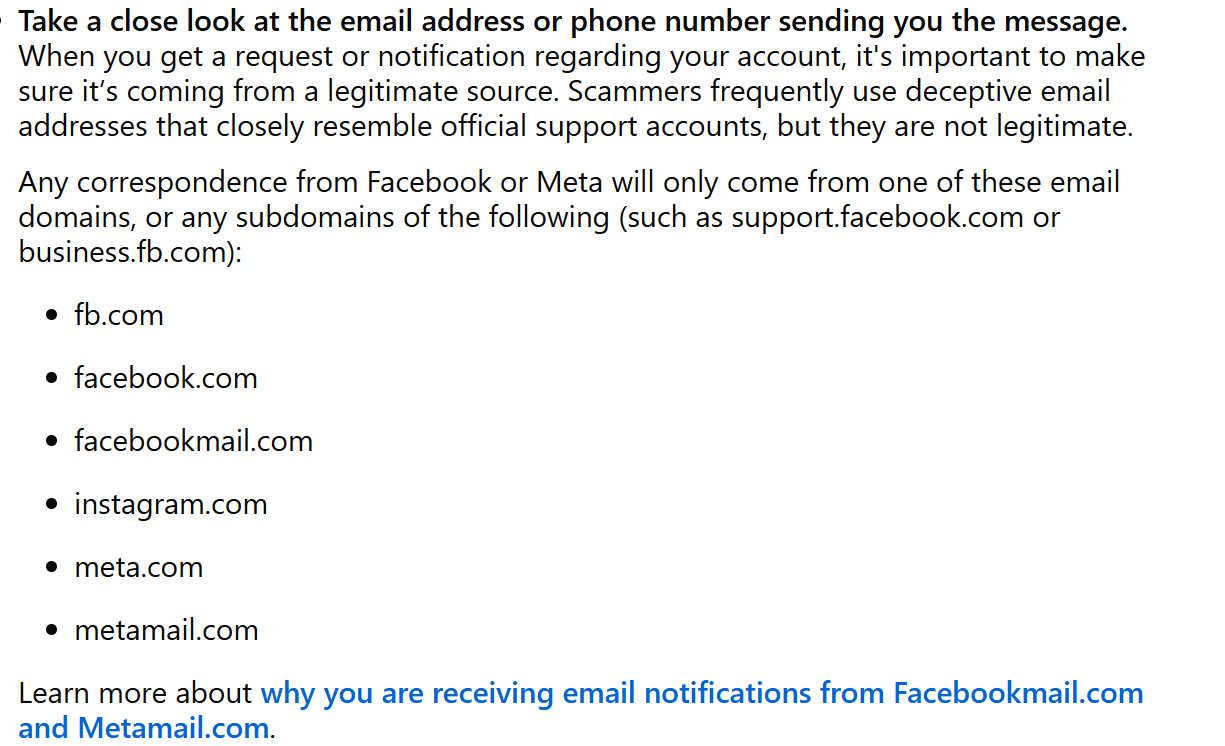
| Facebook and Instagram | Meta says correspondence comes only from fb.com, facebook.com, facebookmail.com, instagram.com, meta.com or metamail.com, or subdomains of those | Open the Page and look under Reviews or Recommendations |
| Yelp | "Legitimate Yelp links will begin with yelp.com, biz.yelp.com, business.yelp.com, or include our country-specific domains" | Sign in at biz.yelp.com by typing the address yourself |
| Tripadvisor | "Legitimate Tripadvisor links will begin with tripadvisor.com, or include our country-specific domains like tripadvisor.com.br or tripadvisor.co.uk" | Open the Management Center and the Reviews tab |
A domain rule is weaker than it looks, and both Yelp and Tripadvisor say so on the same pages that give the rule. Yelp's wording: scammers use "a tactic called 'spoofing' where they will make it seem as if their email or website is coming from a known, trusted source, typically by using a similar sounding domain. For example, yeIp.com, spelled with a capital 'i', is not a legitimate Yelp website." Tripadvisor's example is tripadvisero1.com. A capital I and a lowercase L are the same shape in most fonts, so skim-reading a sender address is not a test.
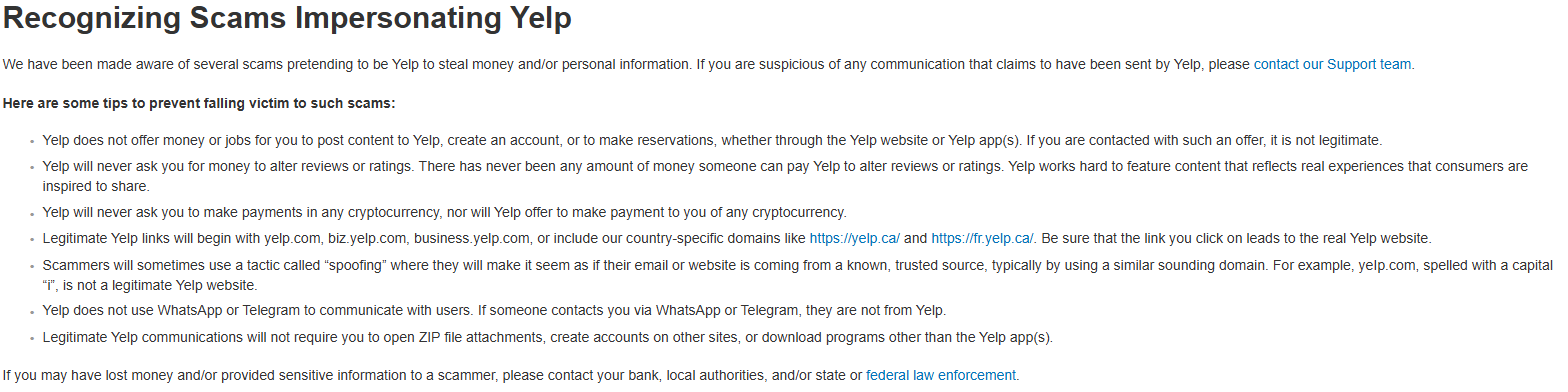
Yelp's page in September 2026. The domain rule is the fourth bullet; the reason it is not enough on its own is the fifth.
Then read the rest of the message. These are the tells that hold up:
- The link does not go where the text says. Hover over it on a computer, or press and hold on a phone, and read the actual destination. If the visible text says Google and the destination is anything else, stop there.
- It asks you to sign in. Gmail's guidance is worth memorising: "If you're signed in to an account, emails from Google won't ask you to enter the password for that account." If you have already clicked, the instruction is to not enter your information and to "go directly to the website you want to use" instead.
- There is an attachment. Yelp says legitimate Yelp communications "will not require you to open ZIP file attachments, create accounts on other sites, or download programs other than the Yelp app(s)". Tripadvisor says the same about ZIP files.
- It arrived on WhatsApp or Telegram. Yelp and Tripadvisor both say they never use either. Google does send WhatsApp and RCS messages in some countries, and the tell is the blue verification tick: its verified WhatsApp account is called "Google Maps", sometimes with a country name after it, and an RCS sender shows as "Google".
- It asks for money, or offers you some. Nobody at a review site will ask you to pay to change a rating, and nobody at a review site will pay you to leave one.
- It is written to rush you. The FTC puts this first among scammers' tactics: "Scammers create a sense of urgency, intimidation, and fear." A genuine review notification carries no deadline, because a review is not a deadline.
The "reputation repair" pitch about a review that does not exist
There is a quieter version of this that catches careful people, because there is no malware and no fake login. Somebody emails or calls, says they have noticed a damaging one-star review on your listing, and offers to have it taken down for a fee. Sometimes they claim to work with Google. Sometimes they send a screenshot. The FTC gives it a heading of its own, Changing Online Reviews: "Some scammers claim they can replace negative reviews of your product or service, add positive reviews, or boost your scores on ratings sites. However, posting fake reviews is illegal."
Two facts kill the pitch. The first is that you can go and look. Open the profile and count. If the review they described is not there, the conversation is over, and it is worth keeping the email, because a claim about a review that does not exist is a useful thing to have in writing.
The second is that there is no paid channel into a review team. Google documents a report, one appeal per review and a legal request, and none of them are for sale. Yelp puts it flatly: "There has never been any amount of money someone can pay Yelp to alter reviews or ratings." Our guide to removing a Google review sets out the routes that do exist, and we went through what a legitimate removal firm can and cannot do in our look at Removify.
One case is different and needs a different response. If the one-star reviews really did land, in a burst, and then a demand for money arrived, that is review extortion rather than a scam email, and Google runs a separate report form for it.
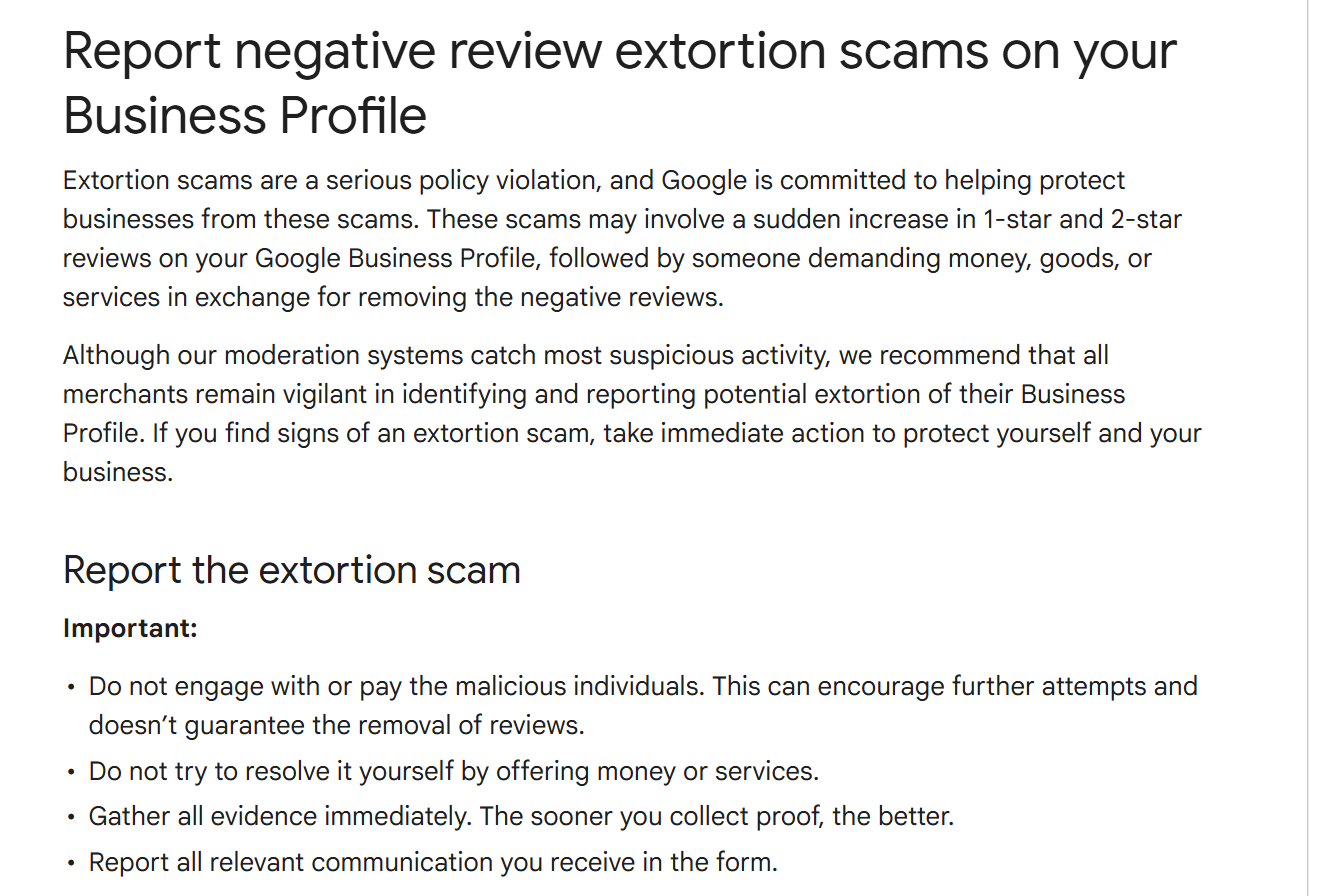
The first instruction on that page is not to negotiate: "Do not engage with or pay the malicious individuals. This can encourage further attempts and doesn't guarantee the removal of reviews."
We walk through the whole pattern, and the evidence a report needs, in how to spot a fake review.
What to do when one of these lands
- Do not click, do not reply and do not open the attachment. Replying confirms the address is live and staffed.
- Open the profile yourself, by typing the address or using a bookmark or the app, rather than the link or a search advertisement. Review monitoring is what makes that check quick.
- If the review is not there, report the message as phishing. In Gmail, open the message, click More next to Reply, then Report phishing. Meta asks you to forward it to phish@fb.com. Tripadvisor asks you to forward anything claiming to be from Tripadvisor to help@tripadvisor.com. Yelp asks you to contact its Support team.
- Report it to the regulator too. It takes a minute, and as the FTC puts it, "your report can help stop the scam". In the US that is ReportFraud.ftc.gov. In the UK, forward the email to report@phishing.gov.uk, the address the NCSC publishes. In Australia, report it to Scamwatch.
- If somebody already clicked and typed a password, change it everywhere it was reused, turn on two-step verification, then check who has access to the profile. Google's own hardening advice is to claim every location, because "unclaimed locations will make your business more vulnerable and prone to hijacks", and to keep the access list short. Watch for the follow-up as well: an emailed request to become an owner or manager of the profile should not be approved "unless you know the individual requesting access".
If the review turns out to be real
Sometimes you open the profile and it is sitting there. Answer it in public, once, within a day or two: name the thing that went wrong, say what changed, give one route to take the rest offline. Worked replies for every rating sit in our review response examples, and the hard end of the range is in how to respond to a 1-star review.
How a network trains 40 front desks not to click
One owner deciding carefully is not a defence when 40 receptionists share a generic inbox. A dental group with 40 practices can fix that with one rule and no training deck: nobody opens a review from an email link, ever. Reviews get read in one place, and that place is not your inbox.
Two things make the rule stick. Give every location one named person who can see the reviews, so a front desk that gets a scary email has somebody to forward it to instead of a decision to make. And give the team the honest reason, which is the FTC's: "Train employees not to send passwords or sensitive information by email, even if the email seems to come from a manager." A rule with a reason under it survives the week. A rule without one does not.
It is also easier to hold when there is somewhere real to look. Cloutly pulls reviews from 39 review sites into one inbox across every location, from the source rather than from a notification, so a review nobody can find there is a review that probably does not exist.
Frequently asked questions
Is the "you have a negative review" email real?
Sometimes. The way to find out is never the link. Open your profile on the platform the message names, signed in, and look at the reviews. If the review is there, the notification was real. If it is not, the message was written to make you click something.
The sender address looks right. Is that enough?
No. Yelp warns specifically about lookalike domains, and gives yeIp.com with a capital I as its example. Meta publishes the six domains its mail comes from, and Yelp and Tripadvisor publish their link rules, so an address that fails those rules is definitely fake. An address that passes them is only probably genuine.
Can anyone remove a bad review for a fee?
No. Google documents a free report, one appeal per review and a legal request, and Yelp says there has never been any amount of money that changes a review or rating. Anyone selling removal is selling you the free routes, a legal process, or nothing.
What should I do if a staff member clicked the link and signed in?
Change that password immediately, and anywhere else it was used. Turn on two-step verification. Then open the profile's list of owners and managers and remove anything you do not recognise, because taking the password is usually a step towards taking the listing.