
How to remove a review from a Facebook Page, and what to do when you can't
Most guides answer this by telling you to switch Recommendations off. Almost none of them mention that you lose every good review with it.
Lachlan Fea 7 min read
In this article9 sections

You cannot remove a review from a Facebook Page yourself. A recommendation is a post the customer owns, and Meta takes one down only when it breaks the Community Standards, so reporting it is the one removal route Meta documents for a Page owner. What you get to decide is whether the review is reportable at all, whether Recommendations stay switched on for the whole Page, and what your public reply says to the next person who reads it.
Every quotation below is Meta's own wording, read off its help pages on 6 September 2026.
Can you delete a Facebook review?
No, and the reason is worth knowing before you spend an afternoon on it.
Turning Recommendations on "lets anyone logged into Facebook publish a Recommendation on your Page", in Meta's words, and nothing in that flow checks whether the person bought anything. Meta says so on the page explaining how the review count and recommendation score work: "We do not verify that users purchased the product or used the service they are reviewing or recommending on Pages on Facebook."
That sentence explains most declined reports. A review can be untrue, written by somebody who has never walked in, posted by a competitor's cousin, and none of that breaks a rule by itself. The Community Standards cover harassment and spam. They do not cover being wrong about you.
Two people can make a recommendation disappear, and you are not one of them.
The first is the customer who wrote it. A recommendation is an ordinary post, so its author can delete it like anything else they have posted, and Meta documents an Edit privacy control for changing who sees it afterwards. Only public recommendations feed your rating, so a customer switching theirs to Friends has the same effect on your score as deleting it.
The second is Meta. It removes recommendations that break the Community Standards, and separately removes reviews that break its spam policies: "when spam reviews are removed, the rating of a Page may change". Nobody tells you when that happens, which is one reason review counts move on their own.
Work out which kind of review you have first
Facebook uses the word review for four different things, and only one of them has the report path most guides describe.
| What is on your Page | Can you report it | Where it lives |
|---|---|---|
| A recommendation with written text | Yes, on Community Standards grounds | Reviews tab, below the cover photo |
| A recommendation that is only a star rating, with no text | No. Meta: "Recommendations that only include a star rating can't be reported" | Counts towards your score, no Options menu route |
| A purchase-experience review collected from your Meta ads | Yes, but from inside Meta Business Suite | Ratings and reviews tool, not the Reviews tab |
| An angry post or comment tagging your Page | Not as a review. Hide, delete or block, per post | Your Page's posts and comments |
The second row catches owners out, and it is on Meta's report a Recommendation page today: a bare one-star with nothing written under it has no report flow at all. What to do about one is further down. Where each of these systems shows its numbers is in the complete guide to Facebook reviews.
How to remove a review from a Facebook Page: the report path
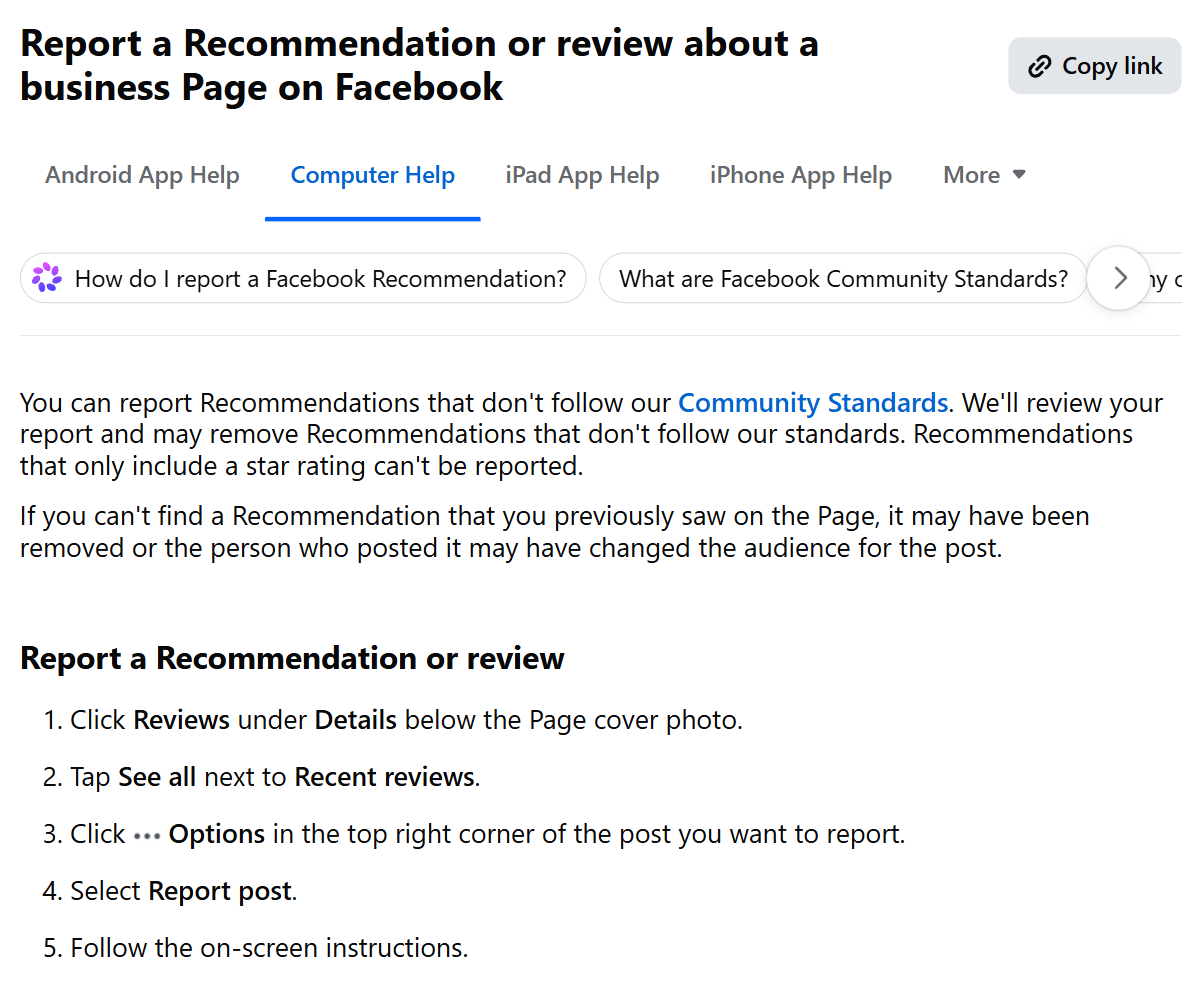
Reporting is the only route Meta gives a Page owner to remove a Facebook recommendation. Meta's steps:
- Click Reviews under Details below the Page cover photo.
- Tap See all next to Recent reviews.
- Click Options in the top right corner of the post you want to report.
- Select Report post.
- Follow the on-screen instructions.
What Meta says happens next is one line: "We'll review your report and may remove Recommendations that don't follow our standards." There is no case number, no published turnaround and no appeal form. You find out by looking at your Page.
The ads-linked reviews get a better tool. Report one from Ratings and reviews in Meta Business Suite and Meta says the review "will still be publicly visible" while it assesses it, with the Status column moving from Published to Pending. Page recommendations have no such column.
What makes a report worth filing
Meta judges the post against the Community Standards rather than against fairness, so the useful question is not whether the review is true but which rule it breaks. A report has a real chance when the post is abusive, hateful, obviously spam, plainly about a different business, or part of a burst from accounts with no history. It has almost none when the complaint is a bad experience described unfairly.
Build the evidence anyway. Screenshot the review with the reviewer's name and the date visible, search your booking system for that name across the dates described, and paste the review's own text into a search engine in quotation marks. The full method is in how to spot a fake review.
One rule works in your favour and almost nobody quotes it. Meta tells reviewers: "You should not leave a recommendation for a business if you help manage its Page." A competitor recommending their own Page breaks that, and so does a launch built on staff and family.
What to do about a rating with no text
This is the real gap in Meta's system. A silent one-star counts towards your score, cannot be reported, and gives you nothing to reply to.
Wait a few days before you do anything else. Meta says Page reviews that violate its spam policies "will be removed", with no report from you required, and that a Page's rating can change when they are. A coordinated run of ratings from thin accounts is the pattern that catches.
Blocking the profile stops the next one rather than fixing this one. Meta's blocking article lists what it does: the blocked profile can no longer see what you post, tag your Page, message it, or find it in search. Nothing already posted comes down. Steps are in how to ban someone from your Facebook business Page.
Then dilute it. Your rating is a share of public recommendations, so one hostile rating in thirty moves the number and the same rating in three hundred does not. Meta says a Page "may not have a rating if it hasn't received at least 5 reviews", so a young Page is fragile in a way an established one is not. Asking every customer is the only defence that works before the fact.
Hiding reviews on your Facebook Page: what it costs
Almost every page ranking for this query ends at the toggle. Meta's own description of the switch is the reason to stop there and think: "Turning Recommendations off will disable Recommendations and remove the rating and reviews from your Page."
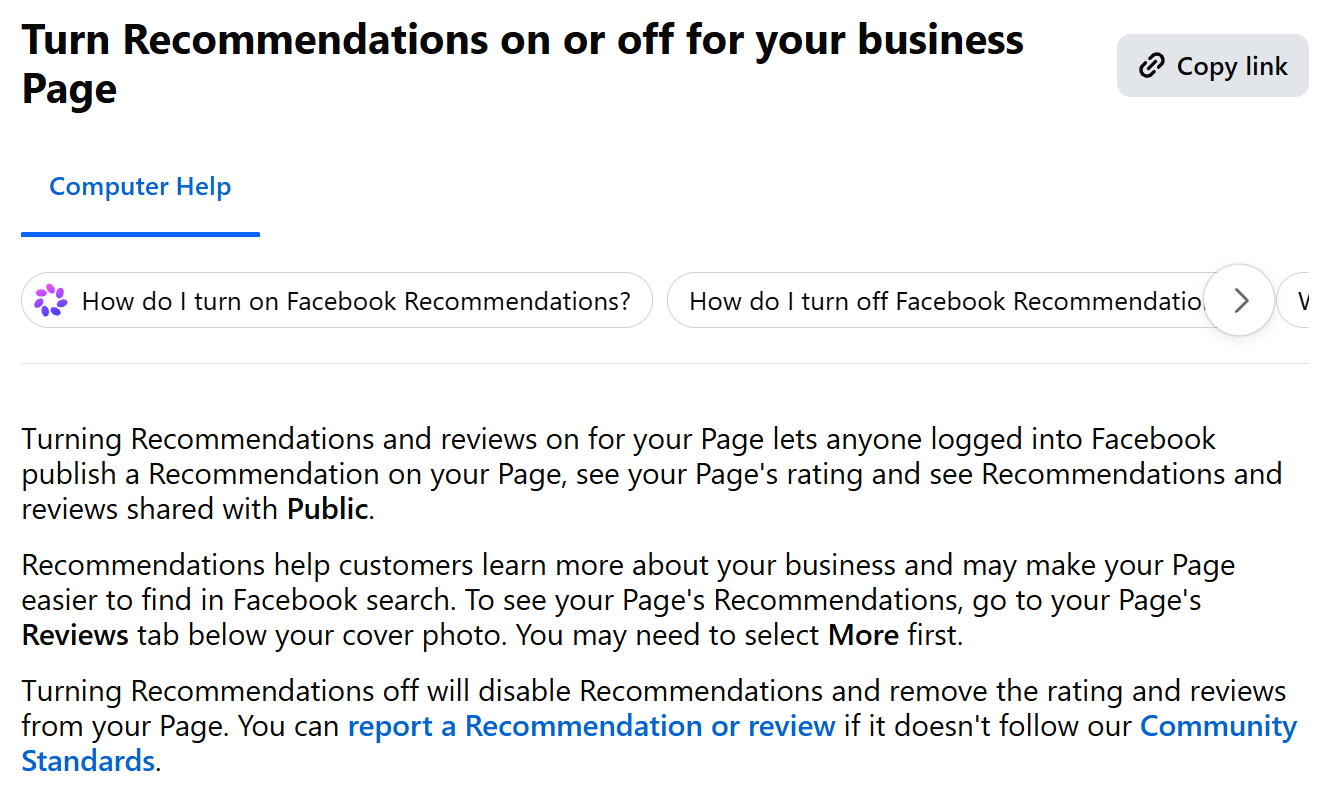
Not the review. The rating and the reviews. All of them, including the eighty good ones you spent two years collecting. The Reviews tab goes with them, so a customer comparing you against two competitors sees two Pages with recommendations and one with none.
The toggle sits under Page and tagging, which is not where anyone expects to find reviews. Most older guides still describe the pre-redesign path, so use the current one in the Facebook reviews guide.
Meta is silent on what happens when you switch it back on. Its help page says only that the toggle removes the rating and reviews. It does note that Pages which previously had reviews had Recommendations turned on for them automatically, which suggests the history survives, but a suggestion is not a guarantee, and this is not a setting to test on a Page you care about.
The one defensible use is a Page under a coordinated attack: off for a week while Meta's spam enforcement catches up, then back on. Anything longer is not review management, it is running a business without social proof.
Reply instead, which is the option most owners skip
A reply is available now, costs nothing, and is read by everyone who arrives after it. A report may never be actioned and is read by nobody.
Reply as the Page rather than as yourself, which means checking the byline on the comment box before you type. Answer the specific complaint, keep it to four lines, and move the detail to a private channel. If you believe the review is invented, say you cannot find a record of the visit and offer a way to reach you.
Do not accuse the reviewer of lying in public, and that is a legal point rather than a manners one: the FTC's review rule bars a business from making a false accusation about a reviewer when it knows the accusation is false or is reckless about whether it is. The mechanics of replying are in the reply section of the Facebook guide; the wording to borrow is in our review response examples.
When a run of one-stars arrives with a demand for money
A burst of one-stars lands overnight from accounts with no history, and a day or two later a message arrives by email or Instagram DM offering to make them go away for a fee.
Do not pay and do not reply. Paying marks your Page as a business that pays, and nothing is removed by the transaction. Keep the message with the sender's address and the timestamps visible, report the recommendations through the flow above, and take it to your local police or consumer regulator. Google runs a dedicated extortion form for exactly this. Meta publishes no dedicated form that I could find in its help centre, so on a Facebook Page the ordinary report path is what you have.
For help separating a policy breach from an opinion you simply dislike, read how to spot a fake review. If the review is on Google instead, use the Google removal process.
When you run more than one Facebook Page
Everything above is per Page, and that is where a network gets caught out. Recommendations are a Page setting with no bulk control, so switching them off is a decision made and reversed one Page at a time. Blocking is per Page as well, and Meta says so plainly: "When you block a profile or Page, you only block it from your Page." Someone banned from your Newcastle Page can still post on the other eleven. And a duplicate Page for one of your sites collects recommendations nobody can report until somebody claims it.
The practical version is a list: every Page, its Reviews tab URL, whether Recommendations are on, and who replies. In Cloutly, reviews from Facebook and the other 38 sites it reads land in one inbox across every location, so a recommendation on the quietest Page is not something a person has to remember to check. The wider playbook is on our multi-location page.
Frequently asked questions
How do I hide reviews on my Facebook Page?
There is no per-review hide. The only control is the Allow others to view and leave reviews on your Page? toggle under Page and tagging, and Meta says turning it off removes the rating and reviews from your Page, not just the one you dislike.
Why can't I report a one-star review on Facebook?
Because it has no text. Meta's rule is explicit: "Recommendations that only include a star rating can't be reported." Its own spam enforcement is the only thing that removes those.
How long does Facebook take to remove a reported review?
Meta publishes no timeframe for Page recommendations and sends no confirmation, so check the Page rather than waiting for an email. The Business Suite tool for ads-linked reviews is the only one that shows a status, and it moves from Published to Pending while the report is assessed.