
How to merge Google Business Profiles, and what happens to your reviews
Google does not join two profiles into one. It stops showing the one it calls a duplicate, and only one of the three routes brings the reviews across.
Lachlan Fea 9 min read
In this article9 sections

To merge Google Business Profiles, open the duplicate in Google Maps, select Suggest an edit, then Place is closed or not here, then Duplicate of another place, then Submit. Google assesses the request and, if it agrees, one profile stops showing while the other survives.
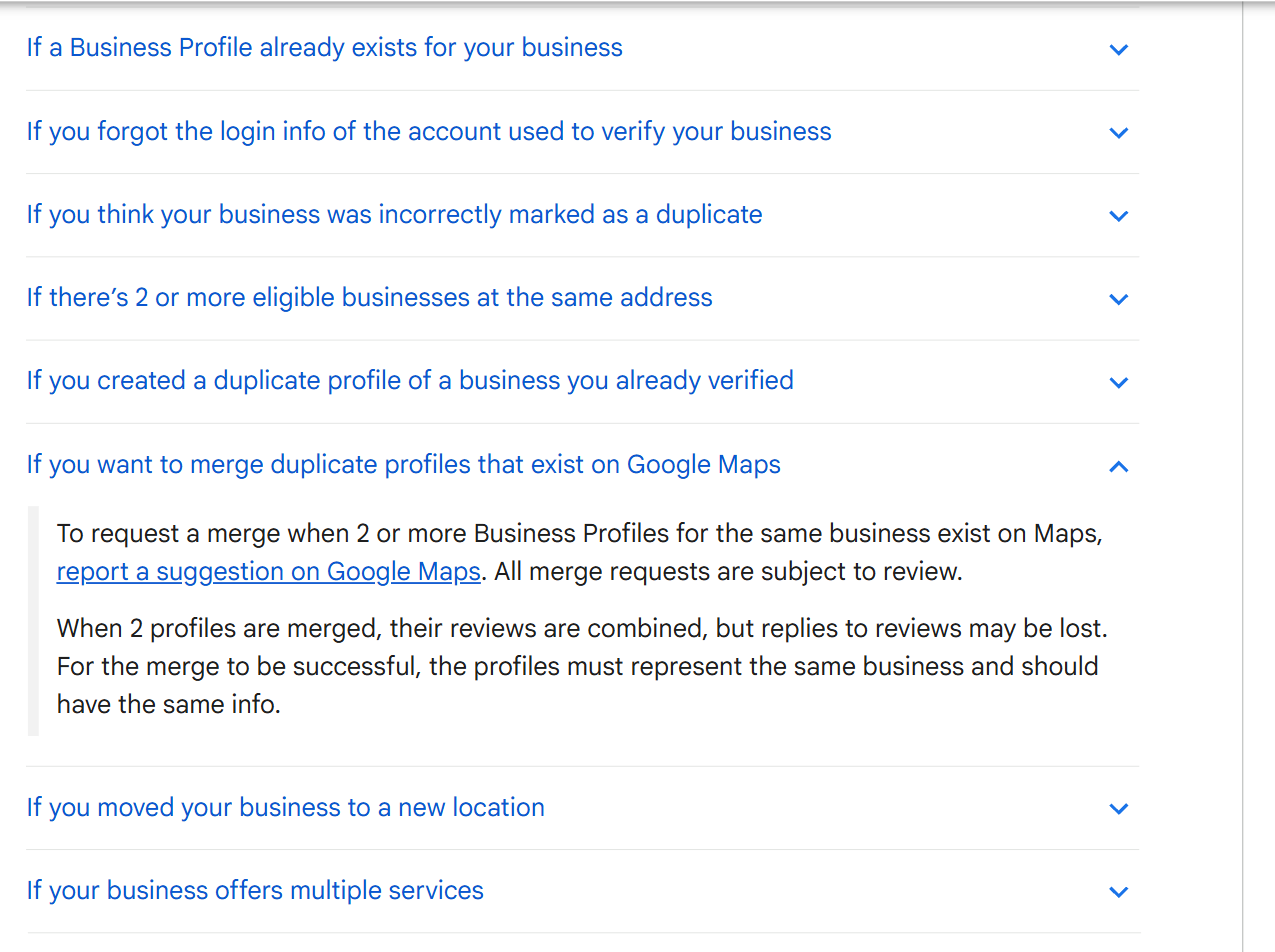
That is the whole mechanism. There is no merge button and no screen where you pick which profile wins. Google's own line is that "all merge requests are subject to review", and that when two profiles do merge, "their reviews are combined, but replies to reviews may be lost" (Resolve duplicate profiles & ownership issues). So the question worth answering is which of the three routes below fits the duplicate in front of you, and what each one costs.
What Google does with a duplicate Business Profile
Google does not fold two records into one. It decides one of them should not be there and takes it out of circulation: "If a profile is considered a duplicate, it won't show on Google Search or Maps."
Google flags a profile for three reasons, in its own words: a verified profile already exists for the same business, multiple profiles share the same address, or multiple profiles exist for the same business offering different services. The last one catches people out. A clinic with one profile for physio and another for podiatry at a single address has two duplicates, not two services, and Google's instruction is to list the services on one profile instead of splitting them.
Is it a duplicate, or two listings Google allows?
Google permits more than one profile at one address in specific cases. Filing a merge on one of those wastes a week and can cost you reviews.
| What you are looking at | Google's view |
|---|---|
| Two profiles, same name, same address | Duplicate |
| The old address still listed after a move | Duplicate |
| One profile per service sold at one address | Duplicate |
| Two businesses at one address with different names and different signage | Allowed |
| A department with its own name, category and entrance | Allowed |
| A named practitioner alongside the practice they work in | Allowed |
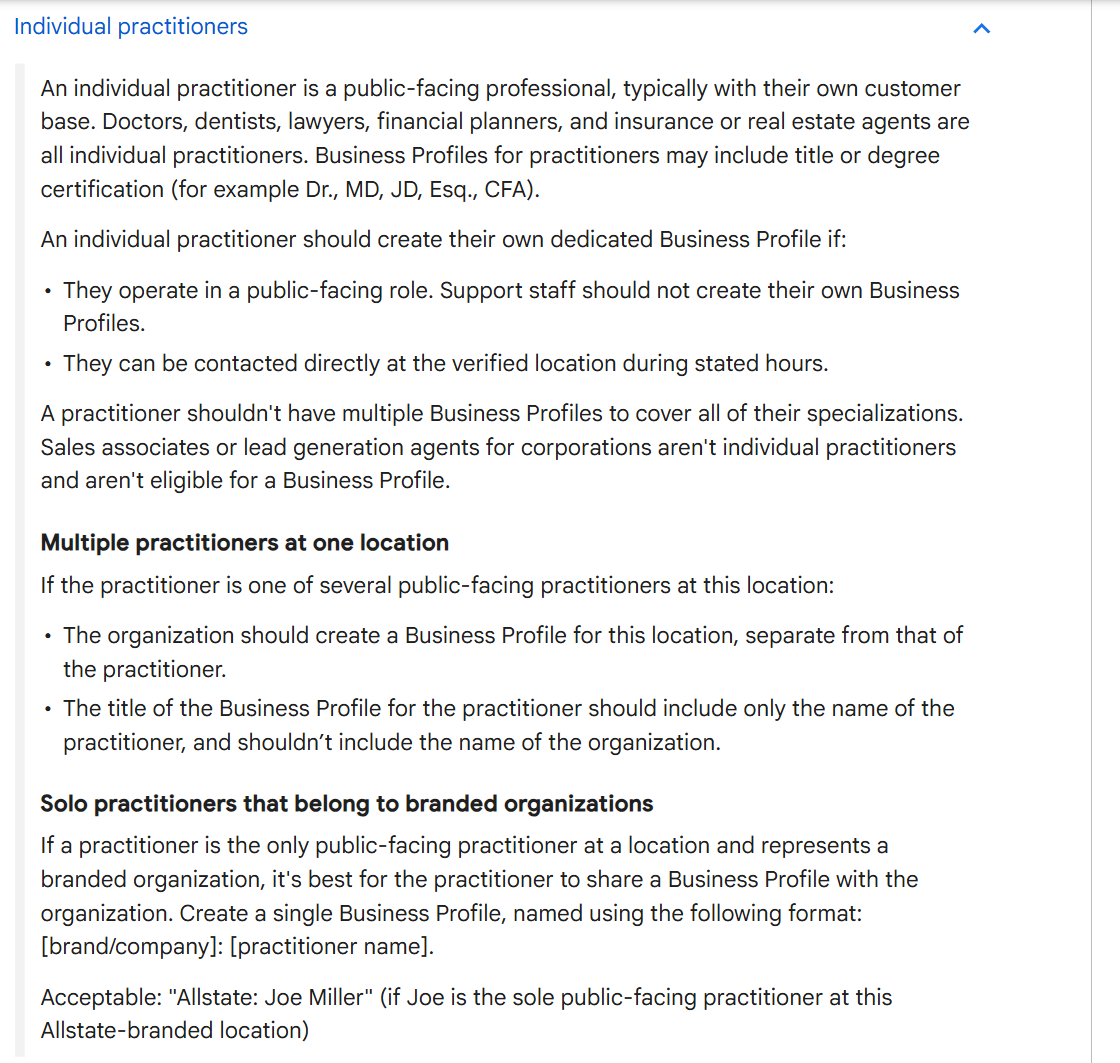
Google's test for two businesses at one address is that they are "distinct businesses with different names and clearly visible differences in signage", and it names what counts: "locations with multiple brands, rebranded businesses, departments within other businesses, or individual practitioners at a shared location." Departments have to earn it. The name has to differ from the main business, the category has to differ from the main business and from every other department, and there is usually a separate customer entrance. "Walmart Vision Center" qualifies. The Apple products section of a Best Buy does not (Guidelines for representing your business on Google).
Practitioners are the rule that dental, legal and allied health groups get wrong. Where several public-facing practitioners work at one location, the organisation holds a profile for the location and each practitioner holds their own, titled with the practitioner's name and not the organisation's. Where one practitioner is the only public-facing one at a branded site, Google wants a single shared profile named [brand/company]: [practitioner name]. Nobody gets a second profile for a second specialisation: "A practitioner shouldn't have multiple Business Profiles to cover all of their specializations."
How to merge Google Business Profiles, step by step
Which route you take depends on who can sign in to the duplicate.
Route 1: both profiles are in your account
If you created the second profile and nothing on it is worth keeping, do not send a merge request. Remove it.
- Go to the duplicate profile, signed in to the Google account that owns it.
- Select More, then Business Profile settings.
- Select Remove Business Profile, then Remove profile content and managers.
- Select Continue, then Remove, then Done.
Google's line on doing this to a duplicate you created yourself is that you "can remove it without affecting your verified listing", with a warning in the next sentence: "When you remove a duplicate profile, all content and linked managers will be removed, so make sure to remove the correct profile" (Resolve duplicate profiles & ownership issues). Only a primary owner can do it, and "new owners and managers must wait 7 days before they can remove profile content or managers" (Remove a Business Profile from your Google Account).
Removal is not a merge, and the reviews are where the difference shows. What disappears is your side of the profile: "any posts, photos, videos, and review replies by owners and managers are permanently removed." What stays is everything customers wrote, because "user-generated content and review remains." So the reviews sit on a place record you can no longer answer on, and the place itself may well stay up: removing all ownership and content "doesn't guarantee that the business won't show up on Maps and Search." If the duplicate carries reviews, take the next route instead.
Route 2: the duplicate is on Maps and nobody manages it
Google builds place records from its own sources, and any signed-in person can add one, so the second listing often has no owner at all.
- Open Google Maps and find the duplicate.
- Select Suggest an edit, then Place is closed or not here.
- Under Operating status, select Duplicate of another place.
- Select Submit.
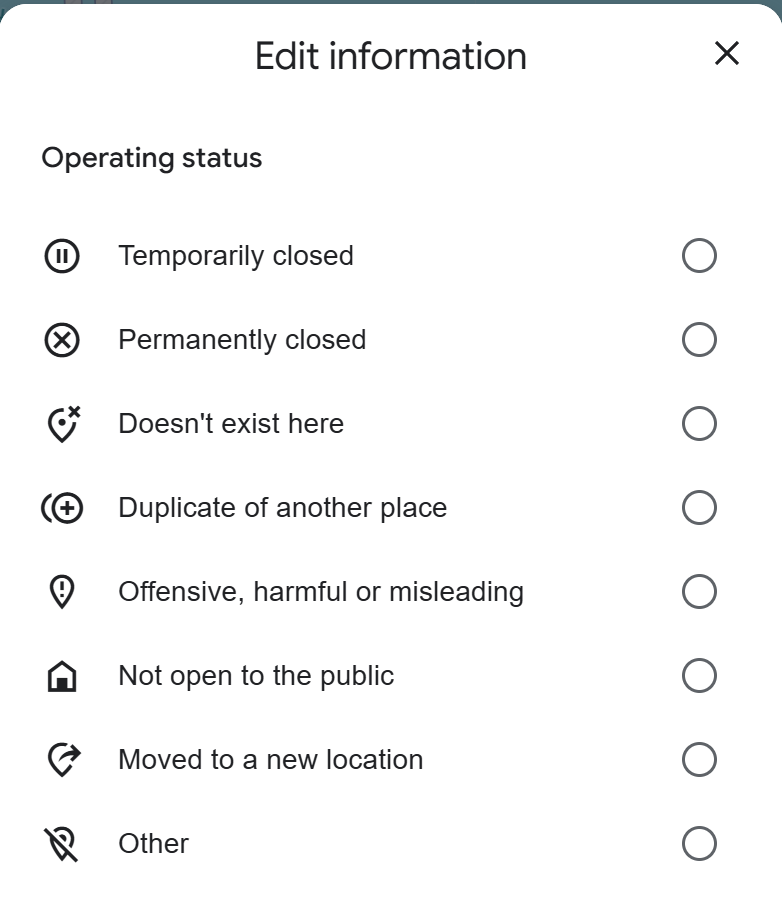
Anyone can file this, which is why it works on a listing left behind by a previous owner. Google's help pages write the second step as "Place closed or not here"; the desktop dialog says "Place is closed or not here" and puts the duplicate option under Operating status, so you are in the right place either way.
Check two things before you file. The form is not available everywhere, since "you can only edit business attributes in select countries and regions" (Mark a place reopened or closed on Google Maps). And it gives you nowhere to name the survivor, so make sure the profile you are keeping is the fuller and better reviewed of the two.
Route 3: someone else has verified the duplicate
An old agency, a franchisee or a manager who left still holds it. You cannot merge a profile you cannot reach.
Go to business.google.com/add, enter the business name and address, pick it from the list, then select Request access and submit the form (Request ownership of a Business Profile). After that, "the current profile owner has 3 days to respond." Approved, you get an email and can manage the profile. Denied, you get an email and "can appeal the denial", and you can still suggest an edit in Maps. No response, and "you have the option to claim the profile", with the caveat Google attaches to it: "the option to claim a profile isn't always available" (Resolve duplicate profiles & ownership issues).
Start this one early. Three days is only three days once somebody is actually reading the email.
What happens to your reviews when profiles merge
This is what decides which route you should have taken.
A merge combines the reviews, and the catch sits in the same sentence: "replies to reviews may be lost." Your written responses are what is at risk, not the reviews themselves.
Removing a profile does not do that. Take a duplicate out of your account and its reviews stay exactly where they are, on a place record you have just given up the ability to answer on.
You also do not get to choose which rating survives. If the duplicate carries eleven one-star reviews, they arrive with everything else, and the combined average is the combined average.
So copy your replies out of the profile that is about to disappear, then request the merge rather than removing the duplicate, because the merge is the only route that carries the reviews across. If reviews look missing once it is done, why a Google review is not showing up covers what Google filters and how long it holds one.
How long a merge takes
Google publishes timings for some of this and none for the merge itself. Any page quoting a firm number of business days is quoting an average somebody measured.
| Step | What Google publishes |
|---|---|
| An edit to a profile you own | "Edits usually take up to 10 minutes to review, but sometimes it can take up to 30 days" |
| A suggestion filed on Google Maps | No timeline. "Changes may take time to appear on the map" |
| A request for ownership | The current owner gets 3 days to respond |
| An appeal through the appeals tool | "Appeal reviews and decisions can take up to 5 business days" |
Those four come from, in order, Understand what happens to your Business Profile edits, Edit place information in Google Maps, Resolve duplicate profiles & ownership issues and Appeal Business Profile content and profile restrictions.
While something is under review, leave it alone. Google asks you not to submit multiple appeals for the same issue before a decision, and not to "create a new Business Profile for the same business while your appeal is under review".
When Google refuses to merge
Google's condition is that "the profiles must represent the same business and should have the same info", so a request filed while the two listings show different names, addresses or phone numbers fails. Fix the survivor first, then file.
The opposite failure is worse. Google merges two profiles that should have stayed apart, and a practice and a practitioner, or two tenants sharing a suite, collapse into one listing. The way back is an appeal, not a new profile: contact Google Business Profile support and appeal the duplicate status. Expect to prove it. "If both businesses serve customers at the same location, you'll be asked to provide evidence of permanent signage that clearly shows both businesses." Photograph the signage while you are standing in front of it, not six weeks later from memory.
Duplicates across twenty locations
One duplicate is an afternoon. Twenty locations is a queue, because duplicates appear faster than anyone files suggestions against them. Almost all of them come from two habits.
Relocation is the first. Google is blunt about it: "If your business relocates, do not create a new Business Profile for the new location. Instead, update the existing profile with the new address." Open a replacement profile when a site moves and you have stranded a listing that kept the reviews.
Access is the second. Somebody at a site claims their own location because nobody ever gave them a login, and now the brand has a profile it does not control.
Audit before you file anything. Search each location by name and suburb, then by street address, and write down every place record that comes back, the unowned ones included. Rank each pair on review count, review recency, photos and verification. The profile with 180 reviews wins even when the other one has the better description, because a description can be rewritten and 180 reviews cannot.
Then work in one direction. Fix the survivor so the two records match, file the duplicate suggestions second, and go back and check rather than assuming. Multiple Google locations with the same name covers the naming half of the same problem.
How to stop the duplicate coming back
A merged duplicate stays merged. A new one takes a minute to create, and almost nobody creates one on purpose.
Hand a location over instead of deleting it: transfer primary ownership and the reviews and the history stay with the site. Own every location from an account the business will still control in five years, which rules out a personal Gmail and the agency's login. And look at each location's public listing on a schedule, because a duplicate created by a customer or a data aggregator turns up in the wild long before it turns up in a dashboard.
Under all of that is one record per location that everything publishes from. Cloutly's listings management works that way: name, phone, website, address and hours go to Google Business Profile and the Facebook Page only after you approve a preview of the exact change, and Google's public view, Yelp, Facebook and TripAdvisor are re-checked against that record weekly.
When you tidy up the survivor afterwards, editing a Google Business Profile covers which fields send you back through verification. Adding a business to Google Maps is the one to read for a site that is not properly on Google yet, and removing a business from Google for one that has closed.
FAQ
Can you merge two Google Business Profiles yourself?
No. You can ask. The request goes through Suggest an edit, then Place is closed or not here, then Duplicate of another place on Google Maps, and Google decides. There is no merge control in Business Profile Manager.
Will I lose my reviews if I merge?
The reviews are combined. Your replies may not survive, so copy anything worth keeping before you file. Removing a duplicate instead of merging it leaves that profile's reviews where they are, on a place record you no longer manage.
How long does a Google Business Profile merge take?
Google does not publish a timeline for merges. It publishes the neighbouring ones: an edit to a profile you own is reviewed in "up to 10 minutes" and sometimes "up to 30 days", the owner of a profile you have asked to take over gets 3 days, and an appeal takes "up to 5 business days". A specific number of business days for a merge is somebody's average, not a Google figure.
Google merged two businesses that are not the same. How do I undo it?
Contact Google Business Profile support and appeal the duplicate status. Both businesses have to be eligible and distinct from one another, and if they serve customers at the same location you will be asked for photographs of permanent signage showing both names.