
How to remove a business from Google Business Profile (2026)
Three different jobs hide behind "remove my business from Google", and only one of them is deletion.
Lachlan Fea 9 min read
In this article10 sections
To remove a business from Google, sign in to the Google account that manages the profile. Open the profile from Google Search or Google Maps, then select More, Business Profile settings, Remove Business Profile, Remove profile content and managers. Only a primary owner can do this, and anyone who became an owner in the past seven days has to wait. The action deletes the posts, photos, videos and review replies your team added. It does not delete the business from Google. Customer reviews stay, and the listing itself can keep showing on Search and Maps.
Most people who search for this do not want all of that. The same request usually means one of three things: saying a business has shut, giving up a profile you no longer run, or taking a street address off a profile you want to keep. Google puts those choices in separate settings. The wrong one is hard to undo, so this guide keeps them apart.
If a guide tells you to log in to a Google My Business dashboard, it is describing a product that no longer exists. Management moved into Google Search and Google Maps, where the settings open over your own search result. Business Profile Manager still exists for accounts with several locations, and the bulk section below uses it.
Remove your business listing, or mark it as closed
Pick the outcome first.
| What you want | What to do | What customers see afterwards |
|---|---|---|
| The business has shut for good | Mark it permanently closed | The profile can still appear on Search and Maps, clearly labelled closed, and the reviews stay with it |
| You want to stop managing it and delete what you posted | Remove profile content and managers | Your posts, photos, videos and review replies are gone permanently. The listing can remain, and customer reviews remain |
| You work from home or travel to customers | Turn off "Show business address to customers" | The profile stays and shows your service area instead of a street address |
| The business never existed, or you cannot get access to it | Suggest an edit on Google Maps | Google reviews the request and may email you follow-up questions |
Removing a Business Profile and deleting a business from Google are different things. Google's help page is blunt about it: removing all ownership and content "doesn't guarantee that the business won't show up on Maps and Search" (Google Business Profile Help). Marking a business closed takes longer. Google says a closed profile "won't disappear from Maps right away. It will slowly disappear from search results and then be completely removed."
Closed is also the honest option. If the business traded and then shut, customers who search for you get an answer instead of a dead end.
Before you start: who can remove a Business Profile
Two rules catch people out.
Only owners can remove a profile. Only primary owners can remove profile content and managers. A manager has almost the same access, but not that. Google's help page puts it plainly: managers "can't add or remove users or remove the profile." If the remove option is missing for you, you are a manager, not an owner.
The second rule is the seven-day wait. "When you become a profile owner or manager, you have to wait 7 days before you can manage some profile features." During those seven days you cannot delete or undelete a profile, remove other owners or managers, or transfer primary ownership (Manage your Business Profile owners and managers). If you have just bought a business, or an agency has just handed the profile back, the clock starts at the transfer, not at the sale.
To see where you stand, select More, Business Profile settings, People and access. The primary owner is labelled there. If that person has left and nobody can reach them, this is an ownership problem rather than a deletion problem. Use the request route further down.
How to remove a business from Google, step by step
- Sign in to the Google account that owns the Business Profile.
- Search for your business name on Google, or open it in Google Maps. The management panel appears over your own result.
- Select More, then Business Profile settings.
- Select Remove Business Profile, then Remove profile content and managers.
- If the business has closed, turn on Mark your business as permanently closed on the same screen.
- Select Continue, then Remove, then Done.
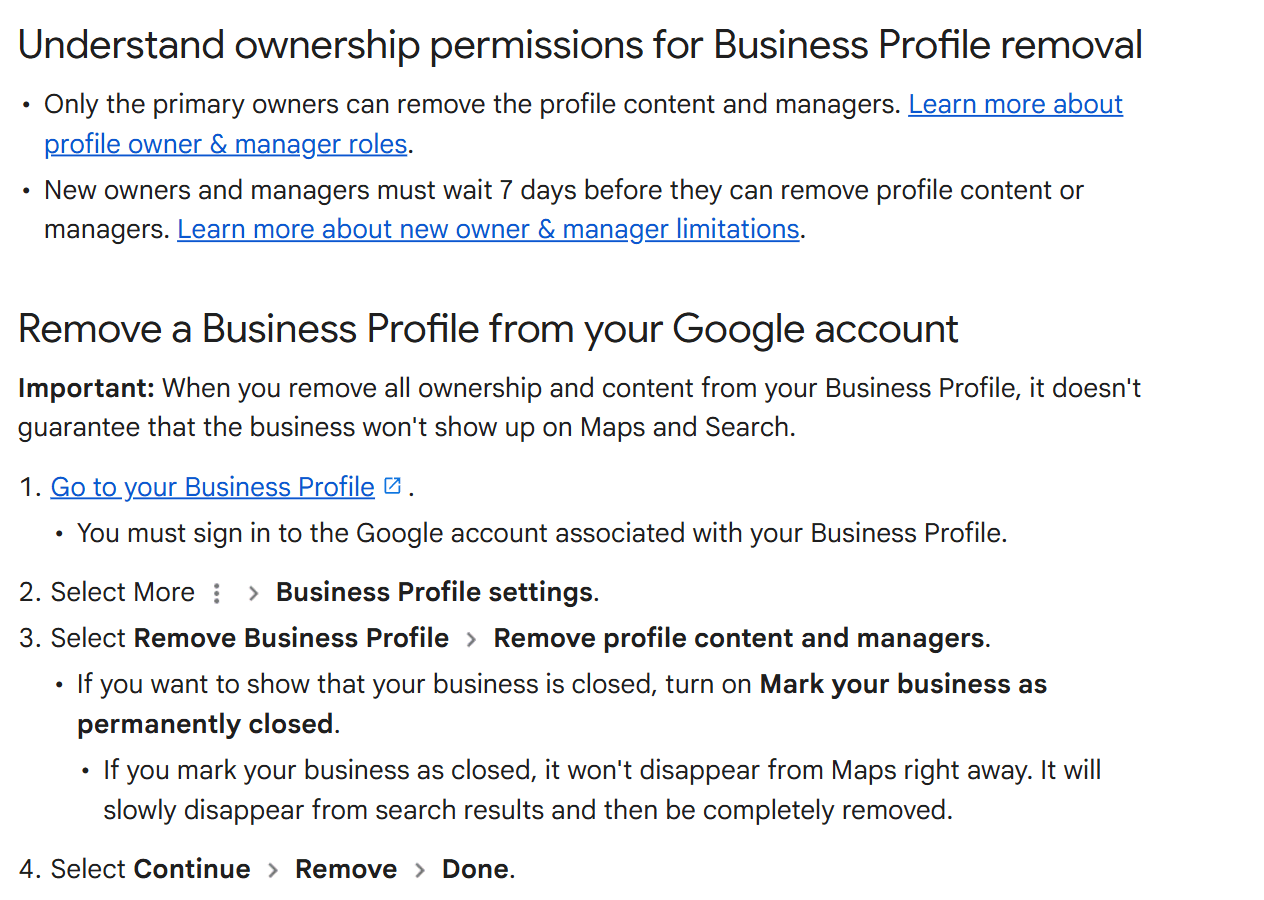
Step 5 is worth pausing on. It is the only point in the flow where you can tell customers what happened. Skip it and the listing can sit there looking open, with your old phone number on it.
If somebody else is taking the business on, do not remove anything. Transfer primary ownership, then take yourself off the profile. The reviews, photos and history stay intact for them, and the notifications stop coming to you.
How to mark a business closed without removing anything
Open the profile, select Edit profile, then Hours. In the "Business hours" section, next to Hours, select the edit icon, then Temporarily closed or Permanently closed, then Save.
Use temporarily closed when the business is shut for more than seven days, closed for the off-season, or closed indefinitely. For a shutdown of seven days or less, set special hours instead. Google warns that on broad queries, temporarily closed businesses can rank after open ones, so it is not a free action (Mark your business as closed).
How to remove your address from Google
This setting is separate from everything above, and it is what many people actually want. A plumber or a mobile physio working from home does not need to delete anything. They need a profile without the house on it.
Google calls this a service-area business: one that "visits or delivers to customers directly but doesn't serve customers at their business address." Its guidelines are direct about home addresses. "If you're a service-area business, you should hide your business address from customers."
To hide it:
- Open your Business Profile and select Edit profile, then Location.
- Next to Business location, select Edit.
- Turn off Show business address to customers.
- Select Save.
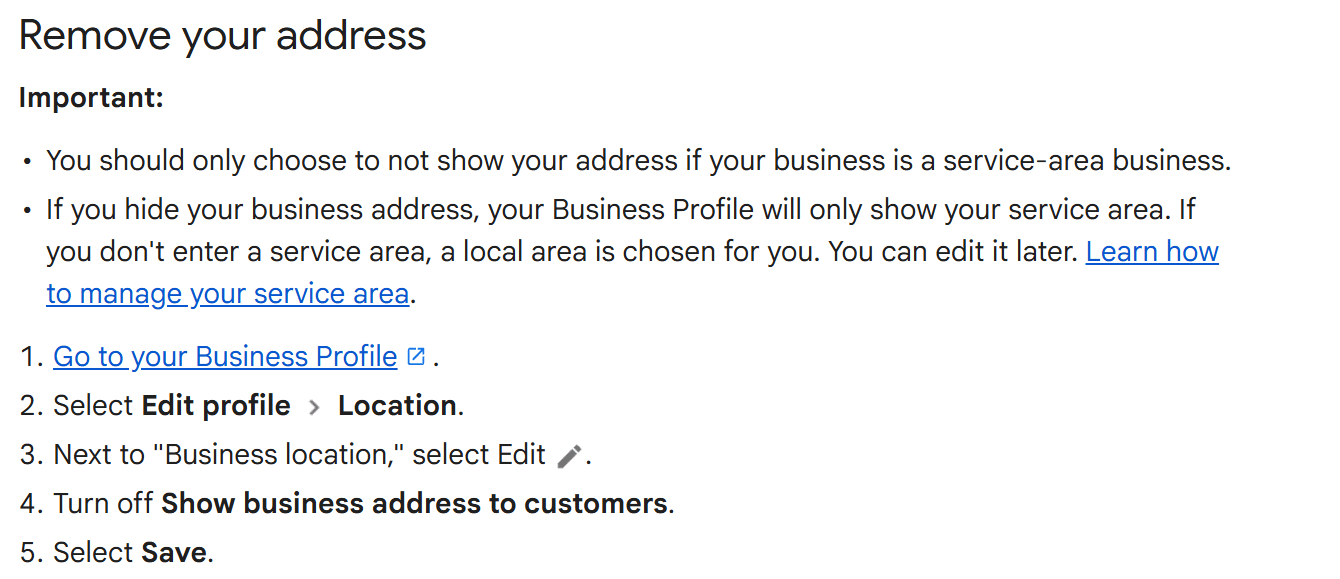
Your profile then shows your service area instead of a street address. Set that area first. If you leave it blank, Google picks a local area for you: Edit profile, Location, then Edit next to Service area. You can list up to 20 areas, and approved changes take up to 48 hours to appear (Manage your service areas).
One exception. A hybrid business, one that serves customers at its address and also travels to them, keeps the address showing and adds a service area on top of it.
If the toggle will not move, check verification first. Google says some businesses "might need to verify their Business Profile first before they can make any changes with their info" (Edit your Business Profile).
Have more than one listing? Close them all in one go
If you run several locations, use Business Profile Manager instead of changing each search result separately.
- Sign in to Business Profile Manager.
- From the list of businesses, select every profile you want to change.
- At the top, click Actions.
- Select Mark as temporarily closed or Mark as permanently closed.
- Confirm the same choice in the dialog.
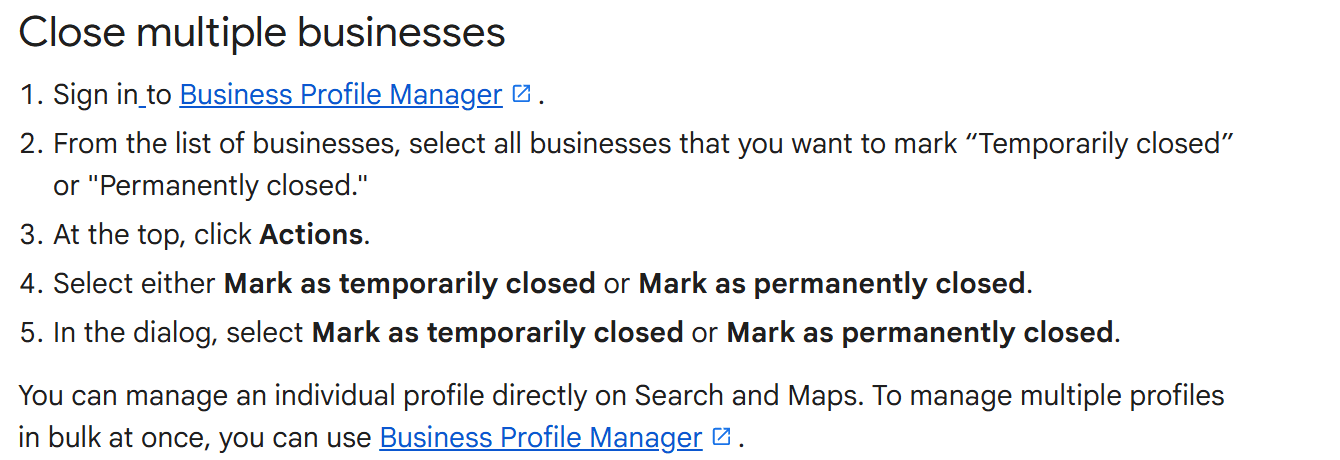
Before you bulk-close anything, check that you are not looking at duplicates. Two profiles for one site breach the guidelines, and the fix is a merge. Request one through a suggestion on Google Maps. Reviews from both profiles combine, but replies to reviews may be lost, so copy anything you want to keep first (Resolve duplicate profiles and ownership issues). Merging duplicate Google Business Profiles covers all three routes, step by step, and what each one costs you.
Networks trading under one brand run into a related problem: several locations sharing the same business name. That one is about naming, and closing a profile to fix it costs you the reviews attached to it. Across a whole network, this stops being a tidy-up and becomes reputation management for multiple locations.
What happens to your reviews, photos and Google-built website
Reviews stay. Google is specific: "any posts, photos, videos, and review replies by owners and managers are permanently removed", while "user-generated content and review remains." Your replies go, but the reviews do not. You also lose the panel you use to read and answer your Google reviews, so anything arriving after that point goes unanswered in public.
Your own photos and posts do not come back either. If those images are the only copies you hold of your fitout or your team, download them first.
A website built through Google is already gone. Google turned off the sites made with Business Profiles in March 2024 and dropped the redirects to the profile on 10 June 2024 (Search Engine Land). If your only website was a business.site address, removing the profile is not what breaks it. It broke in 2024.
Getting the profile back is a re-verification, not an undo. You can claim the business again, but Google treats it as a fresh claim on an existing place, so you verify from the top. That is the same process as setting up a Google Business Profile from scratch, with none of the shortcuts.
Why your listing came back, and what to do about it
If the listing came back after you removed it, here's why.
Google Maps is not a directory of profiles that businesses own. It is a map of places, and owners are not the only people who put places on it. Anyone signed in can add one: search the address in Maps and select Add a missing place, or use Contribute in the app. Google's wording is that the place "shows publicly once it's added". That means a place can exist with nobody attached to it, which is exactly what removing profile content and managers leaves behind.
If the business closed, use the closed label rather than another removal. If it never existed, or the listing is a stale duplicate nobody can log in to, ask Google to take it down. You do not have to own the profile to file it.
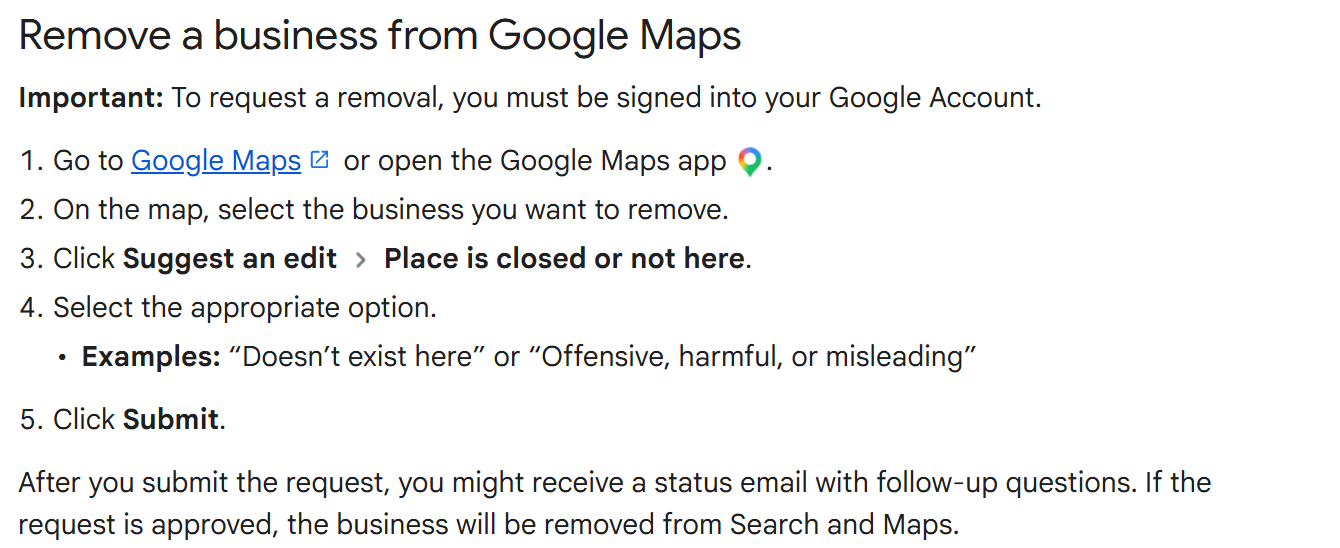
Open the listing in Google Maps, select Suggest an edit, then Place is closed or not here, then the reason that fits, such as Doesn't exist here. Google may email you follow-up questions, and if the request is approved the business is removed from Search and Maps.
An old address is the version of this that hurts a trading business. A wrong address does not look wrong to a customer; it just sends them somewhere. Holding one record per location and publishing from it beats editing profiles one at a time. Cloutly's listings management publishes name, phone, website, address and hours to Google Business Profile and Facebook after you approve a preview of the exact change, then re-checks Google's public view, Yelp, Facebook and TripAdvisor weekly. A wrong address turns up on your screen instead of in a customer's map app.
Removing it because of bad reviews? Read this first
Deleting a profile does not delete its reviews. It removes your ability to answer them. If a place record survives the removal, the reviews survive with it.
If a review breaks Google's policies, report it and appeal rather than deleting the profile around it. If it is a fair review of a bad day, answer it in public. Whoever reads that review next reads your answer directly underneath it.
Then work on the ratio. A business with 14 reviews feels its worst one badly. A business with 300 does not. The way there is to ask everyone you serve, not only the people you expect to be pleased. Screening customers first, or sending only the happy ones on to Google, is review gating, and Google prohibits it: merchants must not "Discourage or prohibit negative reviews, or selectively solicit positive reviews from customers." Incentives are out too, including "payment, discounts, free goods and/or services" for a review (prohibited and restricted content policy).
Can I contact Google if I need support?
Yes, though most removal problems lead to a form rather than a person.
- A listing you cannot access, or one that should not exist. Use the Suggest an edit route above.
- A profile someone else has claimed. Go to business.google.com/add, find the business and select Request access. The current owner has three days to reply. If nobody does, you may get the option to claim and verify it yourself (Request ownership of a Business Profile).
- Names, phone numbers or URLs that look fraudulent. File the Business Redressal Complaint Form. Google says it cannot guarantee action and will not send a status update, so keep your own record of what you filed.
Live support exists through the help centre's contact flow when you are signed in as an owner. It is not fast. Filing the right form beats explaining the situation twice.
FAQ
How do I delete my business from Google Maps?
Removing your Business Profile does not delete the place from Maps. If the business has closed, mark it permanently closed and let the label do the work. If the place should not be there at all, use Suggest an edit, then Place is closed or not here, and wait for Google's decision.
How long does removal take?
The removal itself is immediate. What customers see is not. Profile edits usually appear in about 10 minutes and can take up to 30 days, and a permanently closed listing fades out of search results over time rather than at once.
Does removing my Business Profile delete my Google reviews?
No. Owner and manager content is deleted permanently, replies included. Customer reviews are user-generated content and stay on the record.