
How to edit your Google Business Profile, and what happens after you save
Making the change takes a minute. Getting Google to keep it is the part nobody writes about.
Lachlan Fea 8 min read
In this article11 sections
To edit your Google Business Profile, search for your business while signed in to the account that manages it, select Edit profile, change the field and select Save. In the Google Maps app, tap Business at the bottom right, then Edit profile. Google does not publish the change straight away. "We review your changes before we update them live on your profile", and "Edits usually take up to 10 minutes to review, but sometimes it can take up to 30 days."
Hours, phone and website usually reappear within the hour. Name, address and category are the three that can send you back through verification, so plan those changes. The clicks are quick. The wait and whatever Google does with the change come afterwards.
If a guide tells you to sign in to a Google My Business dashboard, it is out of date. That is why so many walkthroughs point you to menus you cannot find.
Where you edit a Google Business Profile now
There are two places to do it, and both work from your own listing. In Google Search, sign in with the account that manages the profile and search your business name. A panel opens above the results with Edit profile on it. In the Google Maps app, tap Business at the bottom right, then Edit profile. Either way you finish on Save (Edit your Business Profile).
Business Profile Manager at business.google.com is still live, but it manages a set of profiles rather than edits a single one.
Which fields you can edit, and which ones need verification
Everything below sits under Edit profile. The right-hand column tells you how carefully to approach each change.
| Field | What Google says happens |
|---|---|
| Business name | "If you change your business name after it's verified, you might need to verify your business again" |
| Address and pin location | "If you move your business to a new address after it's verified, you must verify your business again" |
| Business category | "If you add or edit an existing category, you might be asked to verify your business again" |
| Regular and special hours | Reviewed, no verification step |
| Phone numbers | Reviewed. Two numbers on top of the primary one |
| Website, social links, description | Reviewed |
| Attributes, photos, opening date, service area | Reviewed |
Name, address and category help Google decide that a business is real and matches its description, so changing one reopens that question. The rest is detail about a business Google has already accepted.
Names have another trap. Google wants the name that "reflect[s] your business's real-world name, as used consistently on your storefront, website, stationery, and as known to customers". It rules out taglines, store codes, trademark symbols, fully capitalised words, opening hours, phone numbers and location descriptors such as "Holiday Inn (I-93 at Exit 2)" (Guidelines for representing your business on Google). Adding your suburb or your main service to the name is the most common rejected edit, and it risks the whole profile: Google "reserves the right to suspend access to Business Profiles on Google or other Google Services to individuals or businesses that violate these guidelines".
A real rebrand is narrower than most people expect. Google allows a name change on the same profile only where "the proper nouns and services described in the business name remain unchanged and the business category remains unchanged". Anything larger counts as a new business: you mark the existing profile closed and create a new one, and the reviews stay on the old profile. Removing a business from Google covers closing one properly.
How to change business hours on Google
Customers use your hours the same day, so this is the field to get right.
- Open your Business Profile and select Edit profile, then Hours.
- Next to "Hours", select Edit, then Open with main hours.
- Tick the box next to each day you are open. A day you leave unticked shows as closed.
- Set the times with the dropdowns. For a day you trade around the clock, select Opens at, then 24 hours.
- Select Save.
A third setting is easy to miss. Open with no main hours publishes the profile with no hours on it at all. That suits a business whose hours genuinely vary, but not one that has not filled them in yet (Edit your business hours).
While you are there, check whether the kitchen shuts before the venue or delivery runs later than the counter. Those details belong in More hours, not your main hours.
Special hours and holiday hours
Special hours are the tool for a one-off: hours that change "for a brief period of time, like for a special event", set "so that your regular hours don't change".
Select Edit profile, then Hours, then Edit next to "Special hours". Pick or add the date, mark the day closed or enter the times, and save. The ceiling is six days: "You can set special hours if your business temporarily adjusts its hours of operation or remains closed for up to 6 days in a row." Longer, or for a period you cannot put an end date on, and Google wants the profile marked Temporarily closed instead (How to set Special hours).
Public holidays are separate. On the holidays Google tracks for your country, "a warning may appear on your Business Profile that tells users your business hours might differ", whether or not anything about your day changes (About holidays on Google). Confirm the date to clear it. Do the next twelve months in one sitting.
How to update business information on Google without triggering a re-verification
Order matters when you have several things to change. Do the safe fields first and on their own: hours, phone, website, description, photos, attributes. They go into review and come back without moving anything else. Then take name, address and category one at a time, and only when you can prove the new detail from the public record. That is exactly what an appeal will ask you for.
Update the rest of the internet before you press Save. If the old number still sits on your website, you will have to make the edit twice.
How long does a Google Business Profile edit take to show?
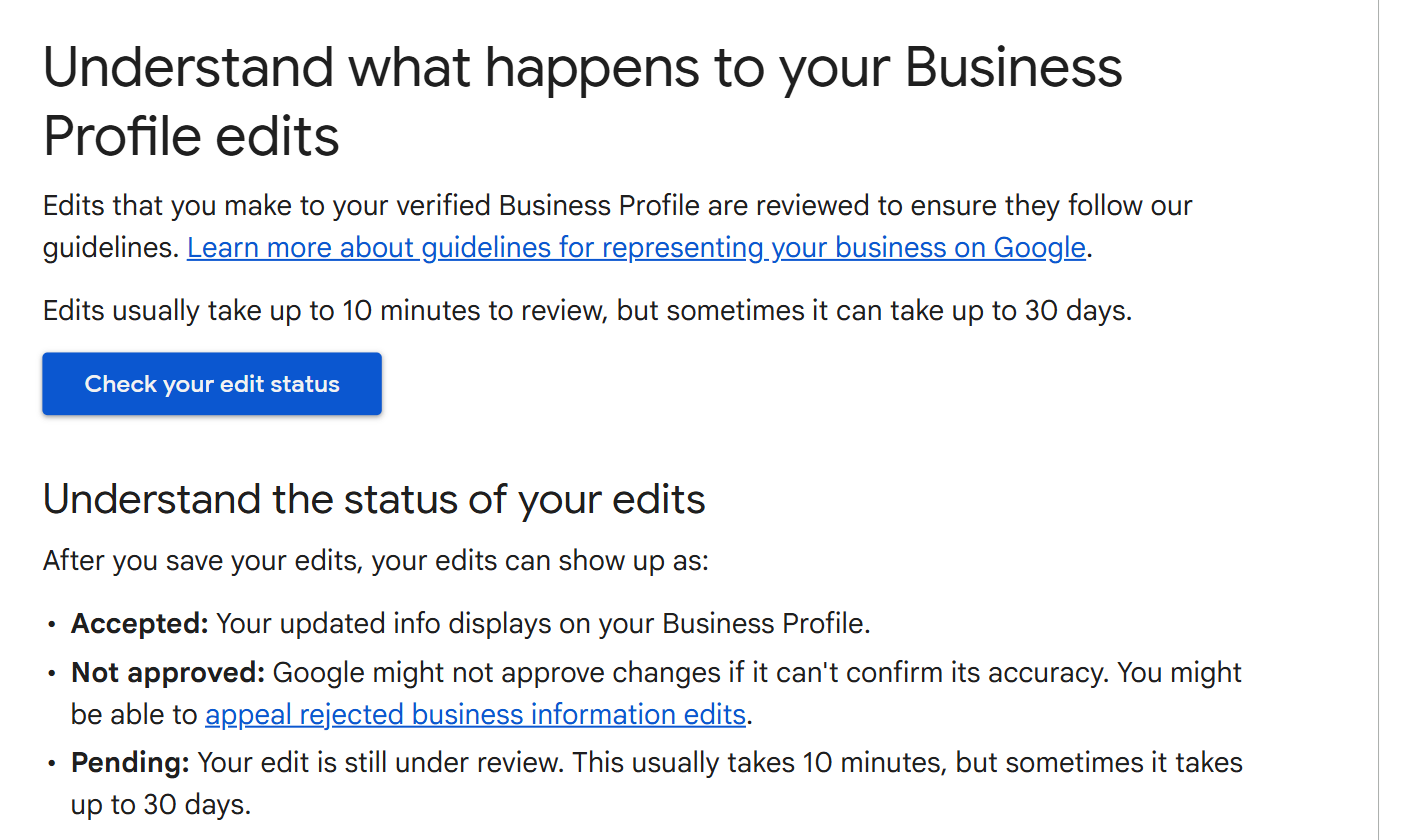
Google reviews everything: "Edits that you make to your verified Business Profile are reviewed to ensure they follow our guidelines", and the published window is "Edits usually take up to 10 minutes to review, but sometimes it can take up to 30 days" (Understand what happens to your Business Profile edits). Most hours and phone changes land in minutes. Address changes, name changes and edits on a profile that has been suspended before are where the long tail lives.
Every edit ends in one of three states. Accepted means it is live. Not approved means "Google might not approve changes if it can't confirm its accuracy". Pending means it is still in review. Google's Check your edit status tool tells you which, so you do not have to refresh your own search result and guess. Sign in to the account that manages the profile first.
Google Business Profile edit not showing: what to check
Work down this list in order.
- It is still pending. Anything under thirty days is inside Google's published window, however unreasonable that feels. Check the status. Resubmitting the same change speeds nothing up.
- It was not approved. Google could not confirm the change was accurate. Most common on names, addresses and phone numbers, and appealable.
- Google changed it back. A different thing from a rejection, and covered below.
- You are editing a duplicate. Where two profiles exist for one site, your edit is live on the one nobody sees. Multiple locations with the same name, and how to fix a duplicate covers clearing them.
- The profile is suspended. Nothing publishes from a suspended profile, and a keyword-stuffed name is a frequent cause.
- You are looking at the wrong thing. Search your exact name and suburb, not a category term, and check on a device you did not edit from.
When an edit is rejected, and how to appeal
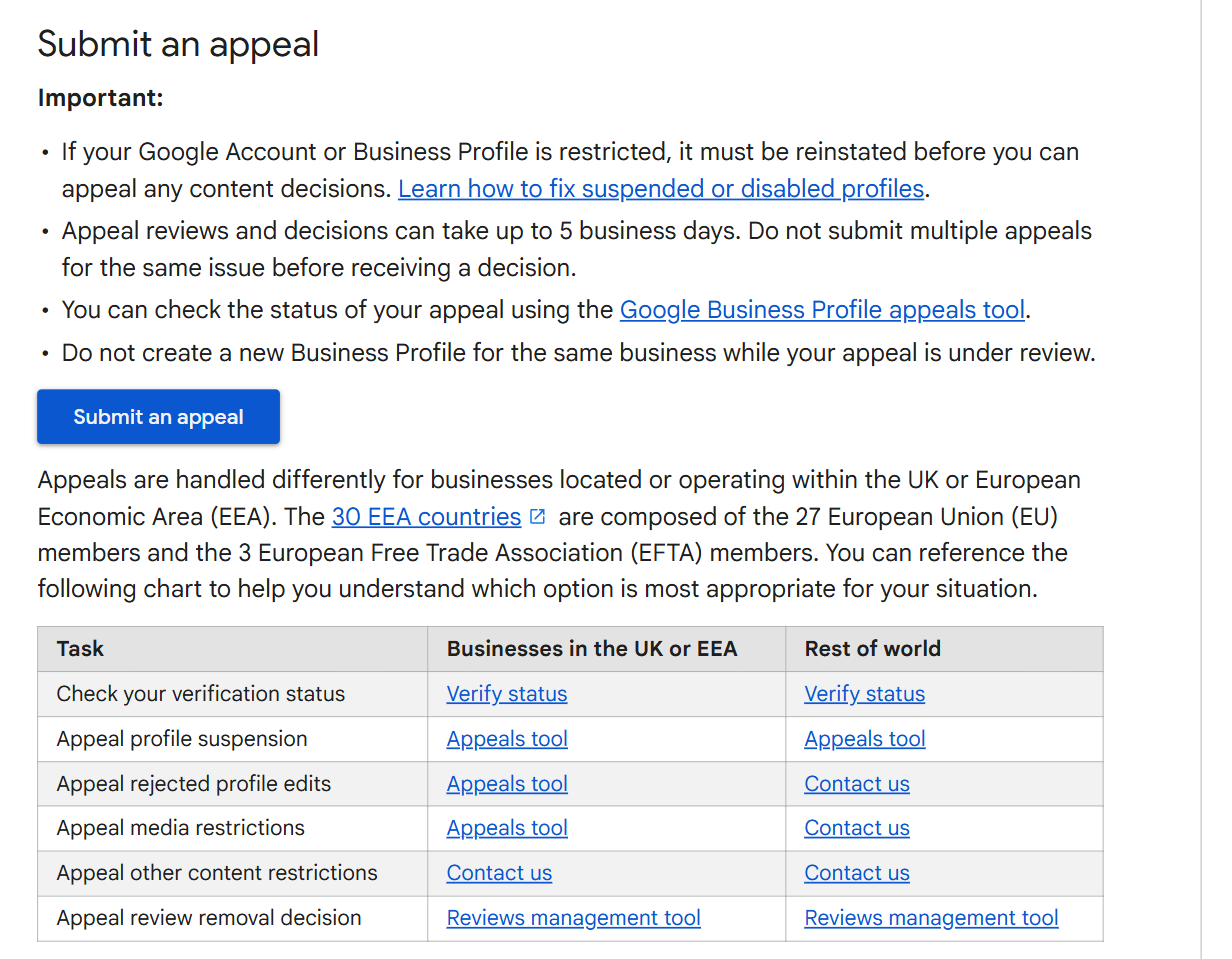
Rejected edits to your name, category, address, phone and website can be appealed, but the route depends on where the business trades. In the UK and the EEA it is Google's appeals tool. Everywhere else it is the contact form (Appeal rejected business information edits).
The evidence matters most. Google wants official business registration, a business licence, tax certificates or utility bills, and it wants "the business name and address match the profile you want to make an appeal for". A power bill in a director's name at a home address does not match a shopfront profile. That mismatch is why appeals fail.
A few details catch people out. You get sixty minutes from submitting the appeal to attach the evidence. "Appeal reviews and decisions can take up to 5 business days", and a second appeal for the same issue slows the queue rather than the reverse. Do not create a fresh profile for the same business while the appeal runs, however tempting that gets.
When Google changes your profile back
An edit can disappear without being rejected. Google updates profiles on its own: "Google gathers info from different sources, like user reports and licensed content", and "If sources report that your profile info is incorrect or outdated, Google may update your profile." Members of the public suggest edits on Maps. A data provider can supply hours you never entered.
You can see this in the editor. The text colour is the tell.
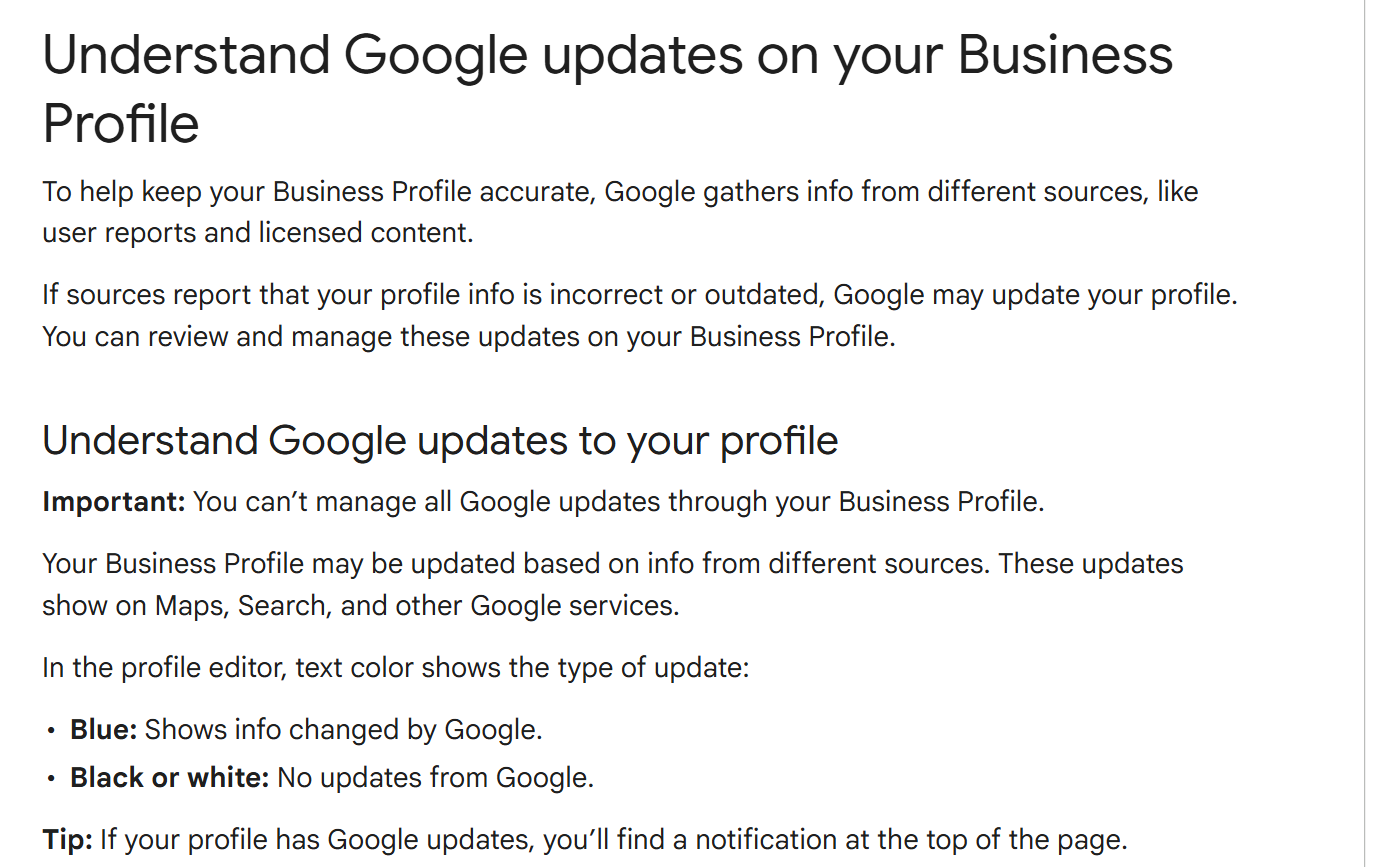
Change it back and save. The caveat is Google's own: "You can't manage all Google updates through your Business Profile." When a change keeps returning, correct the source instead. Usually it is your website footer, a directory with an old number, or a Facebook Page nobody has opened since the fit-out.
Editing several locations at once
At one site this is a ten-minute job. At twenty it is a different job, because every risky field multiplies and hours drift one location at a time.
Business Profile Manager is where that work happens, with business groups for access and a bulk upload spreadsheet for adding and updating profiles at volume. Managing several Google locations sets out the groups, the spreadsheet and the ownership roles, and adding a business to Google Maps covers any site not properly on Google yet.
The sequencing matters. Say Coastline Physio changes its phone number across nine clinics and Emma works through the profiles as she gets time. For that fortnight some clinics are right and some are not, and nobody can tell you which. Decide the new value once, hold it somewhere that is not a profile, and publish everywhere from that record.
Keeping the same facts on every other site
Customers check more than your Google profile, and Google does too. Hours on Yelp, a phone number on Facebook and an address in your website footer all affect how much Google trusts the version you just typed. Keeping them matching is listing consistency, sometimes called NAP consistency, and it is a subject of its own: what it actually does for your rankings, and the audit to run across all eight sources.
That single record is the practical answer. Cloutly's listings management works that way: one record per location carrying name, phone, website, description, address and hours, published to Google Business Profile and to the Facebook Page only after you approve a preview of the exact change, then checked weekly against Google's public view, Yelp, Facebook and TripAdvisor.
FAQ
Can I change my business name on Google without losing my reviews?
Only if the change is minor: the proper nouns and services in the name stay the same and the category does not change. Anything bigger counts as a new business, which means closing the existing profile and creating a new one. The reviews stay with the old profile.
Do I need to verify again if I only change my phone number?
No. Verification comes into it on the name, the address and the category. Phone, website, hours, description and photos are reviewed, but they do not reopen verification.
Why does Google keep changing my hours back?
Because something else is telling Google your hours are different. Google updates profiles from user reports and licensed data, and shows those changes in blue in the editor. Fix the source that disagrees with you, then set the hours again.
Can I still edit my profile in the old Google My Business dashboard?
No. That dashboard is gone. A single profile is edited in Google Search and the Google Maps app, and business.google.com now handles sets of profiles.