
White label reputation management software: a buyer's checklist for agencies
Fifteen questions to ask every vendor before you resell its platform, with examples of answers that need a follow-up.
Lachlan Fea 9 min read
In this article10 sections

White label reputation management software is a review platform an agency resells under its own brand: your domain, your logo, your price, running on software somebody else builds and operates. It is also sold as white label review management software, and the two names cover the same thing. Choosing one is procurement, not a feature comparison. Almost every question that decides it comes down to where the line sits between what you own and what the vendor owns.
Cloutly sells a white label tier, so read this the way you would read any vendor's guide. Everything below is a question you can put to us and to everyone else on your list. We make one claim of our own, in a section marked as ours.
If you have not settled whether to resell at all, that decision comes first, and it is a different piece: white label review management covers the model, the margin and who it does not suit. This page assumes you have decided and are now choosing the platform.
What the white label reputation management software shortlists get wrong
Search the term and you get product pages and affiliate listicles. Take one of them, The CMO's "10 Best White Label Reputation Management Software in 2026", last updated 31 August 2026. It puts review platforms like GatherUp, Grade.us, Synup and Birdeye in the same ranking as Brand24 and BrandMentions, which its own one-line summaries describe as best for real-time brand monitoring and competitor mention tracking. Watching what the internet says about a brand and collecting reviews from customers are different jobs, bought by different people, for different money.
Its evaluation criteria then open on the promise the whole category runs on. It says it looks for platforms with custom domains, logos, colours and branded login screens, "so your clients never see the vendor behind the curtain." No platform here can deliver that. There is always residue somewhere, and your job as a buyer is to find out exactly where before a client does.
One more thing worth knowing before you start ringing vendors. Four of those ten publish no price at all, and the six that do use three different units between them: per location, per seat, and flat per month. So the published numbers are not comparable, and four of the ten cannot be compared at all until you have sat through four sales calls.
Fifteen questions, then, in the order they decide things.
The brand layer: whose product does it look like?
1. Whose domain, and who provisions the certificate? A subdomain of the vendor's site is not white label. Ask what the DNS record is, who issues and renews the TLS certificate, and what happens when it expires at 2am. If the answer involves you running a proxy or adding ACME records every ninety days, the platform has handed you an ops job and priced it as a feature.
2. What is configurable, field by field? Ask for the list. A real one reads like a form: name, domain, primary colour, font, website, marketing URL, privacy URL, terms URL, logo, favicon. A vague one reads like a benefit. "Full branding control" usually means a logo slot and a hex code.
3. Which surfaces carry your brand, and which do not? Walk a client's whole path and check each screen: the login page, the browser tab title and favicon, the dashboard header, the review invite their customer receives, the review widget on their website, the monthly report, the system emails. The widget footer is the one people forget, and it is the one your client's customers see.
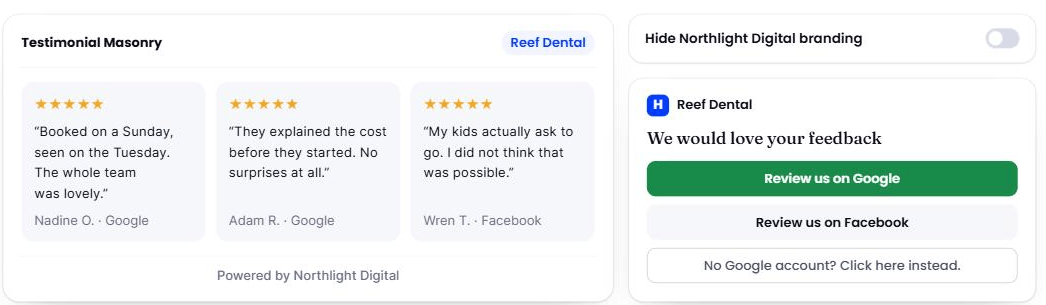
That footer line is the surface an agency finds last and a client's customers find first. Ask to see it, ask whose name goes in it, and ask whether the client can switch it off. (Cloutly's own white label page, 6 September 2026. The agency and the practice in it are invented.)
4. Where does the vendor's name survive? Every platform in this category has a list. Ask for it in writing. That list usually includes the domain review-request emails go out from until the client verifies their own, help-centre links inside the app, any hosted page the platform generates, and the terms your client agrees to. None of that is disqualifying. Finding out about it when a client asks is.
5. Does the vendor's support chat load on your domain? This is a one-minute test and it tells you more than an hour of demo. If their widget appears in a client's dashboard, you have a second support relationship you did not agree to, running in your brand.
The account layer: can you run forty of these?
6. One account per client, with real separation. Their locations, their users, their data, their login. Ask whether you can cap a client's location count, whether a client can add a location themselves, and what happens to the account on the day they stop paying you.
7. What is the agency view, precisely? Most partner portals are a searchable client list with a way into each account, which is the genuinely useful part. A cross-client roll-up of ratings and review counts, or a report you can send straight to a client, is rarer than the category's marketing implies. Ask to see the portal on a screen share, with accounts in it, not on a slide.
8. Impersonation, and what it warns you. You will spend your working day inside client accounts. Check that logging in as a client is one click, that there is an obvious way back, and that the product says plainly that the changes you make are real. A platform that lets you drift between two clients' accounts without noticing will eventually cost you one of them.
9. What tells the software the job is done? This decides whether an account survives past month three. A client who has to upload a CSV stops uploading it. A client whose booking system, point of sale or CRM fires the ask keeps going without thinking about it. Ask which integrations exist for the industries you sell to, and treat a Zapier connection as a fallback rather than an answer.
The money layer: does the margin survive growth?
10. What is the billing unit, and when does the clock start? Per location, per client, per seat, or flat. Per location tracks your cost to the value you deliver, and punishes you the month a good client opens three sites. Flat is easy to forecast and worst at the small end. Per seat quietly taxes your team instead of your revenue. Whichever it is, ask when a newly added location starts being billed, and whether the count updates on its own or somebody has to remember.
11. Does the vendor publish what a business would pay directly? Your client can search. If the vendor sells direct as well as through partners, whatever a business pays on the public site is the number your client will eventually find, so you want to know it before they do. Where it is published you can check it in a minute. Where it is not, ask what a direct customer pays and write the answer down.
12. What is the contract, and how do you leave? Term, notice period, what happens to client accounts on the day you stop paying, and whether you can export reviews, contacts and reply history in a format you could hand to a client or load somewhere else. Ask this in the first call. The answer is short, it is never in the marketing, and it is the question most likely to be met with a pause.
The delivery layer: who does the work?
13. Who writes the replies, and who approves them before they send? AI drafting has made replies much faster, and across forty accounts that is the difference between a service that works and one that does not. What you are checking is whether a person approves each reply before it publishes. Automatic publishing under your brand, on a client's public profile, is a risk you are taking on their behalf.
14. How many review sources, and are they read or written? Reading a site means the reviews turn up in your inbox. Writing to it means the platform can publish hours, phone numbers and replies back. Vendors list both under "supported sites". Ask which is which for the four or five sites your clients care about.
15. Does it gate? A rating step placed in front of the review sites, so only some customers are sent on to Google, is still sold to agencies as a benefit. Do not resell it. Google's tips for getting more reviews say that offering incentives in exchange for posting, changing or removing reviews is "strictly prohibited". And the FTC, asked directly whether a business may ask for reviews only from the customers it thinks are happy, gives an answer no vendor will put on a slide.
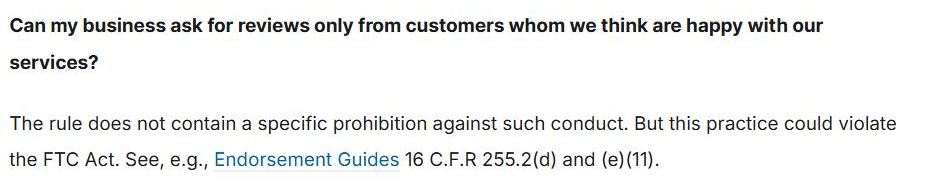
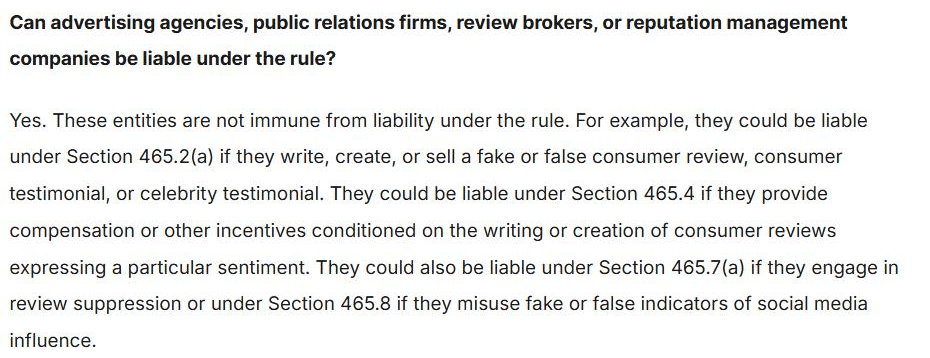
The rule that answer refers to took effect on 21 October 2024, and the same guidance answers whether advertising agencies, public relations firms and reputation management companies can be liable under it: "Yes. These entities are not immune from liability under the rule." When you resell, your brand is on the invoice and the vendor's conduct runs under your name. That makes question 15 a procurement question rather than an ethics seminar. None of this is legal advice, and the rule is American, so if your clients are elsewhere your own regulator is the one to read. What gating is and why it does not work anyway has the longer version.
The one-page version
Take this into the demo.
| Ask | A good answer sounds like | A bad answer sounds like |
|---|---|---|
| 1. The domain | "One CNAME, we issue and renew the certificate" | "You'll get a subdomain" |
| 2. Branding fields | A named list of fields | "Full branding control" |
| 3. Branded surfaces | A walk through every screen, including the widget | "It's fully branded" |
| 4. Vendor residue | A written list, unprompted | "Your clients never see us" |
| 5. Support chat | "It does not load on your domain" | "Clients rarely notice it" |
| 6. Account separation | Per-client logins, and a location cap you set | "Everything's in one workspace" |
| 7. The agency view | A screen share with accounts in it | A slide |
| 8. Impersonation | One click in, an obvious way back, a warning | "You just switch accounts" |
| 9. What triggers the ask | Named integrations for your verticals | "We integrate with 5,000 apps" |
| 10. Billing unit | Per location, per client or flat, stated | "It depends on volume" |
| 11. Direct price | A public pricing page you can open now | "We don't really sell direct" |
| 12. Exit | Term, notice, and an export format | A pause |
| 13. Replies | "A person approves every one" | "Fully automated" |
| 14. Review sites | Which are read, which are written | One number |
| 15. Gating | "We do not do it, and here is why" | "You can turn it on if you want" |
Where we sit
Cloutly's white label tier answers that list this way: one CNAME points at us and the certificate is ours to manage, your name, colour, font, logo and icon go in under Settings, and one partner bill a month is tiered by your clients' total locations while what you charge those clients stays yours to set.
That paragraph is the only claim we make on this page. Run the same fifteen rows against us that you run against everyone else.
How to run the trial so it tells you something
The default way to evaluate this software is a demo and a feature grid, which tests the vendor's sales team rather than the product. Do this instead, over about a week.
- Set up your own agency as the first client. Your brand, your domain, your locations. You will find the residue in an hour, and before a paying client does.
- Onboard one real client, and time it. However long that took is your onboarding cost per account, and it decides how many clients one person can carry.
- Send fifty real invites. Watch what lands, from which sender, on which device, and what your client's customer sees when they tap through.
- Break something. Disconnect a profile, add a location mid-month, ask a support question through the channel your client would use. How a platform behaves when it goes wrong is the part no demo shows.
- Ask for the exit. Request a full export of everything from step 2 and see what arrives.
Step 2 is the one that surprises people, because onboarding hours are the real cost of this service and no platform quotes them. What the agency work involves week to week prices that side of it.
Questions people ask
How much does white label reputation management software cost? Published entry prices run from tens of US dollars a month to a few hundred, but the number on the page is not comparable between vendors, because some price per location, some per seat, some per client and some flat. Normalise it yourself: take your expected client count and total location count in twelve months, and price each vendor against that. Then add the part nobody quotes, which is your onboarding and reply-writing hours.
Is there free white label reputation management software? Not in a form worth building a service line on. Free tiers in this category are single-account, vendor-branded, or both, which defeats the point. The nearest honest version is a trial, and a trial only tells you anything if you run it the way described above.
What is the difference between white label and reseller pricing? White label describes what the client sees: your brand on the software. Reseller describes who pays whom: the vendor bills you, you bill the client, and you set the number. Most partner programmes are both. A programme that is white label without being a reseller arrangement leaves the vendor billing your client directly, which is a different business entirely.
Before you shortlist
Fifteen questions is more than a first call will hold, so if you get two, make them the ones at either end. Question 1 tells you whether the product is genuinely yours to sell. Question 12 tells you what it costs to be wrong about that. Get straight answers to both and the middle is negotiable.
If you are also comparing platforms for your own business rather than for clients, choosing review management software covers the same ground without the agency layer.