
Review schema: what it does now that Google dropped stars
Review schema will not put stars under your own result in Google, and has not since 2019. Here is what it still does, and the markup to use.
Lachlan Fea 9 min read
In this article9 sections

Review schema is structured data that tells a search engine what a rating on your page means: who wrote it, what it is about, and how many people it represents. It will not put star ratings under your own business in Google's results. Google stopped showing those in September 2019 for any business that hosts reviews about itself, and has not brought them back.
That fact is missing from most of the pages ranking for this term, which is why people add the markup, wait a month, and decide they did it wrong. They did it right. The feature was retired.
Everything below was checked on 6 September 2026 against Google's own documentation. Both code blocks were run through the Schema Markup Validator and the Rich Results Test, and the screenshots are what those tools gave back.
What is review schema?
Review schema is a pair of schema.org types you add to a page as JSON-LD. Review describes one person's verdict on one thing, with an author and a rating. AggregateRating describes the average of many, with a rating value and a count. Both attach to the thing they are about, which schema.org calls itemReviewed.
Two terms get used interchangeably and should not be. Review schema markup is the code: a <script type="application/ld+json"> block in your page's HTML. A review snippet is the search feature that code can make you eligible for, the row of gold stars under a result. Eligible is the operative word, and most of this piece is about that gap.
Will review schema put stars under my business in Google?
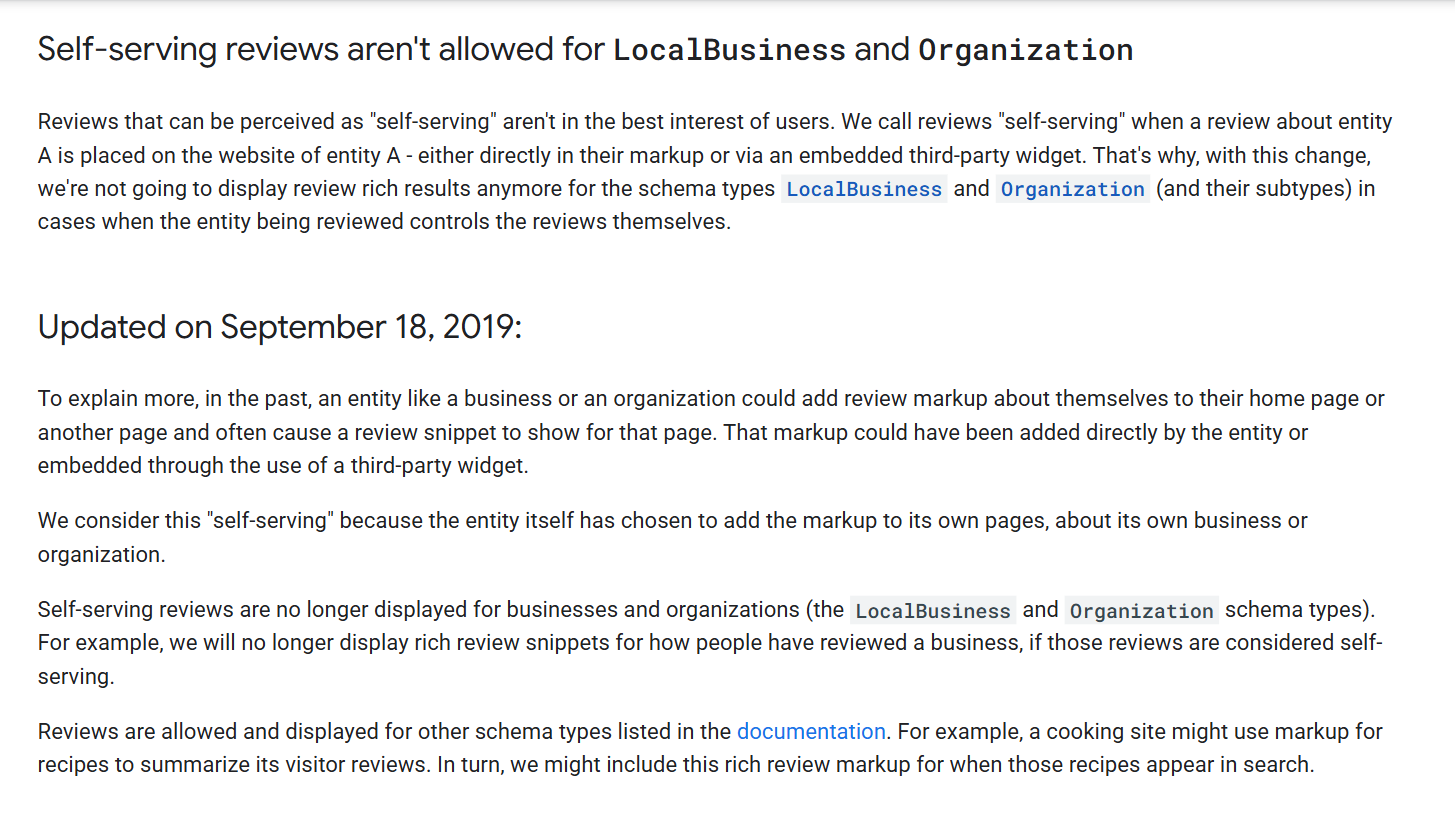
No, not for reviews you host about yourself. On 16 September 2019 Google published Making Review Rich Results more helpful, which did two things at once. It cut the list of schema types that can trigger a review rich result, and it banned what it called self-serving reviews.
Google's own definition, from that post and in the screenshot at the top of this page:
We call reviews "self-serving" when a review about entity A is placed on the website of entity A - either directly in their markup or via an embedded third-party widget.
The rule survives in the current review snippet documentation, worded for developers: if the entity being reviewed controls the reviews about itself, its pages using LocalBusiness or any other type of Organization structured data are ineligible for the star review feature. Google's example is a Google Business reviews or Facebook reviews widget, which covers most of what a small business actually installs.
That documentation now qualifies two entries in its own list of supported features. Local business works "only for sites that capture reviews about other local businesses", and Organization carries the same caveat. A directory that reviews plumbers is eligible. A plumber is not.
The 2019 post answered the obvious follow-ups, and the answers still hold:
- You do not have to remove markup you already have. Google will not show a snippet for it. That is all.
- You will not get a manual action for self-serving review markup on its own.
- Your Google Business Profile is unaffected. The change applies to organic results, not the map pack.
- It covers
AggregateRatingas well as individualReviewitems. - Sites that gather reviews about other organisations were not touched.
The same post made name a required property, so every marked-up review has to say what it is a review of.
What review schema is still good for
Three things, and stars under your own homepage is not one of them.
First, eligibility for the types that do still show snippets. The current feature list is Book, Course list, Event, Local business, Movie, Product, Recipe and Software App, and Google separately supports reviews on CreativeWorkSeason, CreativeWorkSeries, Episode, Game, MediaObject, MusicPlaylist, MusicRecording and Organization. If you sell a product or run a course, reviews of that product or course are eligible on your own site. It is the business-level rating that is not.
Two traps live in that list. Service is absent from it and from the list of valid itemReviewed types, so a rating hung off a Service will not produce a snippet however tidy the code is. HowTo goes the other way: still a valid itemReviewed type in the property definitions, with no entry at all in Google's structured data feature gallery. Google's pages have drifted apart, and the gallery names six types where the reference page names eight. Work from the reference page.
Second, telling a machine what the rating means. A visitor reads "4.8 from 213 reviews" and understands it instantly. A parser sees three numbers next to some text. Markup takes the guess out.
Third, do not assume it does more than that. Nobody at Google, OpenAI or Perplexity publishes review schema as an input to an AI answer, and anyone quoting you a weighting has invented it. The honest version is narrower: the rating is on the page in a form that does not depend on a JavaScript widget rendering first. Our post on what moves AI answers for a local business covers the inputs vendors do document, and whether reviews change what AI says covers the one case a vendor puts in writing.
The rules, in Google's words
These come from the review snippet guidelines and the general structured data guidelines. They are short, and people break them anyway.
- The review has to be on the page. "Don't mark up content that is not visible to readers of the page." A 4.8 that only exists in your CMS is a violation, not a shortcut, and users have to be able to see any aggregate rating you mark up.
- It has to be reachable. Review content must be readily available to users from the marked-up page, and you cannot block that page from Googlebot with robots.txt,
noindexor any other access control. - It has to be about one specific item, not a category or a list of items.
- Ratings must come from users. Google's wording for local business markup is blunt: do not rely on human editors to create, curate or compile ratings information.
- Do not aggregate reviews or ratings from other websites. Blending your Google, Facebook and Yelp ratings into one number breaks the rule directly, and it is one of the most common things review widgets get asked to do.
- No fake reviews, and no undisclosed incentivised ones. A review written in exchange for money, a discount or a free product has to disclose that clearly and prominently, or it stays out of your markup.
- The author's name has to be a real name, under 100 characters. Google's example of an invalid one is "50% off until Saturday".
A review schema markup example you can copy
Two blocks for a fictional practice, Coastline Physio in Newcastle. Change the values, keep the shape.
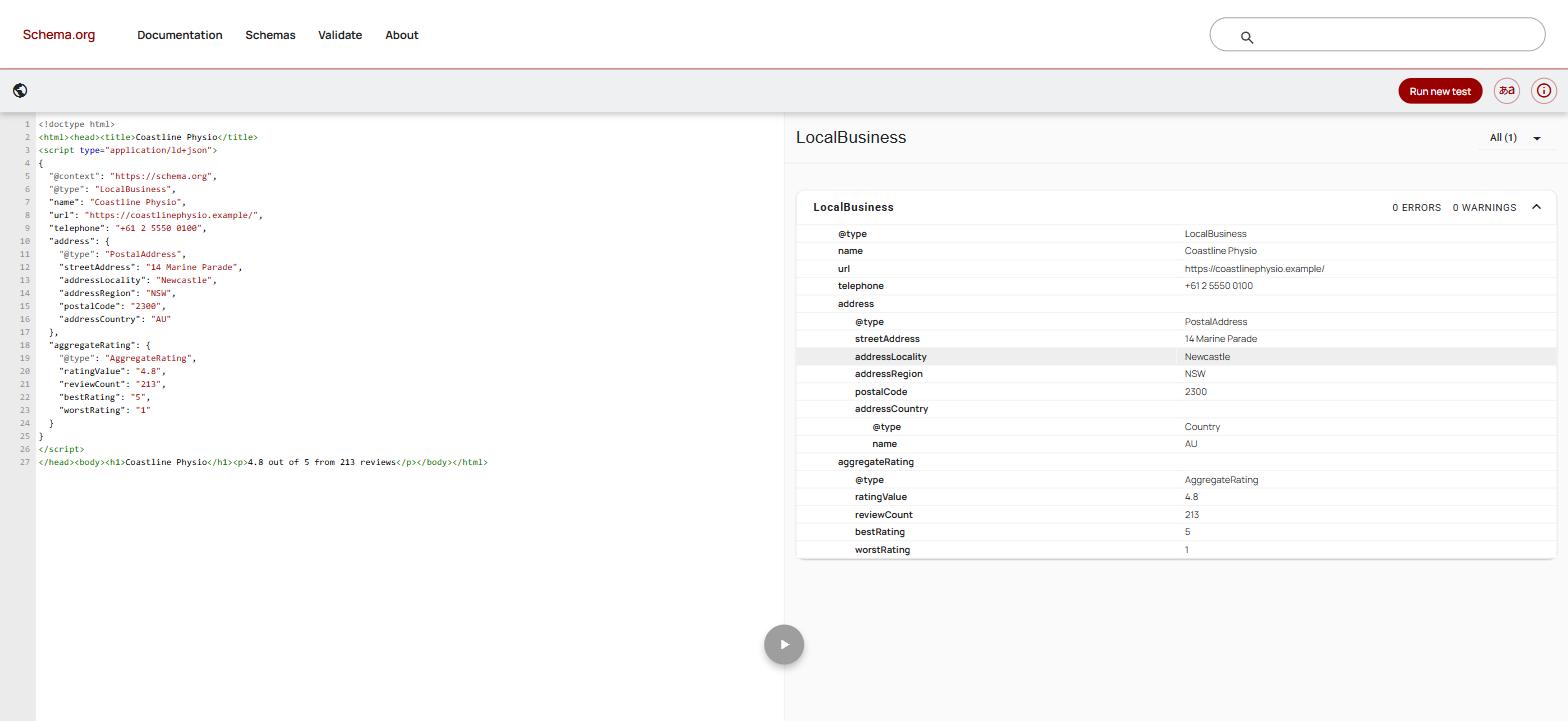
The first is the one most local businesses want. It is accurate, it is allowed, and it will not produce stars. Put it on a page where that 4.8 and that count are visible.
<script type="application/ld+json">
{
  "@context": "https://schema.org",
  "@type": "LocalBusiness",
  "name": "Coastline Physio",
  "url": "https://coastlinephysio.example/",
  "telephone": "+61 2 5550 0100",
  "address": {
    "@type": "PostalAddress",
    "streetAddress": "14 Marine Parade",
    "addressLocality": "Newcastle",
    "addressRegion": "NSW",
    "postalCode": "2300",
    "addressCountry": "AU"
  },
  "aggregateRating": {
    "@type": "AggregateRating",
    "ratingValue": "4.8",
    "reviewCount": "213",
    "bestRating": "5",
    "worstRating": "1"
  }
}
</script>
When aggregateRating is nested inside the thing it rates, you leave itemReviewed out. The parent's name is the name of the item being reviewed, which is what the 2019 change made compulsory.
The second is the eligible case. Coastline Physio also sells a six-week running rehab programme, on its own page, and asks the people who finish it what they thought. Those reviews are about that programme. Product is on the feature list, so this one is eligible.
<script type="application/ld+json">
{
  "@context": "https://schema.org",
  "@type": "Product",
  "name": "Six-Week Running Rehab Programme",
  "description": "A supervised six-week programme for runners returning from injury.",
  "image": "https://coastlinephysio.example/img/running-rehab.jpg",
  "brand": { "@type": "Brand", "name": "Coastline Physio" },
  "offers": {
    "@type": "Offer",
    "price": "540.00",
    "priceCurrency": "AUD",
    "availability": "https://schema.org/InStock",
    "url": "https://coastlinephysio.example/running-rehab"
  },
  "aggregateRating": {
    "@type": "AggregateRating",
    "ratingValue": "4.7",
    "reviewCount": "38",
    "bestRating": "5",
    "worstRating": "1"
  },
  "review": [{
    "@type": "Review",
    "datePublished": "2026-08-19",
    "author": { "@type": "Person", "name": "Emma T" },
    "reviewRating": {
      "@type": "Rating",
      "ratingValue": "5",
      "bestRating": "5",
      "worstRating": "1"
    },
    "reviewBody": "Six weeks and I ran the whole loop without stopping. The load plan was the part I would never have got right on my own."
  }]
}
</script>
The catch is the one nobody writes down. Those 38 ratings have to be ratings of the programme, from people who did the programme, shown on that page. Taking your business's Google rating, renaming it a product rating and hoping the type change earns you stars fails two guidelines at once: the rating is not about that item, and the markup is not a true representation of the page.
Aggregate rating schema: the fields that matter
Schema.org itself marks nothing as required, so "required" here means required by Google for a review snippet.
| Property | Required by Google | What goes in it |
|---|---|---|
itemReviewed | Yes, unless nested | The thing being reviewed. Omit it when the rating sits inside the item, as above. |
name | Yes | The item's name. Required since 2019. Comes from the parent when nested. |
ratingValue | Yes | The average. Use a dot, not a comma. Default scale is 1 to 5. |
ratingCount or reviewCount | One of the two | Ratings given, versus people who wrote something. Pick the one matching what you show. |
bestRating / worstRating | Recommended | Defaults to 5 and 1. Set them if your scale differs. |
author | Yes on a Review | A Person or Organization. Under 100 characters, and a real name. |
datePublished | Recommended | ISO format, so 2026-08-19. |
How to test review schema markup
Use both tools. They answer different questions, and the difference is where most of the confusion lives.
The Schema Markup Validator answers "is this valid schema.org". Run by schema.org, descended from Google's retired Structured Data Testing Tool, it parses your JSON-LD whether or not a search feature exists for it. Use it to catch syntax: a trailing comma, a stray quote, a property hung on a type that does not take it. Both blocks above come back with no errors and no warnings.
The Rich Results Test answers a narrower question: which of Google's own rich result types this markup could generate. The result catches people out because it is the opposite of what most guides say. Paste that Coastline Physio LocalBusiness block in and the tool reports three valid items, one of them a review snippet. It says nothing about the self-serving rule.
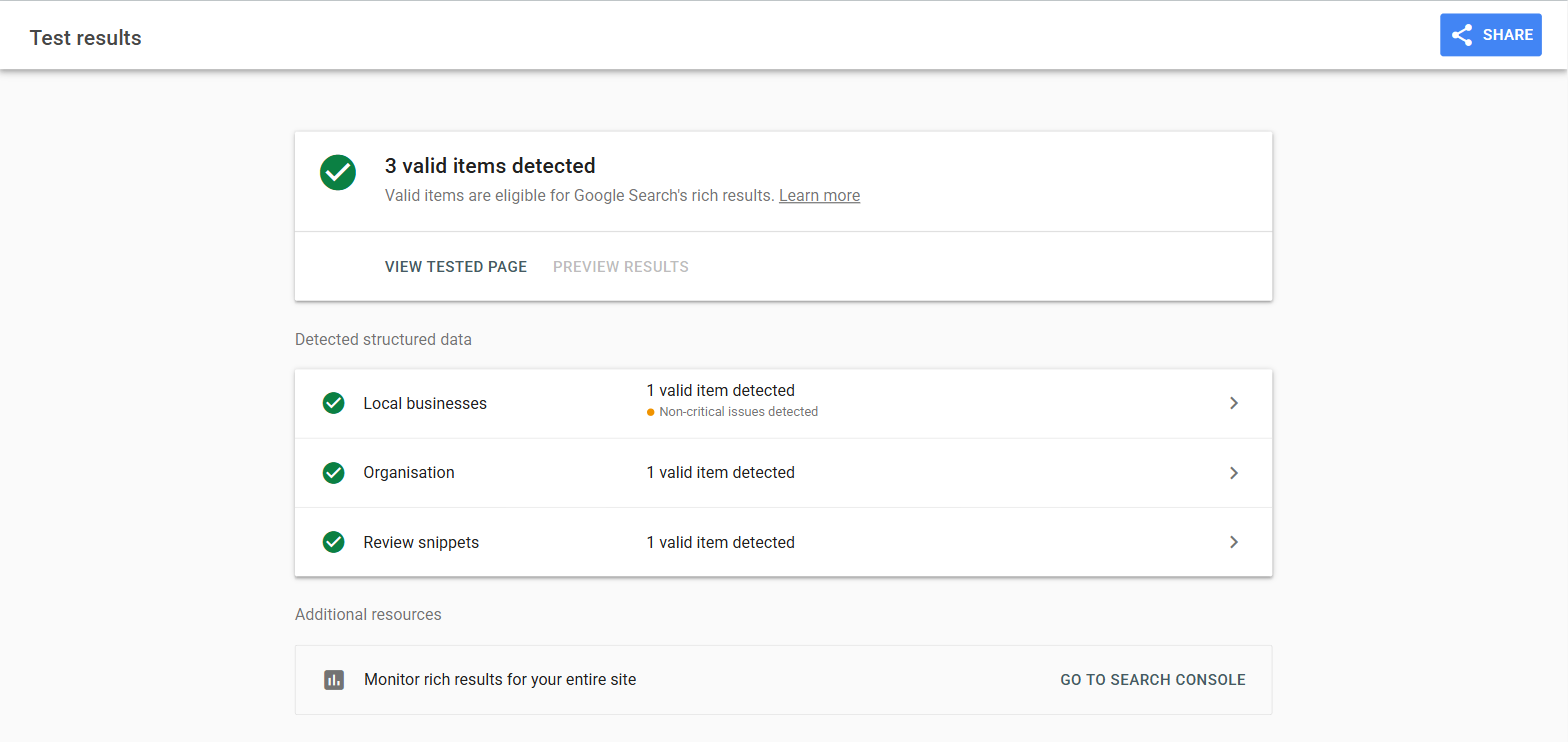
That is neither a bug nor permission. Google splits its requirements into technical guidelines, which the tools check, and quality guidelines, which it says are "not easily testable using an automated tool". The self-serving rule sits on the quality side, and a tool reading a snippet of code cannot know whether the business in the markup owns the site it sits on. So the test goes green, the stars never appear, and the owner spends a fortnight hunting for a bug in their JSON. There is no bug.
Two smaller things it flagged. On the LocalBusiness block, two missing optional fields, priceRange and image: worth filling in, not errors. On the Product block it failed outright at first, "Missing field 'image'", because Product markup is also measured against Google's merchant listing requirements, where an image is required. That is why the block above carries one.
URL Inspection in Search Console answers a third question: what Google saw when it crawled the live page. Run it after you deploy. A widget that injects markup client side can pass both tests on your machine and give a crawler nothing.
Do you need a schema markup generator?
For one block, no. Copy the example above, change the values, and you are done in five minutes. A schema markup generator earns its place when you want a type you have not written before, and Google's Structured Data Markup Helper will walk you through tagging a page by clicking on it.
The risk with any generator is that it will happily produce a rating for content that is not on your page, because it cannot see what your page says. That is the guideline you are most likely to break, and the one Google can act on.
If the rating already comes from a widget on the page, let the widget emit the markup rather than hand-write a second copy that drifts out of date. Cloutly's review widgets can inject AggregateRating markup so the rating is on the page in a form search engines can read.
Common review schema mistakes
- Two
AggregateRatingblocks on one page. An SEO plugin adds one, a review widget adds another, and they disagree. Pick one source. - A rating in the markup that is not on the page. The most common violation, and the easiest to fix.
- A blended rating from several review sites. Against the guidelines. Show your Google and Facebook ratings as separate figures instead.
Serviceinstead ofProduct. Not on the feature list, not a validitemReviewedtype, no snippet.- Expecting stars from a homepage
Organizationblock. The 2019 rule again, and the most common reason people think their markup failed. - Reading a green Rich Results Test as a promise. It tests the code, not the policy.
- Client-side injection nothing can see. Check with URL Inspection as well as a local test.
Once the markup is right, the next question is what to put on the page in the first place. Our guide to embedding Google reviews on your website covers the four routes and the terms attached to each, including what the Places API lets you store.
Frequently asked questions
Does review schema still work in 2026? Yes, for the types Google shows snippets for. It does not work for a business rating a business hosts about itself, and has not since September 2019.
Can a local business get star ratings in Google search results at all? Not under your own organic result, from reviews you host. A third-party profile Google surfaces can still carry a rating, and your Google Business Profile keeps its own rating in the map pack, a separate system the 2019 change did not touch.
Should I remove the review markup I already have? No. Google said plainly that you do not need to remove it and that it will not trigger a manual action on its own. It is accurate information about your page. It just will not earn a snippet.
Does review schema help with AI search? It puts the rating on the page in machine-readable form, which is worth doing. No AI vendor documents review schema as a ranking input, so treat anyone selling it as one with suspicion.