
How to see your Google reviews as a business or customer
There is no dashboard to sign in to any more. Here is where each of your Google reviews lives now, and why the number you see is not always the number your customers see.
Lachlan Fea 7 min read
In this article9 sections

To see your Google reviews as a business, sign in to the Google account that has access to the profile, then search your business name and city on Google, or search "my business". Your Business Profile opens in the results, and Read reviews takes you to the full list, where you can also reply. To see reviews you wrote as a customer, open Google Maps, go to Your contributions and select Reviews.
There is no separate dashboard to sign in to. Google's own instructions say to "go to your Business Profile", meaning the profile as it appears on Search and Maps. Google keeps the Business Profile Manager for owners handling several profiles at once. Search for a control panel and you end up back at the listing.
If what you actually want is more of them rather than a look at the ones you have, how to get more Google reviews is the guide for that.
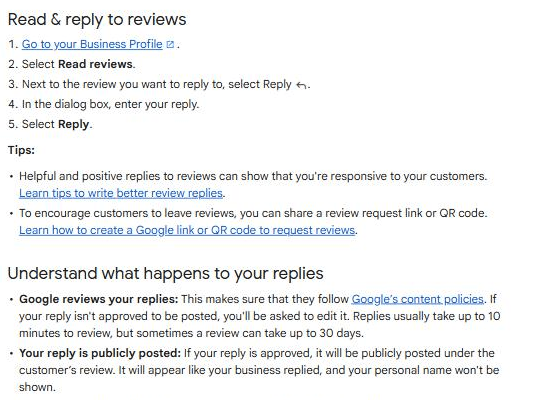
Reviews you wrote: how to see Google reviews by me
On a computer:
- Open Google Maps and sign in to the account you used when you left the reviews.
- At the top left, click Menu.
- Click Your contributions, then Reviews.
Every review you have written is in that list, and you can edit or delete any of them (Google Maps Help). If the list looks short, you are signed in to a different Google account from the one you reviewed with.
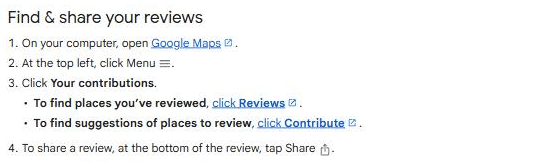
Where your business's Google reviews live now
Your reviews sit on your Business Profile, which is what Google My Business reviews are now called. You can reach it three ways, and all three show the same list. The route matters less than the account: "To find your profile, you must sign in to the Google Account associated with it" (Find your business on Google). Most "where are my Google reviews" moments come from a signed-out browser or a second Google account, not a missing profile.
On Google Search
Search your business name and city, or search "my business". Your profile appears with the star rating and review count. Select Read reviews to open the list, and select the reply icon next to any review to respond (Manage customer reviews). Reading works either way, but you have to verify the business before you can reply to anything.
On Google Maps
Search your business name and city on Maps while signed in. Anyone can read the reviews here, you included.
In the Google Maps app
Tap Business at the bottom right. If you look after more than one business, tap the down arrow at the top and select the one you want (Find your business on Google). The profile that opens is the same one you get on Search, so the reviews and the reply box are the same too.
How to see all Google reviews for a business (including one you don't own)
Anyone can read them. Search the business on Google or Maps, find the rating under the name, and select the review count next to it. That opens every published review on the profile, with no sign-in and no ownership. Use this to check a competitor, or a location your organisation runs that your login does not cover.
What you cannot do from the outside is reply, report a review, or get told when a new one arrives. Those need owner or manager access on the profile. Claiming it is further down.
Why the count you see is not the count your customers see
A customer swears they left a review and it is not there. Or your profile said 214 reviews last week and says 211 today. Google lists the reasons.
Moderation takes time. "Reviews are checked to ensure they comply with our policies. In some cases, this process might take a few days, which can delay a review's appearance on your profile" (About missing or delayed reviews). A recent merge does the same thing: reviews from both profiles can take a few days to display on Search and Maps.
The score lags behind the reviews. "After someone leaves a new review, it may take up to 2 weeks to get an updated review score" (Understand review scores). A review can be sitting on your profile while the average has not caught up to it.
Ratings without text still count. The review score is the average of all ratings published on Google for the place, so a customer who tapped four stars and wrote nothing has moved your average with nothing for you to read.
And some reviews are gone for good. Google's prohibited and restricted content policy covers fake engagement, reviews written in exchange for payment or a discount, off-topic and promotional content, and conflict of interest, which includes reviews from current and former staff. "Reviews removed for policy violations won't be restored." Google also turns reviews off temporarily for some profiles and business categories.
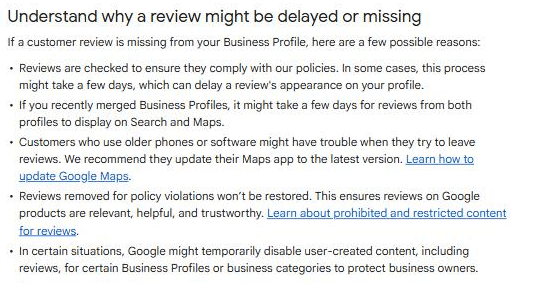
If a review has vanished and none of that fits, Google's Manage your Google Business reviews tool reports removals and checks a review's status. The rest of the causes are in why your Google review is not showing up.
Someone else has claimed my business
If you can find your business on Google but cannot manage it, someone else holds the profile. Usually a former marketing agency, or whoever set the listing up years ago. The fix is a request, not a phone call.
- Go to business.google.com/add and enter the name and address of your business.
- Choose your business from the list. You get a message saying "Someone else may manage this Business Profile".
- Select Request Access, fill out the form and submit it.
- The current owner is notified by email and has 3 days to respond.
If nobody responds inside those three days, open your confirmation email, select View request, then Verify, and follow the steps on screen (Request ownership of a Business Profile).
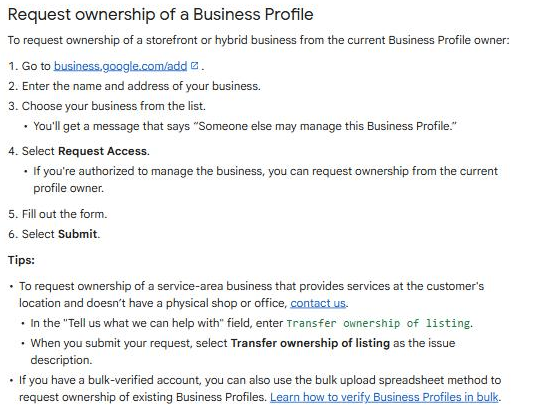
Two things to plan around. A service-area business with no shop or office cannot use the form and has to contact Google support, entering "Transfer ownership of listing" as the issue. And new access is not full access straight away: "When you become a profile owner or manager, you have to wait 7 days before you can manage some profile features", which covers deleting a profile, removing other owners or managers, and transferring primary ownership (Owners and managers).
If the request stalls, work the verification path above rather than creating a second profile. A duplicate splits your reviews across two listings and takes longer to merge than the wait would have. No profile at all? Start with adding your business to Google Maps.
How to get notified when someone leaves a new review
Checking your profile when you remember to is not monitoring. Turn the alerts on once:
- Go to your Business Profile.
- Select More, then Notifications.
- Find the notification you want and turn it on or off.
The one to look for is customer activity, which alerts you when customers leave new reviews or add photos. Notifications arrive by email, or in Search or Maps (Manage your notifications).
One trap: notifications follow the Google account that holds access. If the person who answers your reviews works from a shared login rather than their own access, they get nothing. Add them as a manager under their own email address.
What to do with the reviews once you can see them
Ask customers for reviews
Reviews arrive when you ask, and the timing does more work than the wording. Ask once the job is finished, while the customer still remembers who did it. Ask everyone, not only the customers you expect to be happy: filtering who gets asked is review gating, and it produces a rating nobody believes. Google's policy already treats incentives and reviews from staff as violations.
Respond to every Google review
Reply from Read reviews, using the reply icon beside the review. Replies are moderated, and they "usually take up to 10 minutes to review, but sometimes a review can take up to 30 days". The reviewer is notified and can change their review afterwards, which is the practical argument for keeping a calm reply on an angry one. Wording you can adapt is in our positive review response examples.
Monitor your reviews
Report reviews that break the content policy through the review tool linked above, and be realistic about what qualifies. Off-topic and promotional content is a violation, and so is a review from someone who was never your customer. A review that is merely unfair, or wrong about the facts, is not.
Ensure your listing details are correct
"Only verified businesses can show their business info on Maps and Search", and once you edit something, Google says changes can take up to 3 days to appear in search results. Check the hours, the phone number and the category every quarter. Wrong hours cost you the visit and then earn you the one-star review about being closed.
Seeing reviews across more than one location
Everything above assumes one profile. At two locations that is mildly annoying. At fourteen it is somebody's Monday.
Google's answer is the Business Profile Manager, which lets larger businesses "manage your profiles in bulk" (Manage your Business Profile on Google Maps), and business groups, which "make it easier for multiple administrators to manage a set of profiles". Owners and managers of a group can add, edit and delete the profiles in it; only the group owner can add or remove the people in the group (Business groups). In the Maps app, the down arrow at the top switches between the businesses you have access to.
What none of that gives you is one list of every review across every location, in date order, showing which have been answered. You still open each profile and try to remember where you got to. It also stops at Google, so anything arriving on Facebook, Yelp or a booking site is a separate round of tabs.
Cloutly puts that in one place: reviews from 39 review sites land in one inbox that spans every location under your login and filters down to any one of them.
Two more traps at this size. Locations sharing a name are easy to duplicate, which is how one branch's reviews end up on another branch's profile: see managing multiple locations with the same business name. And access is granted per profile, so the manager you added last year cannot see the four locations you have opened since.
FAQ
Where are my Google reviews if my profile shows none? Check which Google account you are signed in to, then check the profile is verified. Only verified businesses show their business info on Maps and Search.
How long does a Google review take to appear? Usually minutes. Google says policy checks can take a few days, and the review score itself can take up to two weeks to update.
Can I see all Google reviews for a business I do not own? Yes. Search it on Google or Maps and select the review count under the rating. Reading needs no account; replying and reporting need owner or manager access.
Can a manager see and answer reviews, or only the owner? Managers have almost the same access as owners, responding to reviews included. What they cannot do is add or remove users, or delete the profile.
Why did my Google review count go down? Most often Google removed one or more of them for a policy violation, and removals like that are not reversed. A recent profile merge can also move the count for a few days.
Do I need a separate app to see my reviews? No. Google Search, Google Maps and the Business tab in the Maps app are the three paths Google documents.